

Останнє оновлення
Забронюйте та отримайте найкращі пропозиції на авіаквитки Air Baltic
 Air Baltic
Почати з
US$ 33.84
Ціна/особа
Air BalticПочати з
US$ 38.06
Ціна/особа
Air BalticПочати з
US$ 39.27
Ціна/особа
Air BalticПочати з
US$ 39.51
Ціна/особа
Air BalticПочати з
US$ 40.87
Ціна/особа
Air BalticПочати з
US$ 41.13
Ціна/особа
Air BalticПочати з
US$ 44.41
Ціна/особа
Air BalticПочати з
US$ 45.12
Ціна/особа
Air BalticПочати з
US$ 45.68
Ціна/особа
 Зверніть увагу, що ціни, вказані на цій сторінці, можуть бути неактуальними і можуть бути змінені без попереднього повідомлення. Ми прагнемо надавати найбільш точну та актуальну інформацію.
Інформація про рейс авіакомпанії Air Baltic
Місяць найнижчої ціни
трав
Загальна кількість напрямків
31


Огляд
Air Baltic (BT) — авіакомпанія типу перевізник із повним сервісом, яка обслуговує міжнародні маршрути. Норма провезення ручної поклажі, надана цією авіакомпанією, становить 8 кг, а максимальні розміри — 55 cm x 40 cm x 23 cm (L x W x H). Вартість квитка тарифу не включає норму провезення зареєстрованого багажу. Пасажир можуть зареєструватися в аеропорту за 180 хвилин перед запланованого вильоту. Онлайн-реєстрація можлива для рейсу Air Baltic на сторінці офіційного сайту. Її можна оформити за 5 днів до часу вильоту.
Як забронювати
Як оплатити
Платіж за квиток Air Baltic на Airpaz.com може бути здійснений банківськими методами PayPal, банківський переказ, кредитна картка, та способами оплати через стійку. Для докладної інформації відвідайте сторінку Інструкції з оплати Airpaz.com.
Профіль компанії
Air Baltic виконує рейси з кодом IATA BT і кодом ICAO BTI, є авіакомпанією типу перевізник із повним сервісом, що літає за маршрутами міжнародні. Авіакомпанія обслуговує рейси до пунктів призначення по всьому світу від своїм головним хабом, розташованим у аеропорт Вільнюс (VNO), Міжнародний аеропорт Рига (RIX), аеропорт Таллінн (TLL), Tampere Pirkkala Airport (TMP). Авіакомпанія літає до Австрія, Данія, Фінляндія, а кілька пунктів призначення, до яких літають авіакомпанії, це Rīga, Copenhagen, Oslo.
Air Baltic Corporation(A/S) є власником торговельної назви Air Baltic. Керівником компанії є Erno Hildén. Адреса головного офісу: Латвія.
Історія
Air Baltic виконує рейси з кодом IATA (BT) і кодом ICAO (BTI) була вперше створена у 1995. Авіакомпанія є керованою компанією Air Baltic Corporation(A/S). Упродовж років, Air Baltic продовжувала впроваджувати інновації у свій бізнес шляхом підтримання цінного та приємного сервісу для своїх пасажирів. Ця авіакомпанія вперше здійснила рейс 1 жовтня 1995.Air Baltic була відзначена нагородами 2025 Skytrax Best Low-Cost Airline in Eastern Europe, 2026 APEX Five Star Major Airlines. Віхою, якої авіакомпанія здобула, є in 2019, Air Baltic becomes the first airline to obtain full-scope maintenance capability for Airbus A220-300 aircraft, Air Baltic carries more than five million passengers in 2019, or 22% more than the year before, in 2020, Air Baltic becomes the first European airline to hand every customer on every flight an envelope containing a face mask and two disinfectant wipes.
Бортпровідники

Кабінний екіпаж Air Baltic носить форму в якій переважає чорний. Чоловіки-бортпровідники носять білий довгий рукав з чорним костюмом і жовтою краваткою і чорні штани. Жінки-бортпровідниці носять білий довгий рукав з чорним костюмом і жовтим шарфом і чорна спідниця. Сама форма відображає цілеспрямованість Air Baltic доставляти найкращий досвід для своїх пасажирів під час польоту.
Флот

Air Baltic експлуатує низку повітряних суден, усі з яких можна перевірити нижче:
| Type | Quantity |
|---|---|
| Airbus A220-300 | 54 |
Онлайн-чат
Сервіс онлайн-чату недоступний для пасажирів Air Baltic.
Багаж
Ручна поклажа
Пасажирам, які летять з Air Baltic, дається норма ручної поклажі, включена до їхніх вартості авіаквитків. Найбільший габарит поклажі, розміщеної на верхній полиці салону, становить 55 cm x 40 cm x 23 cm (L x W x H), тоді як найбільша вага багажу становить 8 кг.Будь ласка, пам’ятайте, що вона має поміщатися під сидінням перед вами.
Зареєстрований багаж
Безкоштовна норма зареєстрованого багажу не надається пасажирам, які летять Air Baltic.
Наднормовий багаж
Наднормову вагову норму зареєстрованого багажу не можна купити на Airpaz.
Відмова від відповідальності: Зазначена вище інформація призначена лише як загальний довідник і може бути змінена авіакомпанією без попереднього повідомлення. Для отримання додаткової інформації зверніться до авіакомпанії.
Місце

Економічний клас
Розмір стандартного місця для економічного тарифу класу в Air Baltic становить 32" pitch and 18.5" width.
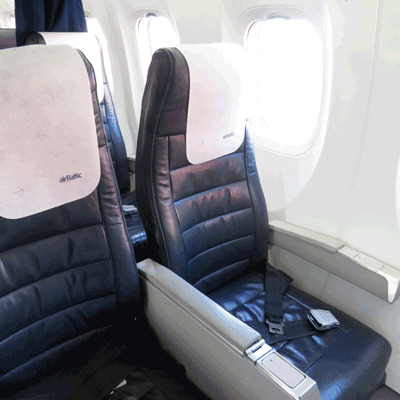
Бізнес-клас
Розмір стандартного місця для бізнес-класу в Air Baltic становить 38" pitch and 18.5" width.
Комфорт на борту

Розваги на борту
Air Baltic надає пасажирам послуги та розваги на борту під час польоту на своїх літаках, такі як magazine.
Безкоштовна закуска на борту
Безкоштовна закуска/напій не доступна під час рейсів з Air Baltic.

Замовлення харчування
Пасажири можуть замовити напій, щоб насолодитися ним протягом польоту, відповідно до наявності. Щоб переглянути меню напоїв і страв авіакомпанії, натисніть тут.Онлайн-реєстрація
Через офіційний веб-сайт Air Baltic пасажири можуть пройти онлайн-реєстрацію. Для цього натисніть тут, щоб перейти на сторінку реєстрації авіакомпанії. Сторінка веб-реєстрації доступна за 5 днів до запланованого часу вильоту.
Реєстрація в аеропорту
Реєстрацію в аеропорту можна пройти на стійках реєстрації Air Baltic за 180 хвилин перед часу вильоту рейсу. Рекомендується пройти реєстрацію щонайменше за півтори години до закриття стійки реєстрації та здачі багажу в аеропорту.
Реєстрація в кіоску
Послуги реєстрації в кіоску доступні для пасажирів Air Baltic, і можуть скористатися ними в аеропорту міста вильоту залежно від доступності. Для отримання додаткової інформації про цю послугу зверніться до кол-центру служби підтримки клієнтів авіакомпанії. Час реєстрації становить 120 годин до часу вильоту.
Реєстрація в застосунку
Ця послуга недоступна для пасажирів, які летять з Air Baltic.
Правила тарифу
a. Скасування та повернення коштів
Квитки цієї авіакомпанії неможливо скасувати.b. Зміна дати
Зміни, як-от перенесення дати, можна внести для квитка, звернувшись безпосередньо до авіакомпанії.
Для докладнішої інформації про квиток Air Baltic і правила тарифу натисніть тут.
Відмова від відповідальності: авіакомпанія може змінити свою політику без попереднього повідомлення. Щоб отримати оновлену інформацію, якщо це станеться, а також відомості про її політику щодо страхування, затримки рейсу тощо, перевірте сторінку правил тарифу авіакомпанії або зверніться безпосередньо до авіакомпанії.
Перевірте розклад рейсів авіакомпанії Air Baltic ()
| Номер рейсу | Модель літака | Відправлення | Прибуває | Місто відправлення | Аеропорт вильоту | Місто прибуття | Аеропорт прибуття | |
|---|---|---|---|---|---|---|---|---|
| BT151 | AIRBUS A350-900 | 07:00 | 07:30 | Rīga | RIX | Oslo | OSL | Дізнатися ціни |
| BT271 | BOEING 787-9 | 07:05 | 08:05 | Rīga | RIX | Vienna | VIE | Дізнатися ціни |
| BT131 | Airbus A320 N | 07:05 | 07:35 | Rīga | RIX | Copenhagen | CPH | Дізнатися ціни |
| BT271 | BOEING 777-300ER | 07:25 | 08:25 | Rīga | RIX | Vienna | VIE | Дізнатися ціни |
| BT711 | - | 11:40 | 14:55 | Rīga | RIX | Istanbul | IST | Дізнатися ціни |
| BT5131 | Airbus A220 | 12:30 | 15:10 | Vienna | VIE | Vilnius | VNO | Дізнатися ціни |
| BT135 | Airbus A320 N | 12:45 | 13:15 | Rīga | RIX | Copenhagen | CPH | Дізнатися ціни |
| BT155 | - | 12:45 | 13:15 | Rīga | RIX | Oslo | OSL | Дізнатися ціни |
| BT5132 | - | 15:55 | 16:45 | Vilnius | VNO | Vienna | VIE | Дізнатися ціни |
| BT273 | BOEING 787-9 | 17:55 | 18:55 | Rīga | RIX | Vienna | VIE | Дізнатися ціни |
| BT273 | Airbus A220 | 18:40 | 19:40 | Rīga | RIX | Vienna | VIE | Дізнатися ціни |
| BT153 | - | 19:15 | 19:45 | Rīga | RIX | Oslo | OSL | Дізнатися ціни |
| BT139 | Airbus A319 | 19:25 | 19:50 | Rīga | RIX | Copenhagen | CPH | Дізнатися ціни |
| BT7442 | Boeing 737 | 20:00 | 23:15 | Rīga | RIX | Istanbul | IST | Дізнатися ціни |
Чому мандрівники обирають Airpaz для бронювання рейсів Air Baltic
- Швидкий та простий пошук: Фільтруйте та порівнюйте рейси за ціною, розкладом, тривалістю та пересадками — усе в одному пошуку.
- Зручні додаткові послуги: Додайте зареєстрований багаж, виберіть місце, попередньо замовте їжу або придбайте туристичну страховку для свого рейсу.
- Варіанти класів обслуговування: Шукаєте трохи більше розкоші? Ми пропонуємо вибір класів обслуговування від економ- до першого класу для більш преміального досвіду польоту.
- Різноманітні способи оплати: Вибирайте між кредитними/дебетовими картками, банківськими переказами, PayPal, електронними гаманцями та багатьма популярними місцевими способами оплати.
- Швидке підтвердження квитка: Отримайте підтвердження бронювання та квиток безпосередньо на свою електронну пошту після завершення оплати.
- Глобальна служба підтримки: Наша багатомовна служба підтримки клієнтів готова 24/7 допомогти вам із змінами в бронюванні, скасуваннями або будь-якими запитаннями.
- Ексклюзивні акції в додатку та для учасників: Насолоджуйтесь спеціальними пропозиціями, розробленими для учасників Airpaz, та знижками, доступними лише в додатку.
- Виняткова вигода: Ми забезпечуємо ексклюзивні угоди та спеціальні промо-тарифи, щоб ви могли отримати максимум від свого бюджету на подорожі.
Поради, як знайти дешеві рейси Air Baltic на Airpaz
- Бронюйте заздалегідь: Тарифи, як правило, зростають із наближенням дня вильоту. Намагайтеся бронювати за 4–8 тижнів наперед, щоб отримати найкращі пропозиції та тарифи.
- Будьте гнучкими щодо дат: Використовуйте режим календаря Airpaz, щоб порівнювати ціни на різні дати.
- Літайте посеред тижня: Рейси у вівторок і середу зазвичай пропонують дешевші тарифи, ніж рейси у вихідні дні.
- Полюйте на промоакції: Регулярно перевіряйте сторінку та сторінку на Airpaz на наявність промокодів і обмежених у часі пропозицій від Air Baltic.
- Уникайте пікових сезонів: Шкільні канікули, державні свята та святкові періоди призводять до підвищення тарифів — подорожуйте в несезон, щоб заощадити більше.
- Об'єднуйте і заощаджуйте: Бронюйте рейс і проживання в одному бронюванні, щоб отримати більше знижок.
- Платіть за допомогою додатка Airpaz: Ексклюзивні промокоди в додатку та знижки лише для учасників часто є найкращим способом отримати найнижчі ціни на рейси.
Як забронювати рейс на Airpaz
- Відвідайте Airpaz.com або відкрийте додаток Airpaz, а потім виберіть «політ».
- Введіть місто відправлення (наприклад, Куала-Лумпур) та пункт призначення (наприклад, Балі, Сінгапур або Бангкок).
- Виберіть дату подорожі та кількість пасажирів.
- Натисніть «Пошук», щоб побачити доступні рейси.
- Використовуйте фільтри, такі як ціна, час відправлення або тривалість, щоб знайти найкращий варіант, а потім виберіть бажаний рейс.
- Заповніть дані пасажирів точно так, як вони вказані у вашому паспорті або посвідченні особи (повне ім'я, дата народження, громадянство та контактна інформація).
- За необхідності додайте додаткові послуги, такі як багаж, вибір місця, харчування або туристична страховка.
- Перевірте деталі свого бронювання.
- Виберіть спосіб оплати (кредитна/дебетова картка, банківський переказ, PayPal або оплата частинами).
- Завершіть оплату — ваш електронний квиток буде надіслано на вашу електронну пошту та стане доступним у додатку.
Поширені запитання про Air Baltic
Більше рекомендованих рейсів з Air Baltic
Популярний маршрут Air Baltic
Популярний напрямок за Аеропорт
Популярний напрямок за Місто
Популярний напрямок за Континент


Чому варто подорожувати з Airpaz

Спростіть своє враження від бронювання
Відчуйте гнучкість і простоту протягом усього процесу бронювання

Широкий вибір туристичних продуктів
Насолоджуйтесь незабутніми моментами з мільйонами вигідних рейсів та пропозицій

Ексклюзивна пропозиція щодня
Різноманітні щоденні акції з конкурентоспроможними цінами для всіх мандрівників

Експерт з онлайн-бронювання
Разом із нашими надійними партнерами ми задовольняємо незліченні потреби мандрівників з 2011 року

Ласкава підтримка клієнтів
Надаючи найкращу допомогу, наша служба підтримки клієнтів доступна 24/7 вашою місцевою мовою

Ажіотаж місцевих бронювань у світі
Безтурботне бронювання з місцевою оплатою, валютою та мовою