


Online prijava
Dostupno za online prijavu
Prijava pre polaska
Počevši 120 minuta pre polaska
Poslednji put ažurirano na
Avelo Airlines Informacije o letu


Преглед
Avelo Airlines (XP) је авио-компанија нискотарифни превозник која обавља домаће руте. Дозвољени ручни пртљаг се не обезбеђује путнику Avelo Airlines. Тарифа карте не укључује бесплатан дозвољени предати пртљаг. Пријава почиње 120 минута пре планираног времена поласка лета. Онлајн пријава је могућа за лет са авио-компанијом на званичној страници веб-сајта Avelo Airlines. Може се обрадити 24 сати пре планираног времена поласка.
Како резервисати
Како платити
Плаћање за вашу Avelo Airlines резервацију карте на Airpaz може се извршити путем банковних метода PayPal, банковни трансфер, кредитна картица, и метода плаћања на шалтеру. За све информације, посетите страницу Водича за плаћање на Airpaz.
Информације о Avelo Airlines
Упознавање са авиокомпанијом пре лета увек је паметан потез. То Вам помаже да путујете са самопоуздањем и да тачно знате шта можете да очекујете. Avelo Airlines је нискотарифни превозник који обавља домаће руте од 1987, са седиштем у Сједињене Државе. У ваздухопловној индустрији, Avelo Airlines је званично препознатљив по свом IATA коду (XP) и ICAO коду (VXP), стандардним идентификаторима који се користе за резервације, чекирање и праћење летова широм света. У наставку ћете пронаћи све основне детаље, од кодова и рута до кључних чињеница, како бисте могли да планирате и резервишете своје следеће путовање са потпуним поверењем.
Чвориште и операције
Avelo Airlines обавља домаће летове из свог главног чворишта на Wilmington Airport (ILG), Tweed New Haven Airport (HVN), са седиштем у Сједињене Државе. Комплетна листа дестинација и актуелни редови летења доступни су када претражујете лет на Airpaz.
Пртљаг
Седишта
Avelo Airlines нуди седишта у више класа кабине, при чему се удобност и конфигурација разликују у зависности од типа авиона и руте. Изаберите свој лет да бисте видели седишта доступна за вашу резервацију.
Седишта у економској класи
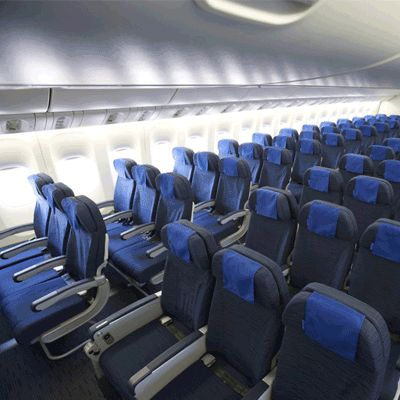
Седишта у економској класи нуде 30" seat pitch and 17.3" seat width. Карактеристике и конфигурација седишта могу да се разликују у зависности од типа авиона и руте.
Пријава на лет
У наставку су наведени начини пријаве на лет доступни за летове Avelo Airlines. Доступност може да варира у зависности од аеродрома, руте или типа тарифе.
Веб пријава на лет
Пријавите се на лет онлајн преко веб-сајта Avelo Airlines користећи податке о резервацији. Након пријаве, можете преузети или одштампати своју карту за укрцавање. Веб пријава на лет доступна је до 24 сати пре поласка.
Пријава на лет преко апликације
Пријавите се преко мобилне апликације Avelo Airlines на iOS или Android уређају. Ваша карта за укрцавање биће доступна у апликацији и обично се може додати у ваш дигитални новчаник. Услуга пријаве на лет преко апликације доступна је до 0 сати пре поласка.
Пријава на лет на шалтеру аеродрома
Посетите шалтер за пријаву на лет Avelo Airlines на аеродрому поласка до 120 минута пре поласка. Ова опција се препоручује путницима којима је потребна посебна помоћ, који имају групне резервације или путују са превеликим пртљагом. Могу се применити додатне накнаде у зависности од политике Avelo Airlines.
Важне информације о путовању
- Стигните на аеродром довољно рано да завршите пријаву на лет, безбедносну контролу и све потребне имиграционе процедуре.
- Проверите крајње време за пријаву на шалтеру и за излаз за укрцавање за вашу руту пре него што кренете на аеродром.
- Понесите сва важећа путна документа — авионску карту, званични идентификациони документ и пасош (са свим потребним визама) за међународно путовање.
- Услови за улазак могу се променити без претходног обавештења. Проверите визне, здравствене и улазне услове за вашу дестинацију довољно унапред пре датума поласка.
- Поштујте правила Avelo Airlines о дозвољеном пртљагу. Погледајте одељак Садржаји и услуге за детаље о кабинском пртљагу.
- Типови тарифа имају различита правила за пртљаг, избор седишта, оброке и флексибилност. Прегледајте услове тарифе приказане при плаћању пре него што завршите резервацију.
- У случају промене реда летења, кашњења или отказивања које иницира Avelo Airlines, примењују се сопствене оперативне политике авио-компаније. Airpaz ће помоћи са обавештењима и координацијом где год је то могуће, али коначне одлуке у вези са поновним резервисањем, повраћајем новца или накнадом остају у надлежности авио-компаније.
Правила у авиону
- Сваки путник мора седети на седишту додељеном током пријаве на лет.
- Ручни пртљаг мора бити смештен у преграду изнад седишта или испод седишта испред вас.
- Мобилни телефони и електронски уређаји морају бити искључени или постављени у режим летења, посебно током полетања и слетања.
- Вежите сигурносни појас, склопите сточић, вратите седиште у усправан положај и отворите застор на прозору током полетања и слетања.
- Пушење, укључујући електронске цигарете и вејпинг, строго је забрањено било где у авиону током целог лета.
- Увек пратите сва упутства посаде Avelo Airlines и безбедносна обавештења у авиону.
Како да управљате резервацијом на Airpaz-у
- Пријавите се на свој Airpaz налог.
- Идите у одељак Поруџбина да бисте пронашли свој лет.
- Изаберите своју резервацију да бисте видели електронску карту, план путовања и податке о плаћању.
- Да бисте затражили повраћај новца или промену распореда, изаберите приказану опцију и пратите кораке.
- Унесите тражене информације и потврдите подношење захтева.
- Пратите статус свог захтева са исте странице.
Zašto putnici biraju Airpaz za rezervacije letova avio-kompanije Avelo Airlines
- Brza i laka pretraga: Filtrirajte i uporedite letove po ceni, rasporedu, trajanju i presedanjima — sve u jednoj pretrazi.
- Laki dodaci (Add-Ons): Dodajte predati prtljag, izaberite sedište, unapred naručite obroke ili uzmite putno osiguranje za svoj let.
- Opcije klase: Tražite malo više luksuza? Nudimo izbor klasa letenja od ekonomske do prve klase za vrhunsko iskustvo letenja.
- Više načina plaćanja: Birajte između kreditnih/debitnih kartica, bankovnih transfera, PayPal-a, e-novčanika i mnogih popularnih lokalnih opcija plaćanja.
- Besprekorna potvrda karte: Dobijte potvrdu rezervacije i kartu direktno u vaše e-mail sanduče nakon što se plaćanje završi.
- Globalna korisnička podrška: Naš višejezični tim za korisničku podršku dostupan je 24/7 da vam pomogne oko izmena rezervacije, otkazivanja ili bilo kakvih pitanja.
- Ekskluzivne promocije za aplikaciju i članove: Uživajte u posebnim ponudama dizajniranim za članove Airpaz-a i ekskluzivnim ponudama samo u aplikaciji.
- Izuzetna vrednost: Obezbeđujemo ekskluzivne ponude i posebne promotivne cene kako biste maksimalno iskoristili svoj budžet za putovanje.
Saveti kako da pronađete jeftine Avelo Airlines letove na Airpaz-u
- Rezervišite unapred: Cene obično rastu kako se približava dan polaska. Pokušajte da rezervišete 4-8 nedelja unapred da biste dobili najbolje ponude i cene.
- Ostanite fleksibilni sa datumima: Koristite kalendarski prikaz Airpaz-a da uporedite cene za više datuma.
- Letite sredinom nedelje: Letovi utorkom i sredom obično nude jeftinije karte nego letovi vikendom.
- Lovite promocije: Redovno proveravajte Airpaz stranicu i stranicu za promo kodove i vremenski ograničene Avelo Airlines ponude.
- Izbegavajte špiceve sezone: Školski raspusti, državni praznici i praznični periodi podižu cene — putujte van sezone da biste uštedeli više.
- Kombinujte i uštedite: Rezervišite let i smeštaj u jednoj rezervaciji kako biste uživali u većim uštedama.
- Platite putem Airpaz aplikacije: Ekskluzivni promo kodovi za aplikaciju i popusti samo za članove su često najbolji način da dobijete niže cene letova.
Kako rezervisati let na Airpaz-u
- Posetite Airpaz.com ili otvorite Airpaz aplikaciju, zatim izaberite „Let“
- Unesite grad polaska (npr. Kuala Lumpur) i destinaciju (npr. Bali, Singapur ili Bankok)
- Izaberite datum putovanja i broj putnika
- Pritisnite „Pretraga“ da biste videli dostupne letove
- Koristite filtere poput cene, vremena polaska ili trajanja leta da biste pronašli najbolju opciju, a zatim izaberite željeni let
- Unesite podatke o putnicima tačno onako kako su navedeni u pasošu ili ličnoj karti (puno ime, datum rođenja, državljanstvo i kontakt podaci)
- Dodajte dodatke ako su potrebni, poput prtljaga, izbora sedišta, obroka ili putnog osiguranja
- Pregledajte detalje vaše rezervacije
- Izaberite način plaćanja (kreditna/debitna kartica, bankovni transfer, PayPal ili na rate)
- Završite plaćanje — vaša e-karta će biti poslata na vaš e-mail i biće dostupna u aplikaciji
Česta pitanja o Avelo Airlines
Još preporučenih letova sa Avelo Airlines
Popularna ruta avio-kompanije Avelo Airlines
Popularna destinacija prema Kontinent
Popularna destinacija prema Zemlja


Zašto putovati sa Airpazom

Pojednostavite svoje iskustvo rezervacije
Osetite fleksibilnost i jednostavnost tokom celog procesa rezervacije

Širok izbor putničkih proizvoda
Uživajte u nezaboravnim trenucima sa milionima povoljnih letova i smeštaja

Svaki dan ekskluzivna ponuda
Različite dnevne promocije sa konkurentnim cenama za sve putnike

Ekspert za online rezervacije
Sa našim pouzdanim partnerima, ispunjavamo brojne potrebe putnika od 2011. godine

Srdačna podrška korisnicima
Pružajući najbolju pomoć, naš tim korisničke podrške je dostupan 24/7 na vašem lokalnom jeziku

Svetsko lokalno uzbuđenje rezervacija
Iskustvo rezervacije bez stresa sa lokalnim načinom plaćanja, valutom i jezikom