

Check-in online
Disponibil pentru check-in online
Check-in înainte de plecare
Începând cu 120 minute înainte de plecare
Ultima actualizare pe
Avelo Airlines Informații de zbor


Prezentare
Avelo Airlines (XP) este o companie aeriană de tip transportator low-cost care operează rute interne. Limita de bagaj de cabină nu este oferită pasagerilor Avelo Airlines. Tariful biletului nu include limita de bagaj de cală gratuită . Pasagerii pot începe check-inul la aeroport cu 120 minute înaintea orei programate a plecării zborului. Check-inul online este disponibil pentru zborurile Avelo Airlines pe site-ul web oficial. Acesta poate fi efectuat cu 24 ore înainte de orei plecării.
Cum să rezervați
Cum să plătiți
Plata pentru rezervarea dvs. Avelo Airlines pe Airpaz poate fi efectuată prin metode bancare PayPal, transfer bancar, card de credit, și metode de plată la ghișeu. Pentru informații integrale, vizitați pagina Ghidului de plată Airpaz.
Informații despre Avelo Airlines
Să cunoașteți compania aeriană înainte de zbor este întotdeauna o decizie înțeleaptă. Acest lucru Vă ajută să călătoriți cu încredere și să știți exact la ce să Vă așteptați. Avelo Airlines este un transportator low-cost care operează rute interne din 1987, cu sediul central în Statele Unite ale Americii. În industria aviației, Avelo Airlines este recunoscută oficial prin codul său IATA (XP) și codul său ICAO (VXP), identificatorii standard utilizați la nivel mondial pentru rezervări, check-in și urmărirea zborurilor. Mai jos veți găsi toate detaliile esențiale, de la coduri și rute până la informații-cheie, pentru a Vă ajuta să planificați și să rezervați următoarea călătorie cu deplină încredere.
Hub și operațiuni
Avelo Airlines operează zboruri interne din hub-ul său principal de la Wilmington Airport (ILG), Tweed New Haven Airport (HVN), cu sediul central în Statele Unite ale Americii. Lista completă a destinațiilor și orarele actuale sunt disponibile atunci când căutați un zbor pe Airpaz.
Bagaje
Locuri
Avelo Airlines oferă locuri în mai multe clase de cabină, confortul și configurația variind în funcție de tipul aeronavei și de rută. Selectați zborul pentru a vedea locurile disponibile pentru rezervarea dumneavoastră.
Locuri la clasa economică
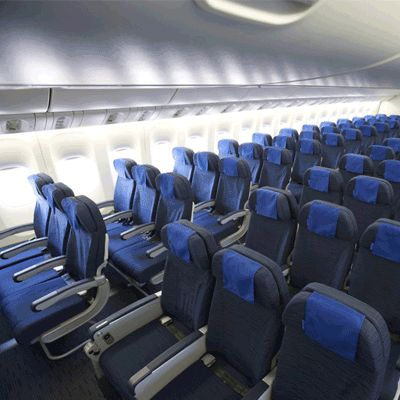
Locurile la clasa economică oferă 30" seat pitch and 17.3" seat width. Caracteristicile și configurația locurilor pot varia în funcție de tipul aeronavei și de rută.
Check-in
Mai jos sunt prezentate metodele de check-in disponibile pentru zborurile Avelo Airlines. Disponibilitatea poate varia în funcție de aeroport, rută sau tipul tarifului.
Check-in online
Efectuați check-inul online prin site-ul Avelo Airlines, folosind detaliile rezervării. După check-in, puteți descărca sau imprima cartea de îmbarcare. Check-inul online este disponibil cu până la 24 ore înainte de plecare.
Check-in prin aplicație
Efectuați check-inul prin aplicația mobilă Avelo Airlines pe iOS sau Android. Cartea de îmbarcare va fi disponibilă în aplicație și, de obicei, poate fi adăugată în portofelul digital. Serviciul de check-in prin aplicație este disponibil cu până la 0 ore înainte de plecare.
Check-in la ghișeul aeroportului
Mergeți la ghișeul de check-in Avelo Airlines din aeroportul de plecare cu până la 120 minute înainte de plecare. Această opțiune este recomandată pasagerilor care au nevoie de asistență specială, au rezervări de grup sau călătoresc cu bagaje supradimensionate. Se pot aplica taxe suplimentare, în funcție de politica Avelo Airlines.
Informații importante de călătorie
- Sosiți la aeroport suficient de devreme pentru a finaliza check-inul, controlul de securitate și orice proceduri de imigrare necesare.
- Verificați orele-limită pentru ghișeul de check-in și poarta de îmbarcare pentru ruta dumneavoastră înainte de a vă îndrepta spre aeroport.
- Aduceți toate documentele de călătorie valabile — biletul de avion, un act de identitate emis de autorități și pașaportul (cu orice vize necesare) pentru călătoriile internaționale.
- Cerințele de intrare se pot modifica fără notificare prealabilă. Verificați cerințele privind viza, sănătatea și intrarea pentru destinația dumneavoastră cu mult înainte de data plecării.
- Respectați regulile Avelo Airlines privind bagajele permise. Consultați secțiunea Facilități și servicii pentru detalii despre bagajul de cabină.
- Tipurile de tarife au reguli diferite pentru bagaje, alegerea locului, mese și flexibilitate. Examinați condițiile tarifului afișate la finalizarea plății înainte de a vă finaliza rezervarea.
- În cazul unei modificări de program, întârzieri sau anulări inițiate de Avelo Airlines, se aplică propriile politici operaționale ale companiei aeriene. Airpaz va ajuta cu notificări și coordonare ori de câte ori este posibil, însă deciziile finale privind reprogramarea, rambursările sau compensațiile aparțin companiei aeriene.
Reguli la bord
- Fiecare pasager trebuie să ocupe locul alocat în timpul check-inului.
- Bagajul de mână trebuie depozitat în compartimentul superior sau sub scaunul din fața dumneavoastră.
- Telefoanele mobile și dispozitivele electronice trebuie oprite sau setate pe modul avion, în special în timpul decolării și aterizării.
- Fixați-vă centura de siguranță, pliați măsuța, readuceți scaunul în poziție verticală și deschideți parasolarul ferestrei în timpul decolării și aterizării.
- Fumatul, inclusiv țigările electronice și vapingul, este strict interzis oriunde în aeronavă pe toată durata zborului.
- Respectați întotdeauna toate instrucțiunile echipajului Avelo Airlines și anunțurile de siguranță de la bord.
Cum să vă gestionați rezervarea pe Airpaz
- Conectați-vă la contul dumneavoastră Airpaz.
- Accesați secțiunea Comandă pentru a vă găsi zborul.
- Selectați rezervarea pentru a vizualiza biletul electronic, itinerarul și detaliile de plată.
- Pentru a solicita o rambursare sau o reprogramare, alegeți opțiunea afișată și urmați pașii.
- Furnizați informațiile solicitate și confirmați trimiterea cererii.
- Urmăriți starea cererii de pe aceeași pagină.
De ce aleg călătorii Airpaz pentru rezervările de zboruri Avelo Airlines
- Căutare rapidă și ușoară: Filtrează și compară zborurile după preț, program, durată și escale — totul într-o singură căutare.
- Suplimente simple: Adaugă bagaj de cală, alege-ți locul, precomandă mese sau obține asigurare de călătorie pentru zborul tău.
- Opțiuni de clasă tarifară: Cauți puțin mai mult lux? Oferim selecții de clase tarifare de la clasa economică până la clasa întâi pentru o experiență de zbor mai premium.
- Mai multe metode de plată: Alege dintre carduri de credit/debit, transferuri bancare, PayPal, portofele electronice și multe opțiuni de plată locale populare.
- Confirmare fără probleme a biletului: Primești confirmarea rezervării și biletul direct în căsuța ta de e-mail după finalizarea plății.
- Asistență globală pentru clienți: Echipa noastră multilingvă de asistență pentru clienți este pregătită 24/7 să te ajute cu modificări ale rezervării, anulări sau orice întrebări.
- Promoții exclusive în aplicație și pentru membri: Bucură-te de oferte speciale create pentru membrii Airpaz și reduceri disponibile doar în aplicație.
- Valoare excepțională: Asigurăm oferte exclusive și tarife promoționale speciale pentru a te lăsa să obții maximum din bugetul tău de călătorie.
Sfaturi pentru a găsi zboruri ieftine Avelo Airlines pe Airpaz
- Rezervă din timp: Tarifele tind să crească pe măsură ce se apropie ziua plecării. Încearcă să rezervi cu 4–8 săptămâni înainte pentru a obține cele mai bune oferte și tarife.
- Fii flexibil cu datele: Folosește vizualizarea calendarului Airpaz pentru a compara tarifele pe mai multe date.
- Zboară la mijlocul săptămânii: Zborurile de marți și miercuri oferă de obicei tarife mai ieftine decât cele de weekend.
- Vânează promoții: Verifică regulat pentru coduri promoționale și oferte Avelo Airlines pe timp limitat pe pagina și pagina de pe Airpaz.
- Evită sezoanele de vârf: Vacanțele școlare, sărbătorile legale și perioadele festive duc la creșterea tarifelor — călătorește în afara sezonului pentru a economisi mai mult.
- Combină și economisește: Rezervă-ți zborul și cazarea într-o singură rezervare pentru a te bucura de mai multe economii.
- Plătește cu aplicația Airpaz: Codurile promoționale exclusive din aplicație și reducerile doar pentru membri sunt adesea cea mai bună modalitate de a obține cele mai mici tarife de zbor.
Cum să rezervi un zbor pe Airpaz
- Vizitează Airpaz.com sau deschide aplicația Airpaz, apoi selectează Zboruri.
- Introdu orașul de plecare (ex. Kuala Lumpur) și destinația (ex. Bali, Singapore sau Bangkok).
- Alege data călătoriei și numărul de pasageri.
- Apasă pe Căutare pentru a vedea zborurile disponibile.
- Folosește filtre precum prețul, ora de plecare sau durata pentru a găsi cea mai bună opțiune, apoi selectează zborul preferat.
- Completează detaliile pasagerilor exact așa cum apar pe pașaportul sau buletinul tău (numele complet, data nașterii, naționalitatea și informațiile de contact).
- Adaugă suplimente dacă este necesar, cum ar fi bagaj, alegerea locului, mese sau asigurare de călătorie.
- Revizuiește detaliile rezervării tale.
- Selectează o metodă de plată (card de credit/debit, transfer bancar, PayPal sau plată în rate).
- Finalizează plata — biletul tău electronic va fi trimis pe e-mailul tău și va fi disponibil în aplicație.
Întrebări frecvente despre Avelo Airlines
Mai multe zboruri recomandate cu Avelo Airlines
Rută populară cu Avelo Airlines
Destinație populară după Continent
Destinație populară după Țară


De ce să călătorești cu Airpaz?

Simplificați-vă experiența de rezervare
Simțiți flexibilitatea și simplitatea pe tot parcursul procesului de rezervare

O selecție largă de produse de călătorie
Bucurați-vă de momentele memorabile cu milioane de zboruri și cazări favorabile

Ofertă exclusivă în fiecare zi
Diverse promoții zilnice cu preț competitiv pentru toți călătorii

Expert în rezervări online
Împreună cu partenerii noștri credibili, îndeplinind nenumărate nevoi ale călătorilor din 2011

Suport pentru clienți afectuos
Oferind cea mai bună asistență, asistența noastră pentru clienți este disponibilă 24/7 în limba dvs. locală

Entuziasmul rezervărilor locale din lume
Experiență de rezervare fără stres cu plată locală, monedă și limbă