

Ultima actualizare pe
Rezervați și obțineți cele mai bune oferte de zboruri Aer Lingus
 Aer Lingus
Începe de la
US$ 41.51
Preț/ Pax
Aer LingusÎncepe de la
US$ 45.02
Preț/ Pax
Aer LingusÎncepe de la
US$ 47.94
Preț/ Pax
Aer LingusÎncepe de la
US$ 55.77
Preț/ Pax
Aer LingusÎncepe de la
US$ 49.46
Preț/ Pax
Aer LingusÎncepe de la
US$ 49.94
Preț/ Pax
Aer LingusÎncepe de la
US$ 58.28
Preț/ Pax
Aer LingusÎncepe de la
US$ 51.62
Preț/ Pax
Aer LingusÎncepe de la
US$ 60.45
Preț/ Pax
Aer LingusÎncepe de la
US$ 52.55
Preț/ Pax
 Vă rugăm să rețineți că prețurile enumerate pe această pagină pot să nu fie actualizate și pot fi modificate fără notificare prealabilă. Ne străduim să oferim cele mai exacte și actuale informații.
Aer Lingus Informații de zbor
Luna cu cel mai mic tarif
Aug.
Total destinații
61


Prezentare
Aer Lingus (EI) este o companie aeriană transportator cu servicii complete care zboară pe rute interne și internaționale. Franșiza pentru bagaj de cabină asigurată de această companie aeriană este de 7 kg și are dimensiunea dimensiune 33 cm x 20 cm x 48 cm (L x W x H). Franșiza gratuită pentru bagaj de cală nu este inclusă în zbor Check-inul începe cu 180 minute înainte de ora programată de plecare a zborului. Check-in online este disponibil pentru zborul pe site-ul web oficial Aer Lingus. Acesta poate fi efectuat cu 2 zile înainte de ora programată de plecare a zborului.
Cum se rezervă
Cum se plătește
Plata pentru rezervarea Aer Lingus pe Airpaz poate fi efectuată prin metode bancare transfer bancar, PayPal, card de credit, și metode la ghișeu. Pentru informații detaliate, vizitați pagina Payment Guide de pe Airpaz.
Profilul companiei
Aer Lingus, care operează cu codul IATA EI și codul ICAO EIN, este o companie aeriană de tip transportator cu servicii complete care operează rute interne și internaționale. Compania aeriană deservește zboruri către orașe de destinație din întreaga lume din principalul său hub situat în Aeroportul Dublin (DUB). Compania aeriană zboară către Austria, Irlanda, Spania, iar mai multe orașele către care zboară companiile aeriene sunt Dublin, Gran Canaria, Vienna.
Aer Lingus Limited este proprietarul numelui comercial Aer Lingus. Compania este condusă de directorul general Lynne Embleton. Sediul central al companiei aeriene se află în Irlanda.
Istoric
Aer Lingus, care operează cu codul IATA (EI) și codul ICAO (EIN), a fost pentru prima dată fondată în 1936. Compania aeriană este administrată de Aer Lingus Limited. În decursul anilor, Aer Lingus întotdeauna se străduiește să devină una dintre companiile aeriene lider în viitor. Această companie aeriană și-a demarat operațiunile la 27 mai 1936.Aer Lingus a fost premiată cu 2026 APEX Five Star Major Airlines.
Echipaj de cabină

Echipajul de cabină Aer Lingus poartă o uniformă în tosca verde sau neagra. Însoțitorii de bord bărbați poartă camasa alba cu costum negru si cravata tosca verde și pantaloni negri. Însoțitoarele de bord poartă camasa verde cu nasturi tosca și fusta tosca verde. Această uniformă a fost proiectată perfect, care o face mai ușoară pentru deplasarea echipajului prin cabină în timp ce răspunde nevoilor pasagerilor.
Flotă

Aer Lingus operează cu un număr de aeronave, toate putând fi verificate în tabelul următor:
| Type | Quantity |
|---|---|
| Airbus A320 | 23 |
| Airbus A330-200 | 2 |
| Airbus A330-300 | 11 |
| Airbus A321neo | 14 |
| Airbus A320neo | 8 |
Chat live
O altă alternativă este să accesați pagina lor de chat live aici.
Bagaje
Bagaj de cabină
Pasagerilor care folosesc serviciile Aer Lingus li se acordă o alocație pentru bagajul de cabină inclusă în biletele de avion. Dimensiunea maximă admisă a bagajului plasate în compartimentul superior al cabinei este 33 cm x 20 cm x 48 cm (L x W x H), în timp ce greutatea maximă admisă a bagajelor este 7 kg.Vă rugăm să rețineți că acesta trebuie să încapă sub scaunul din fața dumneavoastră.
Bagaj de cală
Aer Lingus nu pune la dispoziție pasagerilor alocație gratuită pentru bagaj de cală.
Exces de bagaj
Alocația excedentară pentru bagaj de cală ca alocație nu poate fi achiziționată pe Airpaz.com.
Declinare de responsabilitate: Informațiile menționate mai sus sunt destinate doar ca ghid general și pot fi modificate de compania aeriană fără notificare prealabilă. Contactați compania aeriană pentru informații suplimentare.
Scaun

Clasa economică
Dimensiunea scaunului standard pentru tariful clasei economică la Aer Lingus este 31"-32 seat pitch and 17" width.
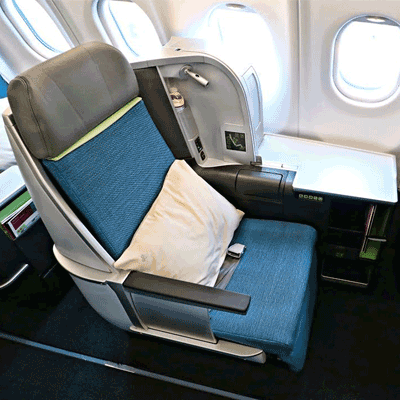
Clasa business
Dimensiunea scaunului standard pentru tariful clasei business la Aer Lingus este 58" seat pitch and 21" width.
Confort în timpul zborului

Divertisment în timpul zborului
Aer Lingus oferă servicii și divertisment la bord pentru pasageri în timpul zborului pe aeronavele sale, precum blockbuster movies, classic films, TV programmes, box sets or music videos, games.
Gustare gratuită în timpul zborului
În timpul zborurilor cu Aer Lingus, gustarea/băutura gratuită nu este disponibilă.

Comandă de masă
Pasagerii pot comanda masă pentru a se bucura de aceasta în timpul zborului, în funcție de disponibilitate. Pentru meniul de băuturi și mese al companiei aeriene, faceți clic aici.
WiFi în timpul zborului
Aer Lingus oferă WiFi în timpul zborului pentru pasageri.
Program de privilegii
Programul de privilegii este disponibil pentru clienții fideli ai Aer Lingus, iar informații mai complete despre acesta pot fi cititeaici.Check-in online
Prin site-ul oficial Aer Lingus, pasagerii pot face check-in online. Pentru a face acest lucru, faceți clic aici pentru a accesa pagina de check-in a companiei aeriene. Check-inul online poate fi efectuat cu 2 zile înainte de ora de plecare programată.
Check-in la aeroport
Check-inul la aeroport poate fi efectuat la ghișeele de check-in Aer Lingus cu 180 minute înainte de ora de plecare programată a zborului. Vă recomandăm să faceți check-in cu cel puțin o oră și jumătate înainte de închiderea ghișeului de check-in și predare a bagajelor de la aeroport.
Check-in la chioșc
Aer Lingus oferă servicii de check-in la chioșc pentru pasageri, care pot fi accesate la aeroportul de orașul de plecare în raport cu disponibilitatea. Pentru informații suplimentare despre acest serviciu, contactați serviciul clienți al companiei aeriene. Ora de check-in este cu 180 ore înainte de ora de plecare a zborului.
Check-in prin aplicație
Pasagerii Aer Lingus pot face check-in prin aplicația mobilă oficială (Android/iOS) a companiei aeriene. Pentru a face acest lucru, pasagerii trebuie să descarce aplicația mobilă Aer Lingus pe telefonul mobil lor. Ora de check-in este cu 48 ore înainte de ora de plecare a zborului.
Reguli tarifare
a. Anulare și rambursare
Biletul la compania aeriană nu poate fi anulate.b. Reprogramare
Modificările, cum ar fi reprogramarea, poate fi efectuate pentru biletele contactând direct compania aeriană.
Declinarea responsabilității: Compania aeriană își poate modifica politica fără nicio notificare prealabilă. Pentru a primi informații actualizate atunci când se întâmplă acest lucru și pentru politica privind asigurarea, întârzierea zborului etc., verificați pagina companiei aeriene cu regulile tarifare sau contactați direct compania aeriană.
Verificați programul zborului Aer Lingus ()
De ce aleg călătorii Airpaz pentru rezervările de zboruri Aer Lingus
- Căutare rapidă și ușoară: Filtrează și compară zborurile după preț, program, durată și escale — totul într-o singură căutare.
- Suplimente simple: Adaugă bagaj de cală, alege-ți locul, precomandă mese sau obține asigurare de călătorie pentru zborul tău.
- Opțiuni de clasă tarifară: Cauți puțin mai mult lux? Oferim selecții de clase tarifare de la clasa economică până la clasa întâi pentru o experiență de zbor mai premium.
- Mai multe metode de plată: Alege dintre carduri de credit/debit, transferuri bancare, PayPal, portofele electronice și multe opțiuni de plată locale populare.
- Confirmare fără probleme a biletului: Primești confirmarea rezervării și biletul direct în căsuța ta de e-mail după finalizarea plății.
- Asistență globală pentru clienți: Echipa noastră multilingvă de asistență pentru clienți este pregătită 24/7 să te ajute cu modificări ale rezervării, anulări sau orice întrebări.
- Promoții exclusive în aplicație și pentru membri: Bucură-te de oferte speciale create pentru membrii Airpaz și reduceri disponibile doar în aplicație.
- Valoare excepțională: Asigurăm oferte exclusive și tarife promoționale speciale pentru a te lăsa să obții maximum din bugetul tău de călătorie.
Sfaturi pentru a găsi zboruri ieftine Aer Lingus pe Airpaz
- Rezervă din timp: Tarifele tind să crească pe măsură ce se apropie ziua plecării. Încearcă să rezervi cu 4–8 săptămâni înainte pentru a obține cele mai bune oferte și tarife.
- Fii flexibil cu datele: Folosește vizualizarea calendarului Airpaz pentru a compara tarifele pe mai multe date.
- Zboară la mijlocul săptămânii: Zborurile de marți și miercuri oferă de obicei tarife mai ieftine decât cele de weekend.
- Vânează promoții: Verifică regulat pentru coduri promoționale și oferte Aer Lingus pe timp limitat pe pagina și pagina de pe Airpaz.
- Evită sezoanele de vârf: Vacanțele școlare, sărbătorile legale și perioadele festive duc la creșterea tarifelor — călătorește în afara sezonului pentru a economisi mai mult.
- Combină și economisește: Rezervă-ți zborul și cazarea într-o singură rezervare pentru a te bucura de mai multe economii.
- Plătește cu aplicația Airpaz: Codurile promoționale exclusive din aplicație și reducerile doar pentru membri sunt adesea cea mai bună modalitate de a obține cele mai mici tarife de zbor.
Cum să rezervi un zbor pe Airpaz
- Vizitează Airpaz.com sau deschide aplicația Airpaz, apoi selectează Zbor.
- Introdu orașul de plecare (ex. Kuala Lumpur) și destinația (ex. Bali, Singapore sau Bangkok).
- Alege data călătoriei și numărul de pasageri.
- Apasă pe Căutare pentru a vedea zborurile disponibile.
- Folosește filtre precum prețul, ora de plecare sau durata pentru a găsi cea mai bună opțiune, apoi selectează zborul preferat.
- Completează detaliile pasagerilor exact așa cum apar pe pașaportul sau buletinul tău (numele complet, data nașterii, naționalitatea și informațiile de contact).
- Adaugă suplimente dacă este necesar, cum ar fi bagaj, alegerea locului, mese sau asigurare de călătorie.
- Revizuiește detaliile rezervării tale.
- Selectează o metodă de plată (card de credit/debit, transfer bancar, PayPal sau plată în rate).
- Finalizează plata — biletul tău electronic va fi trimis pe e-mailul tău și va fi disponibil în aplicație.
Întrebări frecvente despre Aer Lingus
Mai multe zboruri recomandate cu Aer Lingus
Rută populară cu Aer Lingus
Destinație populară după Aeroport
Destinație populară după Oraș
Destinație populară după Continent


De ce trebuie să călătorești cu Airpaz

Simplificați-vă experiența de rezervare
Simțiți flexibilitatea și simplitatea pe tot parcursul procesului de rezervare

O selecție largă de produse de călătorie
Bucurați-vă de momentele memorabile cu milioane de zboruri și cazări favorabile

Ofertă exclusivă în fiecare zi
Diverse promoții zilnice cu preț competitiv pentru toți călătorii

Expert în rezervări online
Împreună cu partenerii noștri credibili, îndeplinind nenumărate nevoi ale călătorilor din 2011

Suport pentru clienți afectuos
Oferind cea mai bună asistență, asistența noastră pentru clienți este disponibilă 24/7 în limba dvs. locală

Entuziasmul rezervărilor locale din lume
Experiență de rezervare fără stres cu plată locală, monedă și limbă