


Online inchecken
Beschikbaar voor online inchecken
Inchecken vóór vertrek
Vanaf 120 minuten voor vertrek
Laatst bijgewerkt op
Avelo Airlines Vluchtinformatie


Overzicht
Avelo Airlines (XP) is een luchtvaartmaatschappij lagekostenmaatschappij que vuela a rutas binnenlandse. La franquicia de equipaje de cabina no se proporciona a los viajeros de Avelo Airlines. La tarifa del billete de avión no incluye franquicia de equipaje facturado . Los viajeros pueden comenzar el check-in en el aeropuerto 120 minutos previo a la hora de salida del vuelo. El check-in en línea está habilitado para vuelos con la aerolínea en la página web oficial de Avelo Airlines. Puede procesarse 24 uur antes de la hora de salida.
Boeken
Betalen
El pago de su billete de Avelo Airlines en Airpaz puede procesarse mediante tarjeta de crédito, transferencia bancaria, PayPal, y métodos de pago en mostrador. Para obtener información completa, visite la página de la Guía de pago de Airpaz.com.
Informatie over Avelo Airlines
Uw luchtvaartmaatschappij leren kennen voordat u vliegt, is altijd een verstandige keuze. Het helpt u met vertrouwen te reizen en precies te weten wat u kunt verwachten. Avelo Airlines is een lowcostmaatschappij die sinds 1987 binnenlandse routes uitvoert, met het hoofdkantoor gevestigd in Verenigde Staten. Binnen de luchtvaartsector wordt Avelo Airlines officieel herkend aan haar IATA-code (XP) en ICAO-code (VXP), de standaardidentificaties die wereldwijd worden gebruikt voor boekingen, check-in en vluchttracking. Hieronder vindt u alle essentiële details, van codes en routes tot belangrijke feiten, om u te helpen uw volgende reis met volledig vertrouwen te plannen en te boeken.
Hub en operaties
Avelo Airlines voert binnenlandse vluchten uit vanaf haar belangrijkste hub op Wilmington Airport (ILG), Tweed New Haven Airport (HVN), met het hoofdkantoor gevestigd in Verenigde Staten. De volledige lijst met bestemmingen en de actuele dienstregelingen zijn beschikbaar wanneer u op Airpaz naar een vlucht zoekt.
Bagage
Zitplaatsen
Avelo Airlines biedt zitplaatsen in meerdere cabineklassen, waarbij comfort en configuratie per vliegtuigtype en route kunnen verschillen. Selecteer uw vlucht om de beschikbare zitplaatsen voor uw boeking te bekijken.
Zitplaatsen in economy class
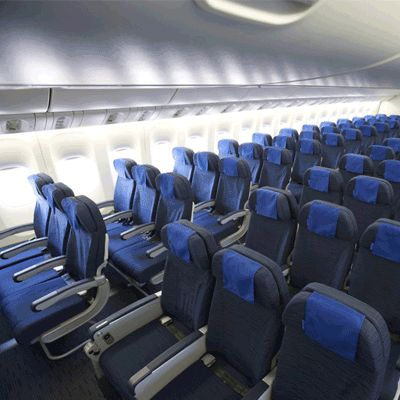
Zitplaatsen in economy class bieden 30" seat pitch and 17.3" seat width. Stoelkenmerken en configuratie kunnen per vliegtuigtype en route verschillen.
Inchecken
Hieronder staan de incheckmethoden die beschikbaar zijn voor vluchten van Avelo Airlines. De beschikbaarheid kan variëren per luchthaven, route of tarieftype.
Online inchecken
Check online in via de website van Avelo Airlines met uw boekingsgegevens. Na het inchecken kunt u uw instapkaart downloaden of afdrukken. Online inchecken is beschikbaar tot 24 uur voor vertrek.
Inchecken via de app
Check in via de mobiele app van Avelo Airlines op iOS of Android. Uw instapkaart is beschikbaar in de app en kan meestal aan uw digitale wallet worden toegevoegd. De incheckservice via de app is beschikbaar tot 0 uur voor vertrek.
Inchecken bij de balie op de luchthaven
Ga naar de incheckbalie van Avelo Airlines op uw vertrekluchthaven tot 120 minuten voor vertrek. Deze optie wordt aanbevolen voor passagiers die speciale assistentie nodig hebben, groepsboekingen hebben of met extra grote bagage reizen. Afhankelijk van het beleid van Avelo Airlines kunnen extra kosten van toepassing zijn.
Belangrijke reisinformatie
- Kom vroeg genoeg op de luchthaven aan om het inchecken, de veiligheidscontrole en eventuele vereiste immigratieprocedures af te ronden.
- Controleer de sluitingstijden van de incheckbalie en de boardinggate voor uw route voordat u naar de luchthaven vertrekt.
- Neem alle geldige reisdocumenten mee: uw vliegticket, een door de overheid uitgegeven identiteitsbewijs en uw paspoort (met eventuele vereiste visa) voor internationale reizen.
- Toelatingseisen kunnen zonder voorafgaande kennisgeving veranderen. Controleer de visum-, gezondheids- en toelatingseisen van uw bestemming ruim vóór uw vertrekdatum.
- Volg de regels voor bagagevrijstelling van Avelo Airlines. Zie het gedeelte Faciliteiten en services voor details over cabinebagage.
- Tarieftypen hebben verschillende regels voor bagage, stoelkeuze, maaltijden en flexibiliteit. Bekijk de tariefvoorwaarden die bij het afrekenen worden weergegeven voordat u uw boeking voltooit.
- In geval van een schemawijziging, vertraging of annulering die door Avelo Airlines is geïnitieerd, zijn de eigen operationele beleidsregels van de luchtvaartmaatschappij van toepassing. Airpaz helpt waar mogelijk met meldingen en coördinatie, maar de uiteindelijke beslissingen over omboekingen, terugbetalingen of compensatie liggen bij de luchtvaartmaatschappij.
Regels aan boord
- Elke passagier moet de stoel innemen die tijdens het inchecken is toegewezen.
- Handbagage moet in het bagagevak boven de stoelen of onder de stoel voor u worden opgeborgen.
- Mobiele telefoons en elektronische apparaten moeten worden uitgeschakeld of in vliegtuigmodus worden gezet, vooral tijdens het opstijgen en landen.
- Doe uw veiligheidsgordel om, klap het tafeltje in, zet uw stoel rechtop en open het raamscherm tijdens het opstijgen en landen.
- Roken, inclusief e-sigaretten en vapen, is tijdens de gehele vlucht overal in het vliegtuig strikt verboden.
- Volg te allen tijde alle instructies van de bemanning van Avelo Airlines en de veiligheidsmededelingen aan boord.
Uw boeking beheren op Airpaz
- Log in op uw Airpaz-account.
- Ga naar het gedeelte Bestelling om uw vlucht te vinden.
- Selecteer uw boeking om uw e-ticket, reisschema en betalingsgegevens te bekijken.
- Als u een terugbetaling wilt aanvragen of wilt omboeken, kiest u de weergegeven optie en volgt u de stappen.
- Verstrek de gevraagde informatie en bevestig uw indiening.
- Volg de status van uw verzoek vanaf dezelfde pagina.
Waarom reizigers voor Airpaz kiezen voor Avelo Airlines-vluchtboekingen
- Snel & Eenvoudig Zoeken: Filter en vergelijk vluchten op prijs, schema, duur en tussenstops — allemaal in één enkele zoekopdracht.
- Handige Extra's: Voeg ruimbagage toe, kies uw stoel, bestel maaltijden vooraf of sluit een reisverzekering af voor uw vlucht.
- Verschillende Tariefklassen: Op zoek naar een beetje extra luxe? Wij bieden een selectie van tariefklassen, van economy tot first class, voor een meer premium vliegervaring.
- Meerdere Betaalmethoden: Kies uit creditcards/betaalpassen, bankoverschrijvingen, PayPal, e-wallets en vele populaire lokale betaalopties.
- Naadloze Ticketbevestiging: Ontvang uw boekingsbevestiging en ticket direct in uw e-mailinbox nadat de betaling is voltooid.
- Wereldwijde Klantenservice: Ons meertalige klantenserviceteam staat 24/7 voor u klaar om u te helpen met wijzigingen in uw boeking, annuleringen of eventuele vragen.
- Exclusieve app- & ledenpromo's: Geniet van speciale deals ontworpen voor Airpaz-leden en exclusieve app-aanbiedingen.
- Uitzonderlijke Waarde: Wij bemachtigen exclusieve deals en speciale actietarieven zodat u het maximale uit uw reisbudget kunt halen.
Tips om Goedkope Avelo Airlines-vluchten te Vinden op Airpaz
- Boek Vooraf: Tarieven stijgen meestal naarmate de vertrekdatum nadert. Probeer 4–8 weken van tevoren te boeken voor de beste deals en tarieven.
- Blijf Flexibel met Data: Gebruik de kalenderweergave van Airpaz om tarieven over meerdere datums te vergelijken.
- Vlieg Doordeweeks: Vluchten op dinsdag en woensdag zijn meestal goedkoper dan vluchten in het weekend.
- Jaag op Promo's: Controleer regelmatig op kortingscodes en tijdelijke Avelo Airlines-aanbiedingen op de Airpaz pagina en pagina.
- Vermijd het Hoogseizoen: Schoolvakanties, feestdagen en festivalperiodes drijven de prijzen op — reis buiten het hoogseizoen om meer te besparen.
- Bundel en Bespaar: Boek uw vlucht en verblijf in één boeking om van nog meer korting te profiteren.
- Betaal met de Airpaz-app: Exclusieve promo codes in de app en ledenkortingen zijn vaak de beste manier om lagere vluchttarieven te krijgen.
Hoe u een Vlucht Boekt op Airpaz
- Ga naar Airpaz.com of open de Airpaz-app en selecteer Vlucht
- Voer uw vertrekstad (bijv. Kuala Lumpur) en bestemming (bijv. Bali, Singapore of Bangkok) in
- Kies uw reisdatum en het aantal passagiers
- Tik op Zoeken om beschikbare vluchten te bekijken
- Gebruik filters zoals prijs, vertrektijd of vluchtduur om de beste optie te vinden, en selecteer vervolgens uw gewenste vlucht
- Vul de passagiersgegevens exact in zoals vermeld op uw paspoort of ID (volledige naam, geboortedatum, nationaliteit en contactgegevens)
- Voeg indien nodig extra's toe, zoals bagage, stoelkeuze, maaltijden of reisverzekering
- Controleer uw boekingsgegevens
- Selecteer een betaalmethode (creditcard/betaalpas, bankoverschrijving, PayPal of in termijnen betalen)
- Voltooi uw betaling — uw e-ticket wordt naar uw e-mail verzonden en is beschikbaar in de app
Veelgestelde vragen over Avelo Airlines
Meer aanbevolen vluchten met Avelo Airlines
Populaire route van Avelo Airlines
Populaire bestemming per Continent
Populaire bestemming per Land


Waarom moet je met Airpaz reizen

Vereenvoudig uw boekingservaring
Voel de flexibiliteit en eenvoud tijdens uw boekingsproces

Brede selectie van reisproducten
Geniet van uw onvergetelijke momenten met miljoenen gunstige vluchten en accommodaties

Exclusieve aanbieding elke dag
Diverse dagelijkse promo's met scherpe prijs voor alle reizigers

Online Boeking Expert
Samen met onze geloofwaardige partners vervullen we sinds 2011 talloze behoeften van reizigers

Hartelijke klantenondersteuning
Onze klantenondersteuning biedt de beste hulp en is 24/7 beschikbaar in uw lokale taal

Werelds lokale boekingsplezier
Stressvrije boekingservaring met lokale betaling, valuta en taal