
Håndbagasje
Gratis tillatt håndbagasje: 7 kg
Innsjekking før avgang
Fra 150 minutter før avgang
Sist oppdatert den
Bestill og få de beste flytilbudene med Airblue
 Airblue
Start fra
US$ 78.56
Pris/ Pax
AirblueStart fra
US$ 86.71
Pris/ Pax
AirblueStart fra
US$ 87.14
Pris/ Pax
AirblueStart fra
US$ 93.61
Pris/ Pax
AirblueStart fra
US$ 93.61
Pris/ Pax
AirblueStart fra
US$ 93.63
Pris/ Pax
AirblueStart fra
US$ 96.58
Pris/ Pax
AirblueStart fra
US$ 97.75
Pris/ Pax
AirblueStart fra
US$ 98.1
Pris/ Pax
AirblueStart fra
US$ 103.98
Pris/ Pax
 Vennligst merk at prisene som er oppgitt på denne siden kanskje ikke er oppdaterte og kan endres uten forvarsel. Vi streber etter å tilby den mest nøyaktige og oppdaterte informasjonen.
Airblue flyinformasjon
Måneden med lavest pris
sep.
Totalt antall destinasjoner
12


Informasjon om Airblue
Det er alltid lurt å bli kjent med flyselskapet før du flyr. Det hjelper deg med å reise med trygghet og vite nøyaktig hva du kan forvente. Airblue er et lavprisselskap som har trafikkert innenriks- og internasjonale ruter siden 2003, med hovedkontor i Pakistan. I hele luftfartsbransjen er Airblue offisielt kjent gjennom sin IATA-kode (PA) og sin ICAO-kode (ABQ), standardidentifikatorene som brukes til bestillinger, innsjekking og flysporing over hele verden. Nedenfor finner du alle viktige opplysninger, fra koder og ruter til sentrale fakta, som hjelper deg med å planlegge og bestille din neste reise med full trygghet.
Knutepunkt og drift
Airblue opererer innenriks- og internasjonale flyvninger fra sitt hovedknutepunkt på King Abdulaziz internasjonale lufthavn (JED), Abu Dhabi internasjonale lufthavn (AUH), Dubai internasjonale lufthavn (DXB), Jinnah internasjonale lufthavn (KHI), Allama Iqbal internasjonale lufthavn (LHE), Islamabad internasjonale lufthavn (ISB), med hovedkontor i Pakistan. Den fullstendige listen over destinasjoner og gjeldende rutetider er tilgjengelig når du søker etter en flyreise på Airpaz.
Bagasje
Håndbagasje
Passasjerer hos Airblue kan ta med håndbagasje om bord med en gratis håndbagasjekvote på opptil 7 kg. Håndbagasje må være innenfor 22 x 15 x 8 inches (56 x 38 x 20 cm). Du kan også ta med en mindre personlig gjenstand, for eksempel en PC-veske, håndveske eller liten ryggsekk, så lenge den får plass under setet foran deg.
Seter
Airblue tilbyr seter på tvers av flere kabinklasser, med komfort og konfigurasjon som varierer etter flytype og rute. Velg flyvningen din for å se setene som er tilgjengelige for bestillingen din.
Seter på Economy Class
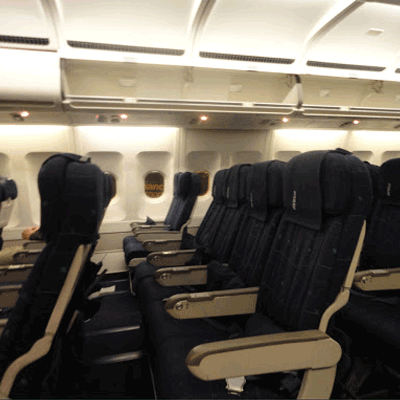
Seter på economy class tilbyr 28"-32" pitch and 18" width. Setefunksjoner og konfigurasjon kan variere etter flytype og rute.Menyalternativer kan variere etter rute, billettype eller flyvarighet.
Innsjekking
Nedenfor finner du innsjekkingsmetodene som er tilgjengelige for Airblue-flyvninger. Tilgjengeligheten kan variere etter flyplass, rute eller billettype.
Innsjekking ved flyplasskranke
Besøk Airblue's innsjekkingsskranke på avreiseflyplassen opptil 150 minutter før avgang. Dette alternativet anbefales for passasjerer som trenger spesiell assistanse, har gruppebestillinger eller reiser med overdimensjonert bagasje. Ytterligere gebyrer kan påløpe avhengig av Airblue's regler.
Viktig reiseinformasjon
- Ankom flyplassen i god nok tid til å fullføre innsjekking, sikkerhetskontroll og eventuelle nødvendige immigrasjonsprosedyrer.
- Kontroller fristene for innsjekkingsskranken og ombordstigningsgaten for ruten din før du drar til flyplassen.
- Ta med alle gyldige reisedokumenter — flybilletten din, offentlig utstedt ID og passet ditt (med eventuelle nødvendige visum) for internasjonale reiser.
- Inreisekrav kan endres uten varsel. Kontroller visum-, helse- og inreisekravene for destinasjonen din i god tid før avreisedatoen.
- Følg Airblue's regler for bagasjekvote. Se avsnittet Fasiliteter og tjenester for detaljer om håndbagasje.
- Billettyper har ulike regler for bagasje, valg av sete, måltider og fleksibilitet. Gå gjennom billettvilkårene som vises ved betaling før du fullfører bestillingen.
- Ved en ruteendring, forsinkelse eller kansellering initiert av Airblue gjelder flyselskapets egne operative retningslinjer. Airpaz hjelper med varsler og koordinering der det er mulig, men endelige beslutninger om ombooking, refusjon eller kompensasjon ligger hos flyselskapet.
Regler om bord
- Hver passasjer må sitte i setet som ble tildelt under innsjekking.
- Håndbagasje må oppbevares i bagasjehyllen over setet eller under setet foran deg.
- Mobiltelefoner og elektroniske enheter må være slått av eller satt i flymodus, spesielt under avgang og landing.
- Fest sikkerhetsbeltet, slå opp bordet, sett setet i oppreist stilling og åpne vindusskjermen under avgang og landing.
- Røyking, inkludert e-sigaretter og vaping, er strengt forbudt overalt på flyet gjennom hele flyvningen.
- Følg alltid alle instruksjoner fra Airblue's besetning og sikkerhetsmeldinger om bord.
Slik administrerer du bestillingen din på Airpaz
- Logg inn på Airpaz-kontoen din.
- Gå til delen Bestilling for å finne flyreisen din.
- Velg bestillingen din for å se e-billetten, reiseruten og betalingsdetaljene.
- For å be om refusjon eller endre reisetidspunkt velger du alternativet som vises, og følger trinnene.
- Oppgi den forespurte informasjonen og bekreft innsendingen.
- Følg statusen for forespørselen din fra samme side.
Sjekk Airblue flyrutetabell
flightstaticpage.airlineinfoheadingpricechart


Hvorfor reisende velger Airpaz for Airblue-flybestillinger
- Rask og enkelt søk: Filtrer og sammenlign flyreiser etter pris, tidsplan, varighet og mellomlandinger – alt i ett enkelt søk.
- Enkle tilleggsvalg: Legg til innsjekket bagasje, velg sete, forhåndsbestill måltider eller skaff reiseforsikring for flyreisen din.
- Billettyper og klasser: Leter du etter litt ekstra luksus? Vi tilbyr et utvalg av billettyper fra økonomi til førsteklasse for en mer premium flyopplevelse.
- Flere betalingsmetoder: Velg mellom kreditt-/debetkort, bankoverføringer, PayPal, e-lommebok og mange populære lokale betalingsalternativer.
- Sømløs billettbekreftelse: Få bestillingsbekreftelsen og billetten levert direkte i innboksen din etter at betalingen er fullført.
- Global kundestøtte: Vårt flerspråklige kundestøtteteam er klart 24/7 for å hjelpe deg med endringer i bestillingen, kanselleringer eller andre spørsmål.
- Eksklusive app- og medlemskampanjer: Nyt spesialtilbud designet for Airpaz-medlemmer og tilbud som kun gjelder i appen.
- Eksepsjonell verdi: Vi sikrer eksklusive avtaler og spesielle kampanjepriser for å la deg få mest mulig ut av reisebudsjettet ditt.
Tips for å finne billige Airblue-flyreiser på Airpaz
- Bestill på forhånd: Prisene har en tendens til å stige etter hvert som avreisedagen nærmer seg. Sikt på å bestille 4–8 uker i forveien for å få de beste tilbudene og prisene.
- Vær fleksibel med datoer: Bruk Airpaz' kalendervisning for å sammenligne priser over flere datoer.
- Fly midt i uken: Tirsdager og onsdager tilbyr vanligvis billigere priser enn helgeflyvninger.
- Jakt på kampanjer: Sjekk regelmessig etter kampanjekoder og tidsbegrensede Airblue-tilbud på Airpaz' -side og -side.
- Unngå høysesong: Skoleferier, helligdager og festivalperioder driver prisene opp – reis utenom sesong for å spare mer.
- Samle og spar: Bestill flyreise og opphold i én enkelt bestilling for å nyte større besparelser.
- Betal med Airpaz-appen: Eksklusive kampanjekoder i appen og medlemsrabatter er ofte den beste måten å få de laveste flyprisene på.
Slik bestiller du en flyreise på Airpaz
- Besøk Airpaz.com eller åpne Airpaz-appen, og velg deretter Flyreiser.
- Skriv inn avreiseby (f.eks. Kuala Lumpur) og destinasjon (f.eks. Bali, Singapore eller Bangkok).
- Velg reisedato og antall passasjerer.
- Trykk på Søk for å se tilgjengelige flyreiser.
- Bruk filtre som pris, avgangstid eller varighet for å finne det beste alternativet, og velg deretter din foretrukne flyreise.
- Fyll inn passasjeropplysninger nøyaktig slik de vises i passet eller ID-en din (fullt navn, fødselsdato, nasjonalitet og kontaktinfo).
- Legg til tilleggstjenester om nødvendig, som bagasje, setevalg, måltider eller reiseforsikring.
- Se over bestillingsdetaljene dine.
- Velg en betalingsmetode (kreditt-/debetkort, bankoverføring, PayPal eller avbetaling).
- Fullfør betalingen – e-billetten din vil bli sendt til e-posten din og være tilgjengelig i appen.
Vanlige spørsmål om Airblue
Flere anbefalte Airblue-flyvninger
Populær rute med Airblue
Populært reisemål etter Flyplass
Populært reisemål etter By
Populært reisemål etter Kontinent
Populært reisemål etter Land


Hvorfor reise med Airpaz?

Forenkle bestillingsopplevelsen din
Føl fleksibiliteten og enkelheten gjennom hele bestillingsprosessen

Bredt utvalg av reiseprodukter
Nyt dine minneverdige øyeblikk med millioner av gunstige flyreiser og overnattingssteder

Eksklusivt tilbud hver dag
Ulike daglige kampanjer med konkurransedyktig pris for alle reisende

Online bookingekspert
Sammen med våre troverdige partnere har vi oppfylt utallige reisendes behov siden 2011

Kjærlig kundestøtte
Vår kundesupport er tilgjengelig 24/7 på ditt lokale språk for å gi deg den beste hjelpen

Verdens lokale bestillingsspenning
Stressfri bookingopplevelse med lokal betaling, valuta og språk