

Sist oppdatert den
Bestill og få de beste flytilbudene med Air Baltic
 Air Baltic
Start fra
US$ 33.84
Pris/ Pax
Air BalticStart fra
US$ 38.06
Pris/ Pax
Air BalticStart fra
US$ 39.27
Pris/ Pax
Air BalticStart fra
US$ 39.51
Pris/ Pax
Air BalticStart fra
US$ 40.87
Pris/ Pax
Air BalticStart fra
US$ 41.13
Pris/ Pax
Air BalticStart fra
US$ 44.41
Pris/ Pax
Air BalticStart fra
US$ 45.12
Pris/ Pax
Air BalticStart fra
US$ 45.68
Pris/ Pax
 Vennligst merk at prisene som er oppgitt på denne siden kanskje ikke er oppdaterte og kan endres uten forvarsel. Vi streber etter å tilby den mest nøyaktige og oppdaterte informasjonen.
Air Baltic flyinformasjon
Måneden med lavest pris
maj
Totalt antall destinasjoner
31


Oversikt
Air Baltic (BT) er et fullserviceselskap som opererer internasjonale ruter. Flyselskapet gir passasjerene en tillatt håndbagasje på 8 kg og maksimal dimensjon på 55 cm x 40 cm x 23 cm (L x W x H). Gratis tillatt innsjekket bagasje er ikke inkludert i flyreisen. Innsjekking starter 180 minutter før den flyavgangstiden. Sjekk inn på nett er mulig for flyvninger med flyselskapet på Air Baltic offisielle nettsted. Det kan gjøres 5 dager innen planlagt avgangstid.
Slik bestiller du
Slik betaler du
Betaling for din Air Baltic bestilling på Airpaz.com kan gjøres via bank kredittkort, PayPal, bankoverføring, og betalingsmetoder over skranke. For mer informasjon kan du besøke siden Airpaz Betalingsguide.
Selskapsprofil
Air Baltic som opererer med IATA-kode BT og ICAO-kode BTI, er et fullserviceselskap som flyr internasjonale ruter. Flyselskapet betjener flyvninger til destinasjoner over hele verden med sin hovedhub i Vilnius lufthavn (VNO), Riga internasjonale lufthavn (RIX), Tallinn lufthavn (TLL), Tampere Pirkkala Airport (TMP). Flyselskapet flyr til Østerrike, Danmark, Finland, og flere byene som flyselskapet flyr til, er Rīga, Copenhagen, Oslo.
Selv om flyselskapet opererer under navnet Air Baltic, er det handelsnavnet til Air Baltic Corporation(A/S). selskapet ledes av administrerende direktør, Erno Hildén. flyselskapets hovedkontor ligger i Latvia.
Historie
Air Baltic opererer med IATA-kode (BT) og ICAO-kode (BTI) ble først etablert i 1995. Flyselskapet opererer under ledelse av Air Baltic Corporation(A/S). Over årene, Air Baltic streber alltid etter for å bli et av de mest foretrukne flyselskapene i fremtidenfortsetter å utvikle sin virksomhet ved å levere en verdifull og hyggelig opplevelse for sine kunderstreber etter å tilfredsstille flere kunder ved å forbedre sine tjenester. Dette flyselskapet begynte driften den 1. oktober 1995.Air Baltic har blitt tildelt 2025 Skytrax Best Low-Cost Airline in Eastern Europe, 2026 APEX Five Star Major Airlines. I dag har flyselskapet lyktes med å nå in 2019, Air Baltic becomes the first airline to obtain full-scope maintenance capability for Airbus A220-300 aircraft, Air Baltic carries more than five million passengers in 2019, or 22% more than the year before, in 2020, Air Baltic becomes the first European airline to hand every customer on every flight an envelope containing a face mask and two disinfectant wipes.
Kabinpersonale

Air Baltic kabinpersonale bruker en uniform i black. Mannlige kabinansatte bruker white long sleeve with black suit and yellow tie med black trousers. Kvinnelige kabinansatte bruker white long sleeve with black suit and yellow scarf med black skirt. Denne uniformen utstråler eleganse, samtidig som den gir besetningen maksimal bevegelsesfrihet ved betjening av passasjerer. Bortsett fra det representerer.
Flåte

Air Baltic opererer med et antall fly, som alle kan ses i følgende tabell:
| Type | Quantity |
|---|---|
| Airbus A220-300 | 54 |
Livechat
Det finnes ingen livechat-tjeneste for passasjerer hos Air Baltic.
Bagasje
Håndbagasje
Passasjerer som reiser med Air Baltic, tilbys en håndbagasjekvote inkludert i sine flybilletter. Den maksimale dimensjonen på bagasje som plasseres i kabinen, er 55 cm x 40 cm x 23 cm (L x W x H), og den maksimale vekten på bagasjen er 8 kg.Husk at den må få plass under setet foran deg.
Innsjekket bagasje
Air Baltic tilbyr ikke gratis kvote for innsjekket bagasje til passasjerene.
Ekstra bagasje
Ekstra innsjekket bagasjevektkvote kan ikke anskaffes på Airpaz.com.
Ansvarsfraskrivelse: Informasjonen ovenfor er kun ment som generell veiledning og kan endres av flyselskapet uten forhåndsvarsel. Kontakt flyselskapet for mer informasjon.
Sete

Economy Class
Standard setestørrelse for Air Baltic Economy billettklasse er 32" pitch and 18.5" width.
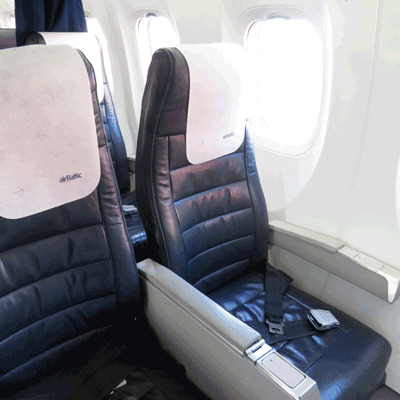
Business Class
Standard setestørrelse for Air Baltic Business Class er 38" pitch and 18.5" width.
Komfort om bord

Underholdning om bord
Air Baltic tilbyr tjenester og underholdning om bord for passasjerene under flyvningen på sine fly, slik som magazine.
Gratis snacks om bord
Gratis snacks/drikke tilbys ikke under flyvninger med Air Baltic.

Måltidsbestilling
Avhengig av tilgjengelighet kan passasjerer bestille mat for å nyte på flyvningen. For flyselskapets meny med måltider og drikkevarer, klikk her.Innsjekking på nett
Passasjerer kan foreta innsjekking på nett via det offisielle nettstedet til Air Baltic. For å gjøre dette klikker du her for å gå til flyselskapets innsjekkingsside. Side for innsjekking på nett kan gjøres 5 dager før planlagt avgangstid.
Innsjekking på flyplassen
Innsjekkingsskrankene for Air Baltic åpner 180 minutter innen planlagt avgangstid. Du anbefales å sjekke inn minst halvannen time før innsjekkings- og bagasjeleveringsskranken på flyplassen stenger.
Kioskinnsjekking
Air Baltic tilbyr kioskinnsjekkingstjenester for passasjerene, som muligens kan nås på avreiseflyplassen i henhold til tilgjengelighet. For mer informasjon om denne tjenesten, kontakt flyselskapets kundeservice. Innsjekkingstiden er 120 timer innen planlagt flyavgangstid.
Appinnsjekking
Air Baltic støtter ikke appinnsjekkingstjenester for passasjerene.
Prisregler
a. Kansellering og refusjon
Flybillett hos flyselskapet kan ikke kanselleres.b. Ombooking
Endringer som ombooking kan gjøres for flybillettene ved å kontakte flyselskapet direkte.
For mer fullstendig informasjon om Air Baltic flybillett og prisregler, klikk her.
Ansvarsfraskrivelse: Flyselskapet kan endre sin policy uten forhåndsvarsel. For å få en oppdatering når det skjer, og for deres policy om forsikring, flyforsinkelser osv., sjekk flyselskapets side med prisregler eller kontakt flyselskapet direkte.
Sjekk Air Baltic () flyplan
| Flynummer | Flymodell | Avreise | Kommer | Avreiseby | Avreiseflyplass | Ankomstby | Ankomstflyplass | |
|---|---|---|---|---|---|---|---|---|
| BT151 | AIRBUS A350-900 | 07:00 | 07:30 | Rīga | RIX | Oslo | OSL | Sjekk priser |
| BT271 | BOEING 787-9 | 07:05 | 08:05 | Rīga | RIX | Vienna | VIE | Sjekk priser |
| BT131 | Airbus A320 N | 07:05 | 07:35 | Rīga | RIX | Copenhagen | CPH | Sjekk priser |
| BT271 | BOEING 777-300ER | 07:25 | 08:25 | Rīga | RIX | Vienna | VIE | Sjekk priser |
| BT711 | - | 11:40 | 14:55 | Rīga | RIX | Istanbul | IST | Sjekk priser |
| BT5131 | Airbus A220 | 12:30 | 15:10 | Vienna | VIE | Vilnius | VNO | Sjekk priser |
| BT135 | Airbus A320 N | 12:45 | 13:15 | Rīga | RIX | Copenhagen | CPH | Sjekk priser |
| BT155 | - | 12:45 | 13:15 | Rīga | RIX | Oslo | OSL | Sjekk priser |
| BT5132 | - | 15:55 | 16:45 | Vilnius | VNO | Vienna | VIE | Sjekk priser |
| BT273 | BOEING 787-9 | 17:55 | 18:55 | Rīga | RIX | Vienna | VIE | Sjekk priser |
| BT273 | Airbus A220 | 18:40 | 19:40 | Rīga | RIX | Vienna | VIE | Sjekk priser |
| BT153 | - | 19:15 | 19:45 | Rīga | RIX | Oslo | OSL | Sjekk priser |
| BT139 | Airbus A319 | 19:25 | 19:50 | Rīga | RIX | Copenhagen | CPH | Sjekk priser |
| BT7442 | Boeing 737 | 20:00 | 23:15 | Rīga | RIX | Istanbul | IST | Sjekk priser |
Hvorfor reisende velger Airpaz for Air Baltic-flybestillinger
- Rask og enkel søk: Filtrer og sammenlign flyreiser etter pris, tidsplan, varighet og mellomlandinger – alt i ett enkelt søk.
- Enkle tilleggsvalg: Legg til innsjekket bagasje, velg sete, forhåndsbestill måltider eller skaff reiseforsikring for flyreisen din.
- Billettyper og klasser: Leter du etter litt ekstra luksus? Vi tilbyr et utvalg av billettyper fra økonomi til førsteklasse for en mer premium flyopplevelse.
- Flere betalingsmetoder: Velg mellom kreditt-/debetkort, bankoverføringer, PayPal, e-lommebok og mange populære lokale betalingsalternativer.
- Sømløs billettbekreftelse: Få bestillingsbekreftelsen og billetten levert direkte i innboksen din etter at betalingen er fullført.
- Global kundestøtte: Vårt flerspråklige kundestøtteteam er klart 24/7 for å hjelpe deg med endringer i bestillingen, kanselleringer eller andre spørsmål.
- Eksklusive app- og medlemskampanjer: Nyt spesialtilbud designet for Airpaz-medlemmer og tilbud som kun gjelder i appen.
- Eksepsjonell verdi: Vi sikrer eksklusive avtaler og spesielle kampanjepriser for å la deg få mest mulig ut av reisebudsjettet ditt.
Tips for å finne billige Air Baltic-flyreiser på Airpaz
- Bestill på forhånd: Prisene har en tendens til å stige etter hvert som avreisedagen nærmer seg. Sikt på å bestille 4–8 uker i forveien for å få de beste tilbudene og prisene.
- Vær fleksibel med datoer: Bruk Airpaz sin kalendervisning for å sammenligne priser over flere datoer.
- Fly midt i uken: Tirsdager og onsdager tilbyr vanligvis billigere priser enn helgeflyvninger.
- Jakt på kampanjer: Sjekk regelmessig etter kampanjekoder og tidsbegrensede Air Baltic-tilbud på Airpaz sin -side og -side.
- Unngå høysesong: Skoleferier, helligdager og festivalperioder driver prisene opp – reis utenom sesong for å spare mer.
- Samle og spar: Bestill flyreise og opphold i én enkelt bestilling for å nyte større besparelser.
- Betal med Airpaz-appen: Eksklusive kampanjekoder i appen og medlemsrabatter er ofte den beste måten å få de laveste flyprisene på.
Slik bestiller du en flyreise på Airpaz
- Besøk Airpaz.com eller åpne Airpaz-appen, og velg deretter Flyreiser.
- Skriv inn avreiseby (f.eks. Kuala Lumpur) og destinasjon (f.eks. Bali, Singapore eller Bangkok).
- Velg reisedato og antall passasjerer.
- Trykk på Søk for å se tilgjengelige flyreiser.
- Bruk filtre som pris, avgangstid eller varighet for å finne det beste alternativet, og velg deretter din foretrukne flyreise.
- Fyll inn passasjeropplysninger nøyaktig slik de vises i passet eller ID-en din (fullt navn, fødselsdato, nasjonalitet og kontaktinfo).
- Legg til tilleggstjenester om nødvendig, som bagasje, setevalg, måltider eller reiseforsikring.
- Se over bestillingsdetaljene dine.
- Velg en betalingsmetode (kreditt-/debetkort, bankoverføring, PayPal eller avbetaling).
- Fullfør betalingen – e-billetten din vil bli sendt til e-posten din og være tilgjengelig i appen.
Vanlige spørsmål om Air Baltic
Flere anbefalte Air Baltic-flyvninger
Populær rute med Air Baltic
Populært reisemål etter flyplassen
Populært reisemål etter By
Populært reisemål etter Kontinent


Hvorfor må du reise med Airpaz

Forenkle bestillingsopplevelsen din
Føl fleksibiliteten og enkelheten gjennom hele bestillingsprosessen

Bredt utvalg av reiseprodukter
Nyt dine minneverdige øyeblikk med millioner av gunstige flyreiser og overnattingssteder

Eksklusivt tilbud hver dag
Ulike daglige kampanjer med konkurransedyktig pris for alle reisende

Online bookingekspert
Sammen med våre troverdige partnere har vi oppfylt utallige reisendes behov siden 2011

Kjærlig kundestøtte
Vår kundesupport er tilgjengelig 24/7 på ditt lokale språk for å gi deg den beste hjelpen

Verdens lokale bestillingsspenning
Stressfri bookingopplevelse med lokal betaling, valuta og språk