


Online prijava
Dostupno za online prijavu
Prijava prije polaska
Počinje 120 minuta prije polaska
Zadnje ažurirano dana
Avelo Airlines Informacije o letu


Pregled
Avelo Airlines (XP) je zrakoplovna kompanija niskotarifni prijevoznik koja obavlja domaće rute. Zrakoplovna kompanija ne osigurava putniku dopuštenu količinu kabinske prtljage. Cijena zrakoplovne karte ne uključuje besplatnu dopuštenu količinu predane prtljage. Prijava u zračnoj luci počinje 120 minuta prije planiranog vremena polaska leta. Online prijava je dopuštena za letove Avelo Airlines na službenoj stranici web-mjesta. Može se obraditi 24 sati prije vremena polaska leta.
Kako rezervirati
Kako platiti
Plaćanje za vašu Avelo Airlines rezervaciju karte na Airpaz može se obraditi putem bankovnih metoda PayPal, kreditna kartica, bankovni prijenos, i metoda plaćanja na šalteru. Za više informacije posjetite stranicu Vodiča za plaćanje na Airpaz.
Informacije o Avelo Airlines
Upoznavanje zrakoplovne kompanije prije leta uvijek je pametan potez. To Vam pomaže da putujete s povjerenjem i točno znate što možete očekivati. Avelo Airlines je niskotarifni prijevoznik koji obavlja domaće rute od 1987, sa sjedištem u Sjedinjene Američke Države. U zrakoplovnoj industriji Avelo Airlines službeno je prepoznat po svom IATA kodu (XP) i ICAO kodu (VXP), standardnim identifikatorima koji se upotrebljavaju za rezervacije, prijavu na let i praćenje letova diljem svijeta. U nastavku ćete pronaći sve ključne pojedinosti, od kodova i ruta do važnih činjenica, kako biste mogli planirati i rezervirati svoje sljedeće putovanje s potpunim povjerenjem.
Čvorište i operacije
Avelo Airlines obavlja domaće letove iz svog glavnog čvorišta u Wilmington Airport (ILG), Tweed New Haven Airport (HVN), sa sjedištem u Sjedinjene Američke Države. Potpuni popis odredišta i trenutačni rasporedi dostupni su kada pretražujete let na Airpaz.
Prtljaga
Sjedala
Avelo Airlines nudi sjedala u više kabinskih klasa, pri čemu se udobnost i konfiguracija razlikuju ovisno o tipu zrakoplova i ruti. Odaberite svoj let kako biste vidjeli sjedala dostupna za vašu rezervaciju.
Sjedala u ekonomskoj klasi
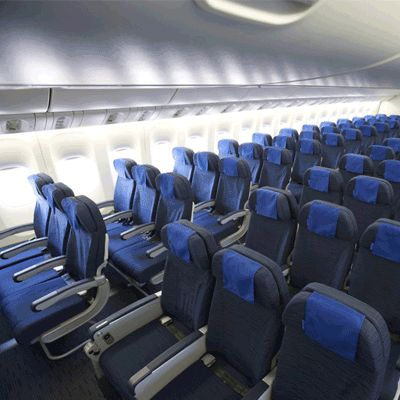
Sjedala u ekonomskoj klasi nude 30" seat pitch and 17.3" seat width. Značajke i konfiguracija sjedala mogu se razlikovati ovisno o tipu zrakoplova i ruti.
Prijava na let
U nastavku su navedeni načini prijave na let dostupni za letove Avelo Airlines. Dostupnost se može razlikovati ovisno o zračnoj luci, ruti ili vrsti tarife.
Web prijava na let
Prijavite se na let online putem web-stranice Avelo Airlines koristeći podatke o svojoj rezervaciji. Nakon prijave možete preuzeti ili ispisati svoju ukrcajnu propusnicu. Web prijava na let dostupna je do 24 sati prije polaska.
Prijava na let putem aplikacije
Prijavite se putem mobilne aplikacije Avelo Airlines na iOS ili Android uređaju. Vaša ukrcajna propusnica bit će dostupna u aplikaciji i obično se može dodati u vaš digitalni novčanik. Usluga prijave na let putem aplikacije dostupna je do 0 sati prije polaska.
Prijava na let na šalteru u zračnoj luci
Posjetite šalter za prijavu na let Avelo Airlines u zračnoj luci polaska do 120 minuta prije polaska. Ova se opcija preporučuje putnicima kojima je potrebna posebna pomoć, imaju grupne rezervacije ili putuju s prevelikom prtljagom. Mogu se primjenjivati dodatne naknade ovisno o pravilima Avelo Airlines.
Važne informacije o putovanju
- Dođite u zračnu luku dovoljno rano kako biste obavili prijavu, sigurnosnu kontrolu i sve potrebne imigracijske postupke.
- Prije odlaska u zračnu luku provjerite krajnje rokove za prijavu na šalteru i za izlaz za ukrcaj na svojoj ruti.
- Ponesite sve važeće putne dokumente — zrakoplovnu kartu, službeni identifikacijski dokument i putovnicu (sa svim potrebnim vizama) za međunarodno putovanje.
- Uvjeti za ulazak mogu se promijeniti bez prethodne obavijesti. Provjerite zahtjeve za vizu, zdravstvene uvjete i uvjete ulaska za svoje odredište znatno prije datuma polaska.
- Pridržavajte se pravila Avelo Airlines o dopuštenoj prtljazi. Pojedinosti o kabinskoj prtljazi potražite u odjeljku Sadržaji i usluge.
- Vrste tarifa imaju različita pravila za prtljagu, odabir sjedala, obroke i fleksibilnost. Prije dovršetka rezervacije pregledajte uvjete tarife prikazane pri plaćanju.
- U slučaju promjene rasporeda, kašnjenja ili otkazivanja koje pokrene Avelo Airlines, primjenjuju se vlastita operativna pravila zrakoplovne kompanije. Airpaz će pomoći s obavijestima i koordinacijom gdje god je to moguće, ali konačne odluke o ponovnoj rezervaciji, povratu novca ili naknadi ostaju na zrakoplovnoj kompaniji.
Pravila u zrakoplovu
- Svaki putnik mora zauzeti sjedalo dodijeljeno tijekom prijave.
- Ručna prtljaga mora biti spremljena u pretinac iznad sjedala ili ispod sjedala ispred vas.
- Mobilni telefoni i elektronički uređaji moraju biti isključeni ili postavljeni u način rada u zrakoplovu, osobito tijekom polijetanja i slijetanja.
- Vežite sigurnosni pojas, sklopite stolić, vratite sjedalo u uspravan položaj i otvorite sjenilo prozora tijekom polijetanja i slijetanja.
- Pušenje, uključujući e-cigarete i vaping, strogo je zabranjeno bilo gdje u zrakoplovu tijekom cijelog leta.
- U svakom trenutku slijedite sve upute posade Avelo Airlines i sigurnosne obavijesti u zrakoplovu.
Kako upravljati rezervacijom na Airpazu
- Prijavite se na svoj Airpaz račun.
- Idite na odjeljak Narudžba kako biste pronašli svoj let.
- Odaberite svoju rezervaciju kako biste vidjeli e-kartu, plan putovanja i podatke o plaćanju.
- Za zahtjev za povrat novca ili promjenu termina odaberite prikazanu opciju i slijedite korake.
- Unesite tražene podatke i potvrdite slanje zahtjeva.
- Pratite status svog zahtjeva na istoj stranici.
Zašto putnici biraju Airpaz za rezervacije letova zrakoplovne tvrtke Avelo Airlines
- Brza i laka pretraga: Filtrirajte i usporedite letove po cijeni, rasporedu, trajanju i presjedanjima — sve u jednom pretraživanju.
- Jednostavni dodaci: Dodajte predanu prtljagu, odaberite svoje sjedalo, unaprijed naručite obroke ili uzmite putno osiguranje za svoj let.
- Opcije klase: Tražite malo više luksuza? Nudimo izbor klasa leta od ekonomske do prve klase za vrhunsko iskustvo letenja.
- Više načina plaćanja: Birajte između kreditnih/debitnih kartica, bankovnih prijenosa, PayPala, e-novčanika i mnogih popularnih lokalnih opcija plaćanja.
- Besprijekorna potvrda karte: Primite potvrdu rezervacije i kartu izravno u svoj pretinac e-pošte nakon završetka plaćanja.
- Globalna korisnička podrška: Naš višejezični tim za korisničku podršku dostupan je 24/7 kako bi vam pomogao s izmjenama rezervacije, otkazivanjima ili bilo kakvim pitanjima.
- Ekskluzivne promocije za aplikaciju i članove: Uživajte u posebnim ponudama osmišljenima za članove Airpaza i ekskluzivnim popustima samo u aplikaciji.
- Iznimna vrijednost: Osiguravamo ekskluzivne ponude i posebne promotivne cijene kako biste maksimalno iskoristili svoj budžet za putovanje.
Savjeti kako pronaći jeftine Avelo Airlines letove na Airpazu
- Rezervirajte unaprijed: Cijene obično rastu kako se približava dan polaska. Pokušajte rezervirati 4–8 tjedana unaprijed kako biste dobili najbolje ponude i cijene.
- Ostanite fleksibilni s datumima: Koristite kalendarski prikaz Airpaza za usporedbu cijena za više datuma.
- Letite sredinom tjedna: Letovi utorkom i srijedom obično nude jeftinije karte nego letovi vikendom.
- Lov na promocije: Redovito provjeravajte Airpazovu stranicu i stranicu za promo kodove i vremenski ograničene Avelo Airlines ponude.
- Izbjegavajte vrhunce sezone: Školski praznici, državni praznici i blagdanska razdoblja podižu cijene — putujte izvan sezone kako biste više uštedjeli.
- Kombinirajte i uštedite: Rezervirajte svoj let i smještaj u jednoj rezervaciji kako biste uživali u većim uštedama.
- Platite putem Airpaz aplikacije: Ekskluzivni promo kodovi za aplikaciju i popusti samo za članove često su najbolji način za dobivanje nižih cijena letova.
Kako rezervirati let na Airpazu
- Posjetite Airpaz.com ili otvorite Airpaz aplikaciju, zatim odaberite Letove
- Unesite grad polaska (npr. Kuala Lumpur) i odredište (npr. Bali, Singapur ili Bangkok)
- Odaberite datum putovanja i broj putnika
- Dodirnite "Traži" da biste vidjeli dostupne letove
- Koristite filtere poput cijene, vremena polaska ili trajanja leta da biste pronašli najbolju opciju, a zatim odaberite željeni let
- Unesite podatke o putnicima točno onako kako su navedeni u putovnici ili osobnoj iskaznici (puno ime, datum rođenja, državljanstvo i kontakt podaci)
- Dodajte dodatke ako su potrebni, poput prtljage, izbora sjedala, obroka ili putnog osiguranja
- Pregledajte detalje svoje rezervacije
- Odaberite način plaćanja (kreditna/debitna kartica, bankovni prijenos, PayPal ili obročno plaćanje)
- Završite plaćanje — vaša e-karta bit će poslana na vaš e-mail i bit će dostupna u aplikaciji
FAQ o Avelo Airlines
Još preporučenih letova s Avelo Airlines
Popularna ruta aviokompanije Avelo Airlines
Popularna destinacija prema Kontinent
Popularna destinacija prema Zemlja


Zašto morate putovati s Airpazom

Pojednostavite svoje iskustvo rezervacije
Osjetite fleksibilnost i jednostavnost tijekom cijelog procesa rezervacije

Širok izbor proizvoda za putovanja
Uživajte u nezaboravnim trenucima uz milijune povoljnih letova i smještaja

Ekskluzivna ponuda svaki dan
Razne dnevne promocije s konkurentnim cijenama za sve putnike

Stručnjak za online rezervacije
Zajedno s našim vjerodostojnim partnerima, ispunjavajući nebrojene potrebe putnika od 2011. godine

Ljubazna korisnička podrška
Pružajući najbolju pomoć, naša korisnička podrška dostupna je 24/7 na vašem lokalnom jeziku

Svjetsko uzbuđenje lokalnih rezervacija
Iskustvo rezervacije bez stresa uz lokalno plaćanje, valutu i jezik