


Päivitetty viimeksi
Air Baltic Lentotiedot
Yleiskatsaus
Air Baltic (BT) on täyden palvelun lentoyhtiö, joka lentää kansainvälisiä reittejä. Tämän lentoyhtiön tarjoama käsimatkatavarakiintiö on 8 kg ja enimmäiskoko 55 cm x 40 cm x 23 cm (L x W x H). Ilmainen kirjatun matkatavaran kiintiö ei sisälly lippuun. Lähtöselvitys alkaa 180 minuuttia ennen lennon lähtöaikaa. Lähtöselvitys verkossa on mahdollinen lennoille Air Baltic-yhtiön virallisella verkkosivulla. Sen voi tehdä 5 päivää ennen aikataulun mukaista lennon lähtöaikaa.
Kuinka varata
Kuinka maksaa
Maksu Air Baltic lipusta Airpaz.comissa voidaan käsitellä pankin kautta pankkisiirrolla, luottokortilla, PayPalilla, sekä tiskillä käytettävillä maksutavoilla. Kattavat tiedot löytyvät Airpazin Maksuopas-sivulta.
Yritysprofiili
Air Baltic liikennöi IATA-koodilla BT ja ICAO-koodilla BTI, on täyden palvelun lentoyhtiö, joka lentää kansainvälisiä reittejä. Lentoyhtiö lentää kohdekaupunkeihin ympäri maailmaa lähtöpaikkanaan Vilnan lentoasema (VNO), Riian kansainvälinen lentoasema (RIX), Tallinnan lentoasema (TLL), Tampere Pirkkalan lentoasema (TMP). Lentoyhtiö lentää maahan Itävalta, Tanska, Suomi, ja useita kaupunkeja, joihin lentoyhtiö lentää, ovat Rīga, Copenhagen, Oslo.
Vaikka lentoyhtiö toimii nimellä Air Baltic, se on Air Baltic Corporation(A/S)-yhtiön kauppanimi. Yhtiön johtaja on Erno Hildén. lentoyhtiön pääkonttori sijaitsee osoitteessa Latvia.
Historia
Air Baltic joka liikennöi koodeilla IATA (BT) ja ICAO (BTI) perustettiin vuonna 1995. Lentoyhtiötä operoi Air Baltic Corporation(A/S). Perustamisjaksonsa aikana, Air Baltic on kasvanut tasaisesti ja jatkaa ylläpitämällä luotettavaa ja uskottavaa palvelua matkustajilleen tullakseen yhdeksi tulevaisuuden suosituista lentoyhtiöistäjatkaa kukoistamista liiketoimintaansa ylläpitämällä arvokkaan ja mukavan palvelun uskollisille asiakkailleentähtäsi palvelemaan useampia asiakkaita parantamalla palveluitaan. Tämä lentoyhtiö aloitti ensimmäiset lentonsa sunnuntai 1. lokakuuta 1995.Air Baltic on voittanut 2025 Skytrax Best Low-Cost Airline in Eastern Europe, 2026 APEX Five Star Major Airlines. Lentoyhtiön tavoittama virstanpylväs on in 2019, Air Baltic becomes the first airline to obtain full-scope maintenance capability for Airbus A220-300 aircraft, Air Baltic carries more than five million passengers in 2019, or 22% more than the year before, in 2020, Air Baltic becomes the first European airline to hand every customer on every flight an envelope containing a face mask and two disinfectant wipes.
Matkustamohenkilöstö

Air Baltic matkustamohenkilöstö käyttää musta väristä univormua. Miespuoliset lentoemännät ja stuertit käyttävät valkoinen pitkähihainen musta puku ja keltainen solmio ja mustat housut. Naispuoliset lentoemännät käyttävät valkoinen pitkähihainen musta puku ja keltainen huivi sekä musta hame. Tämä univormu huokuu eleganssia ja samalla antaa miehistölle mahdollisimman suuren liikkumisvapauden matkustajien palvelemiseen. Lisäksi se ilmentää täydellisesti lentoyhtiön brändin image.
Kalusto

Air Baltic omistaa useita lentokoneita, jotka kaikki voi nähdä alta:
| Type | Quantity |
|---|---|
| Airbus A220-300 | 54 |
Live-chat
Air Baltic-matkustajille ei ole live-chat-palvelua.
Matkatavarat
Käsimatkatavarat
Matkustajille, jotka matkustavat lentoyhtiöllä Air Baltic, tarjotaan käsimatkatavarakiintiö, joka sisältyy heidän lippuhintoihinsa. matkatavaroiden enimmäis paino on 8 kg, ja ylähyllylle sijoitettavan matkatavaroiden enimmäis mitta on 55 cm x 40 cm x 23 cm (L x W x H).On tärkeää varmistaa, että kaikki mahtuu heidän edessään olevan istuimen alle.
Ruumaan menevät matkatavarat
Ilmainen ruumaan menevien matkatavaroiden kiintiö ei ole saatavilla matkustajille, jotka lentävät lentoyhtiöllä Air Baltic.
Ylimääräiset matkatavarat
Ylimääräistä ruumaan menevää matkatavarakiintiötä ei voi ostaa sivustolla Airpaz.
Vastuuvapauslauseke: Yllä olevat tiedot on tarkoitettu vain yleiseksi ohjeeksi, ja lentoyhtiö voi muuttaa niitä ilman ennakkoilmoitusta. Ota yhteyttä lentoyhtiöön saadaksesi lisätietoja.
Istuin

Economy Class
Air Baltic Economy Class vakioistuinkoko on 32" pitch and 18.5" width.
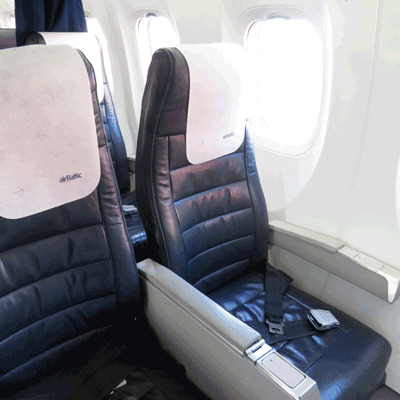
Business Class
Air Baltic Business Class vakioistuimen koko on 38" pitch and 18.5" width.
Mukavuus lennolla

Viihde lennolla
Air Baltic tarjoaa palveluja ja viihdettä lennolla matkustajille lennon aikana heidän ilma-aluksissaan, kuten magazine.
Ilmainen välipala lennolla
Lennoilla lentoyhtiöllä Air Baltic ilmaista välipalaa/juomaa ei ole saatavilla.

Ateriatilaus
Matkustajat voivat tilata aterian nautittavaksi lennolla saatavuuden mukaan. Lentoyhtiön juomien ja aterioiden valikon näet klikkaamalla tästä.Verkkolähtöselvitys
Matkustajat voivat tehdä verkkolähtöselvityksen lentoyhtiön Air Baltic virallisen verkkosivuston kautta. Tee se napsauttamalla tästä, jolloin siirryt lentoyhtiön lähtöselvityssivulle. Web-lähtöselvityssivu voidaan tehdä 5 päivää ennen aikataulun mukaista lähtöaikaa.
Lähtöselvitys lentoasemalla
Lentoyhtiön Air Baltic lähtöselvitystiskit avautuvat 180 minuuttia ennen kuin aikataulun mukainen lennon lähtöaika. Matkustajia kehotetaan tekemään lähtöselvitys vähintään puolitoista tuntia ennen kuin lentoaseman lähtöselvitys- ja matkatavaroiden luovutustiski sulkeutuu.
Kioskilähtöselvitys
Air Baltic mahdollistaa kioskilähtöselvityspalvelujen käytön matkustajille, jotka saatetaan voida käyttää lähtölentoasemalla saatavuuden mukaan. Tarkempia tietoja tästä palvelusta saa ottamalla yhteyttä lentoyhtiön puhelinkeskukseen. Lähtöselvitysaika on 120 tuntia ennen kuin aikataulun mukainen lähtöaika.
Sovelluslähtöselvitys
Air Baltic ei tue sovelluslähtöselvityspalveluja matkustajille.
Hintasäännöt
a. Peruutus ja hyvitys
Lippua kyseisellä lentoyhtiöllä ei voi peruuttaa.b. Uudelleenvaraus
Muutoksia, kuten uudelleenvaraus, voidaan tehdä lentolippuihin ottamalla yhteyttä suoraan lentoyhtiöön.
Saat täydellisempiä tietoja Air Baltic-yhtiön lentolipuista ja hintasäännöistä, napsauta tästä.
Vastuuvapauslauseke: Lentoyhtiö voi muuttaa käytäntöään ilman ennakkoilmoitusta. Saat päivityksen muutoksen tapahtuessa sekä tiedot sen vakuutusta, lennon viivästymistä jne. koskevasta käytännöstä tarkistamalla lentoyhtiön hintasääntösivun tai ottamalla yhteyttä suoraan lentoyhtiöön.


