


Online check-in
Available ang online check-in
Check-in Bago Mag-alis
Simula 120 minuto
Huling Na-update noong
Impormasyon sa Flight ng Avelo Airlines


Pagpapakilala
Ang Avelo Airlines (XP) ay isang low cost carrier na airline na lumilipad sa mga rutang domestic. Ang Avelo Airlines ay hindi naglalaan ng cabin baggage allowance sa pasahero. Hindi kasama sa pamasahe ng ticket ang libreng checked baggage allowance. Ang oras ng airport check-in sa airport ay nagsisimula 120 minuto prior sa naka-iskedyul na oras ng pag-alis. Ang pag-check in online ay pinapayagan para sa mga flight kasama ang airline sa opisyal na website page ng Avelo Airlines. Maaari itong iproseso 24 oras bago naka-iskedyul na oras ng pag-alis.
Paano Mag-book
Paano Magbayad
Ang bayad para sa iyong Avelo Airlines ticket booking sa Airpaz.com ay maaaring gawin sa pamamagitan ng mga paraan na PayPal, credit card, bank transfer, at over the counter. Para sa kumpleto impormasyon, bisitahin ang Payment Guide page ng Airpaz.
Impormasyon Tungkol sa Avelo Airlines
Ang pagkilala sa iyong airline bago ka lumipad ay palaging isang matalinong hakbang. Tinutulungan ka nitong bumiyahe nang may kumpiyansa at malaman nang malinaw kung ano ang aasahan. Ang Avelo Airlines ay isang mababang-gastos na carrier na nagpapatakbo ng mga rutang domestiko mula pa noong 1987, na may punong tanggapan sa Estados Unidos. Sa buong industriya ng abyasyon, opisyal na kinikilala ang Avelo Airlines sa pamamagitan ng IATA code (XP) at ICAO code (VXP), ang mga karaniwang pagkakakilanlan na ginagamit para sa mga booking, check-in, at pagsubaybay ng flight sa buong mundo. Sa ibaba, makikita mo ang lahat ng mahahalagang detalye, mula sa mga code at ruta hanggang sa mahahalagang impormasyon, upang matulungan kang magplano at mag-book ng iyong susunod na biyahe nang may lubos na kumpiyansa.
Hub at Operasyon
Nagpapatakbo ang Avelo Airlines ng mga flight na domestiko mula sa pangunahing hub nito sa Paliparang ng Wilmington (ILG), Tweed New Haven Airport (HVN), na may punong tanggapan sa Estados Unidos. Available ang buong listahan ng mga destinasyon at kasalukuyang iskedyul kapag naghahanap ka ng flight sa Airpaz.
Bagahe
Upuan
Nag-aalok ang Avelo Airlines ng mga upuan sa iba't ibang cabin class, na may kaginhawaan at configuration na nag-iiba ayon sa uri ng sasakyang panghimpapawid at ruta. Piliin ang inyong flight upang makita ang mga upuang available para sa inyong booking.
Mga Upuan sa Economy Class
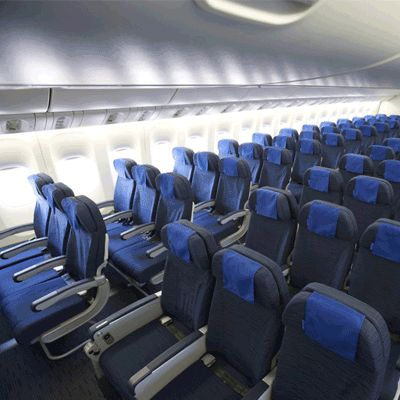
Ang mga upuan sa economy class ay nag-aalok ng 30" seat pitch and 17.3" seat width. Maaaring mag-iba ang mga feature at configuration ng upuan ayon sa uri ng sasakyang panghimpapawid at ruta.
Check-in
Nasa ibaba ang mga paraan ng check-in na available para sa mga flight ng Avelo Airlines. Maaaring mag-iba ang availability ayon sa airport, ruta, o uri ng pamasahe.
Web Check-in
Mag-check in online sa pamamagitan ng website ng Avelo Airlines gamit ang inyong mga detalye ng booking. Pagkatapos ng check-in, maaari ninyong i-download o i-print ang inyong boarding pass. Available ang web check-in hanggang 24 oras bago ang pag-alis.
App Check-in
Mag-check in sa pamamagitan ng mobile app ng Avelo Airlines sa iOS o Android. Magiging available ang inyong boarding pass sa app at karaniwang maaari itong idagdag sa inyong digital wallet. Available ang app check-in service hanggang 0 oras bago ang pag-alis.
Airport Counter Check-in
Bisitahin ang check-in counter ng Avelo Airlines sa inyong departure airport hanggang 120 minuto bago ang pag-alis. Inirerekomenda ang opsyong ito para sa mga pasaherong nangangailangan ng espesyal na tulong, may group booking, o bumibiyahe na may oversized baggage. Maaaring may karagdagang bayarin depende sa patakaran ng Avelo Airlines.
Mahahalagang Impormasyon sa Paglalakbay
- Dumating sa paliparan nang sapat na maaga upang makumpleto ang check-in, security screening, at anumang kinakailangang proseso sa imigrasyon.
- Suriin ang mga oras ng pagsasara ng check-in counter at boarding gate para sa inyong ruta bago pumunta sa paliparan.
- Dalhin ang lahat ng balidong dokumento sa paglalakbay — ang inyong tiket sa flight, government-issued ID, at pasaporte (kasama ang anumang kinakailangang visa) para sa internasyonal na paglalakbay.
- Maaaring magbago ang mga kinakailangan sa pagpasok nang walang abiso. Suriin ang mga kinakailangan sa visa, kalusugan, at pagpasok ng inyong destinasyon nang maaga bago ang petsa ng inyong pag-alis.
- Sundin ang mga patakaran sa baggage allowance ng Avelo Airlines. Tingnan ang seksyong Mga Pasilidad at Serbisyo para sa mga detalye ng cabin baggage.
- Ang mga uri ng pamasahe ay may iba't ibang patakaran para sa bagahe, pagpili ng upuan, pagkain, at flexibility. Suriin ang mga kondisyon ng pamasahe na ipinapakita sa checkout bago kumpletuhin ang inyong booking.
- Kung may pagbabago sa iskedyul, pagkaantala, o pagkansela na sinimulan ng Avelo Airlines, ang sariling mga patakaran sa operasyon ng airline ang ipatutupad. Tutulong ang Airpaz sa mga abiso at koordinasyon hangga't maaari, ngunit ang huling pasya tungkol sa rebooking, refund, o kompensasyon ay nasa airline.
Mga Patakaran sa Loob ng Sasakyang Panghimpapawid
- Ang bawat pasahero ay dapat umupo sa upuang itinalaga sa panahon ng check-in.
- Ang carry-on baggage ay dapat ilagay sa overhead compartment o sa ilalim ng upuan sa inyong harapan.
- Ang mga mobile phone at electronic device ay dapat patayin o ilagay sa flight mode, lalo na sa pag-take off at paglapag.
- Ikabit ang inyong seatbelt, itupi ang tray table, ibalik ang inyong upuan sa tuwid na posisyon, at buksan ang window shade sa pag-take off at paglapag.
- Mahigpit na ipinagbabawal ang paninigarilyo, kabilang ang e-cigarettes at vaping, saanman sa sasakyang panghimpapawid sa buong flight.
- Sundin sa lahat ng oras ang lahat ng tagubilin mula sa crew ng Avelo Airlines at ang mga anunsyo sa kaligtasan sa loob ng sasakyang panghimpapawid.
Paano Pamahalaan ang Inyong Booking sa Airpaz
- Mag-log in sa inyong Airpaz account.
- Pumunta sa seksyong Order upang hanapin ang inyong flight.
- Piliin ang inyong booking upang makita ang inyong e-ticket, itinerary, at mga detalye ng pagbabayad.
- Upang humiling ng refund o reschedule, piliin ang ipinapakitang opsyon at sundin ang mga hakbang.
- Ibigay ang hinihinging impormasyon at kumpirmahin ang inyong pagsusumite.
- Subaybayan ang status ng inyong kahilingan mula sa parehong pahina.
Bakit Pinipili ng mga Manlalakbay ang Airpaz para sa mga Flight Booking sa Avelo Airlines
- Mabilis at Madaling Paghahanap: I-filter at ihambing ang mga flight base sa presyo, schedule, tagal ng biyahe, at stops — lahat sa isang paghahanap lang.
- Madaling Add-Ons: Magdagdag ng checked baggage, pumili ng iyong upuan, mag-pre-order ng pagkain, o kumuha ng travel insurance para sa iyong flight.
- Mga Opsyon sa Class Fare: Naghahanap ng konting luho? Nag-aalok kami ng mga pagpipilian mula economy hanggang first class para sa mas premium na flight experience.
- Iba't ibang Paraan ng Pagbabayad: Pumili mula sa mga credit/debit card, bank transfer, PayPal, e-wallet, at marami pang sikat na lokal na payment options.
- Mabilis na Ticket Confirmation: Kunin ang iyong booking confirmation at ticket nang direkta sa iyong email inbox pagkatapos makumpleto ang pagbabayad.
- Pandaigdigang Suporta sa Kostumer: Ang aming multilingual customer support team ay handa 24/7 upang tulungan ka sa pagbabago ng booking, pagkansela, o anumang mga katanungan.
- Eksklusibong app at member promos: I-enjoy ang mga special deals na idinisenyo para sa mga Airpaz members at mga app-only na alok.
- Sulit na Halaga: Kumukuha kami ng mga eksklusibong deal at special promotional rates para masulit mo ang iyong travel budget.
Mga Tip para Makahanap ng Murang Flight sa Avelo Airlines sa Airpaz
- Mag-book ng Maaga: Madalas tumaas ang pamasahe habang papalapit ang araw ng pag-alis. Subukang mag-book 4–8 linggo nang maaga para makuha ang pinakamagandang deal at pamasahe.
- Maging Flexible sa mga Petsa: Gamitin ang calendar view ng Airpaz upang ihambing ang mga pamasahe sa iba't ibang petsa.
- Lumipad sa Gitna ng Linggo: Karaniwang mas mura ang mga flight tuwing Martes at Miyerkules kumpara sa mga weekend flights.
- Maghanap ng mga Promo: Laging i-check ang page at page ng Airpaz para sa mga promo code at limited-time offers ng Avelo Airlines.
- Iwasan ang Peak Seasons: Ang mga school holidays, public holidays, at festive periods ay nagpapataas ng pamasahe — maglakbay tuwing off-peak upang makatipid.
- I-bundle at Makatipid: I-book ang iyong flight at hotel nang sabay sa iisang booking para mas makatipid.
- Magbayad gamit ang Airpaz app: Ang mga eksklusibong app promo codes at member-only discounts ay madalas na ang pinakamagandang paraan para makakuha ng mas mababang pamasahe sa flight.
Paano Mag-book ng Flight sa Airpaz
- Bisitahin ang Airpaz.com o buksan ang Airpaz app, pagkatapos ay piliin ang Flight
- Ilagay ang iyong lungsod ng pag-alis (hal. Kuala Lumpur) at destinasyon (hal. Bali, Singapore, o Bangkok)
- Piliin ang iyong petsa ng biyahe at bilang ng mga pasahero
- I-tap ang Maghanap para makita ang mga available na flight
- Gumamit ng mga filter tulad ng presyo, oras ng pag-alis, o tagal ng biyahe para mahanap ang pinakamagandang opsyon, pagkatapos ay piliin ang iyong gustong flight
- Punan ang mga detalye ng pasahero nang eksakto sa kung ano ang nakalagay sa iyong pasaporte o ID (buong pangalan, petsa ng kapanganakan, nasyonalidad, at contact info)
- Magdagdag ng mga extras kung kailangan, tulad ng bagahe, seat selection, pagkain, o travel insurance
- I-review ang mga detalye ng iyong booking
- Pumili ng payment method (credit/debit card, bank transfer, PayPal, o installment)
- Kumpletuhin ang iyong pagbabayad—ipapadala ang iyong e-ticket sa iyong email at magiging available ito sa app
Mga FAQ Tungkol sa Avelo Airlines
Higit pang Inirerekomendang mga Flight ng Avelo Airlines
Popular na ruta ng Avelo Airlines
Sikat na destinasyon ayon sa Kontinente
Sikat na destinasyon ayon sa Bansa


Bakit dapat maglakbay kasama ang Airpaz

Padaliin ang Iyong Bookin Experience
Simple at maginhawang proseso ng booking

Malawak na Pagpipilian ng Travel Product
Alalahanin ang mga 'di malilimutang sandali kasama ang milyong-milyong flights at accomodations

Natatanging mga Offers Araw-araw
Iba't-ibang promo na abot-kaya para sa lahat ng byahero

Eksperto sa Online Booking
Kasama ang aming mga katuwang, kami ay nagbibigay-daan para sa mga pangangailangan ng mga byare noon pang 2011

Mapagmahal na Customer Support
Laging handa sa pagbigay ng tulong, ang aming customer support ay nakatutok 24/7 sa iyong lokal na salita

Local Booking Excitement sa Buong Mundo
Banayag na booking experience na may kasamang lokal na payment,salapi, at salita