

Онлайн-регистрация
Доступно для онлайн-регистрации
Регистрация до вылета
За 120 мин. до вылета
Последнее обновление:
Avelo Airlines Информация о рейсах
Месяц самого низкого тарифа
дек.
Всего направлений
27


Информация о Avelo Airlines
Ознакомиться с авиакомпанией перед полетом всегда является разумным шагом. Это помогает путешествовать уверенно и точно знать, чего ожидать. Avelo Airlines является лоукостером, которая выполняет внутренние маршруты с 1987 года, а ее головной офис расположен в США. В авиационной отрасли Avelo Airlines официально распознается по своему коду IATA (XP) и коду ICAO (VXP), стандартным идентификаторам, используемым во всем мире для бронирования, регистрации на рейс и отслеживания рейсов. Ниже вы найдете все необходимые сведения, от кодов и маршрутов до ключевых фактов, которые помогут вам спланировать и забронировать следующую поездку с полной уверенностью.
Хаб и операционная деятельность
Avelo Airlines выполняет внутренние рейсы из своего основного хаба в Wilmington Airport (ILG), Tweed New Haven Airport (HVN), а ее головной офис расположен в США. Полный список направлений и актуальное расписание доступны при поиске рейса на Airpaz.
Багаж
Места
Avelo Airlines предлагает места в нескольких классах обслуживания, при этом комфорт и конфигурация различаются в зависимости от типа самолета и маршрута. Выберите свой рейс, чтобы посмотреть места, доступные для вашего бронирования.
Места экономического класса
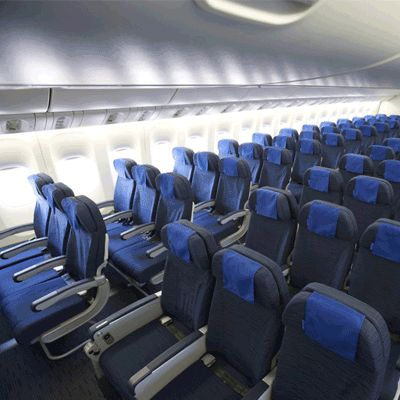
Места экономического класса предлагают 30" seat pitch and 17.3" seat width. Характеристики и конфигурация мест могут различаться в зависимости от типа самолета и маршрута.
Регистрация на рейс
Ниже приведены способы регистрации, доступные для рейсов Avelo Airlines. Доступность может различаться в зависимости от аэропорта, маршрута или типа тарифа.
Онлайн-регистрация на сайте
Зарегистрируйтесь онлайн на сайте Avelo Airlines, используя данные бронирования. После регистрации вы можете скачать или распечатать посадочный талон. Онлайн-регистрация на сайте доступна за 24 часов до вылета.
Регистрация в приложении
Зарегистрируйтесь через мобильное приложение Avelo Airlines для iOS или Android. Ваш посадочный талон будет доступен в приложении, и обычно его можно добавить в цифровой кошелек. Услуга регистрации в приложении доступна за 0 часов до вылета.
Регистрация на стойке в аэропорту
Посетите стойку регистрации Avelo Airlines в аэропорту вылета не позднее чем за 120 минут до вылета. Этот вариант рекомендуется пассажирам, которым требуется специальная помощь, которые имеют групповые бронирования или путешествуют с негабаритным багажом. В зависимости от правил Avelo Airlines могут взиматься дополнительные сборы.
Важная информация для путешествия
- Прибудьте в аэропорт достаточно заранее, чтобы пройти регистрацию, досмотр службы безопасности и все необходимые иммиграционные процедуры.
- Перед поездкой в аэропорт проверьте крайнее время регистрации на стойке и посадки на рейс для вашего маршрута.
- Возьмите все действительные проездные документы — авиабилет, удостоверение личности государственного образца и паспорт (с необходимыми визами) для международной поездки.
- Требования к въезду могут измениться без предварительного уведомления. Заранее до даты вылета проверьте визовые, медицинские и въездные требования пункта назначения.
- Соблюдайте правила нормы провоза багажа Avelo Airlines. Подробную информацию о ручной клади см. в разделе «Удобства и услуги».
- Разные типы тарифов предусматривают разные правила в отношении багажа, выбора места, питания и гибкости. Перед завершением бронирования ознакомьтесь с условиями тарифа, отображаемыми при оплате.
- В случае изменения расписания, задержки или отмены рейса по инициативе Avelo Airlines применяются собственные операционные правила авиакомпании. Airpaz поможет с уведомлениями и координацией, когда это возможно, но окончательные решения о перебронировании, возврате средств или компенсации принимает авиакомпания.
Правила на борту
- Каждый пассажир должен занимать место, назначенное во время регистрации.
- Ручная кладь должна быть размещена на верхней багажной полке или под сиденьем перед вами.
- Мобильные телефоны и электронные устройства должны быть выключены или переведены в режим полета, особенно во время взлета и посадки.
- Во время взлета и посадки пристегните ремень безопасности, сложите столик, приведите спинку кресла в вертикальное положение и откройте шторку иллюминатора.
- Курение, включая электронные сигареты и вейпинг, строго запрещено в любом месте воздушного судна на протяжении всего полета.
- Всегда выполняйте все инструкции экипажа Avelo Airlines и бортовые объявления по безопасности.
Как управлять бронированием на Airpaz
- Войдите в свою учетную запись Airpaz.
- Перейдите в раздел Заказ, чтобы найти свой рейс.
- Выберите свое бронирование, чтобы просмотреть электронный билет, маршрут и платежные данные.
- Чтобы запросить возврат средств или изменить дату, выберите показанный вариант и следуйте инструкциям.
- Укажите запрошенную информацию и подтвердите отправку заявки.
- Отслеживайте статус своей заявки на той же странице.
Проверьте расписание рейсов Avelo Airlines
Найти самую низкую цену на рейс Avelo Airlines


Почему путешественники выбирают Airpaz для бронирования рейсов Avelo Airlines
- Быстрый и удобный поиск: Фильтруйте и сравнивайте рейсы по цене, расписанию, продолжительности и пересадкам — все это в одном поиске.
- Удобные дополнительные услуги: Добавьте регистрируемый багаж, выберите место, закажите питание заранее или оформите туристическую страховку для вашего рейса.
- Выбор класса обслуживания: Хочется немного роскоши? Мы предлагаем тарифы от эконом- до первого класса для еще более комфортного перелета.
- Различные способы оплаты: Выбирайте оплату кредитными/дебетовыми картами, банковским переводом, через PayPal, электронными кошельками и многими популярными местными платежными системами.
- Мгновенное подтверждение: Получите подтверждение бронирования и электронный билет прямо на вашу электронную почту сразу после оплаты.
- Глобальная служба поддержки: Наша многоязычная служба поддержки готова помочь вам 24/7 с внесением изменений в бронирование, отменой или любыми другими вопросами.
- Эксклюзивные акции в приложении и для пользователей: Наслаждайтесь специальными предложениями, разработанными для участников Airpaz, и эксклюзивными скидками в приложении.
- Исключительная выгода: Мы находим эксклюзивные предложения и специальные рекламные тарифы, чтобы вы могли извлечь максимум из вашего бюджета на поездку.
Советы, как найти дешевые билеты на рейсы Avelo Airlines на Airpaz
- Бронируйте заранее: Тарифы, как правило, растут по мере приближения даты вылета. Старайтесь бронировать за 4–8 недель, чтобы получить лучшие предложения и цены.
- Будьте гибки с датами: Используйте вид календаря на Airpaz, чтобы сравнивать цены на разные даты.
- Летайте в середине недели: По вторникам и средам билеты обычно дешевле, чем в выходные дни.
- Охотьтесь за промоакциями: Регулярно проверяйте страницу и страницу на Airpaz на наличие промокодов и временных предложений от Avelo Airlines.
- Избегайте пиковых сезонов: Школьные каникулы, государственные праздники и праздничные периоды повышают цены — путешествуйте в низкий сезон, чтобы сэкономить больше.
- Бронируйте комплектом: Забронируйте перелет и проживание в рамках одного бронирования, чтобы сэкономить еще больше.
- Платите через приложение Airpaz: Эксклюзивные промокоды в приложении и скидки только для участников часто являются лучшим способом получить самые низкие цены на билеты.
Как забронировать рейс на Airpaz
- Зайдите на сайт Airpaz.com или откройте приложение Airpaz, затем выберите раздел «Рейс»
- Введите город отправления (например, Куала-Лумпур) и пункт назначения (например, Бали, Сингапур или Бангкок)
- Выберите дату поездки и количество пассажиров
- Нажмите «Поиск», чтобы увидеть доступные рейсы
- Используйте фильтры по цене, времени вылета или продолжительности, чтобы найти лучший вариант, затем выберите подходящий рейс
- Заполните данные пассажиров точно так, как указано в вашем паспорте или удостоверении личности (полное имя, дата рождения, гражданство и контактная информация)
- При необходимости добавьте дополнительные услуги, такие как багаж, выбор места, питание или туристическая страховка
- Внимательно проверьте данные вашего бронирования
- Выберите способ оплаты (кредитная/дебетовая карта, банковский перевод, PayPal или рассрочка)
- Завершите оплату — ваш электронный билет будет отправлен на вашу электронную почту, а также появится в приложении
Часто задаваемые вопросы о Avelo Airlines
Больше рекомендованных рейсов с Avelo Airlines
Популярный маршрут Avelo Airlines
Популярное направление по Аэропорт
Популярное направление по Город
Популярное направление по Континент
Популярное направление по Страна


Почему нужно путешествовать с Airpaz?

Облегчите ваш опыт бронирования
Почувствуйте гибкость и простоту процесса бронирования

Широкий выбор туристических продуктов
Наслаждайтесь незабываемыми моментами благодаря миллионам выгодных рейсов и вариантов проживания

Эксклюзивное предложение каждый день
Различные ежедневные акции с конкурентоспособной ценой для всех пассажиров

Эксперт по бронированиям онлайн
Вместе с нашими надежными партнерами мы удовлетворяем бесчисленные потребности путешественников с 2011 года

Отзывчивая поддержка клиентов
Наша служба поддержки работает круглосуточно и без выходных на вашем родном языке

Превосходное локальное бронирование по всему миру
Приятный опыт бронирования с местной оплатой, валютой и языком