


Utolsó frissítés
Avelo Airlines Repülési információk
A legalacsonyabb viteldíj hónapja
dec


Áttekintés
Avelo Airlines (XP) egy fapados légitársaság, amely belföldi útvonalakon repül. Avelo Airlines utasának nem biztosítanak kézipoggyász-keretet. A repülőjegy ára nem tartalmaz feladott poggyászkeretet. A check-in 120 perccel járatindulási idő előtt kezdődik. Az online bejelentkezés elérhető a légitársaság járatához az Avelo Airlines hivatalos weboldalán. Ez 1 nappal az indulási idő előtt feldolgozható.
Foglalás menete
Fizetés menete
Fizetés az Avelo Airlines foglalásáért az Airpaz felületén banki PayPal-lal, banki átutalással, hitelkártyával, és pultnál történő fizetési módszerekkel feldolgozható. További információért keresse fel az Airpaz Fizetési útmutató oldalát.
Vállalati profil
Avelo Airlines üzemel XP IATA-kóddal és VXP ICAO-kóddal, egy fapados légitársaság, amely belföldi útvonalakon repül. A légitársaság a világ minden táján járatokat szolgál ki úti célokra a Wilmington Airport (ILG), Tweed New Haven Airport (HVN) helyen található fő csomópontjával rendelkezve.
A Avelo Airlines az Avelo Airlines kereskedelmi név tulajdonosa. A vállalatot a vezérigazgató, Andrew Levy vezeti. A légitársaság központi irodája Amerikai Egyesült Államok helyen található.
Történet
Avelo Airlines üzemel IATA-kód (XP) és ICAO-kód (VXP) használatával 1987 évben jött létre. A légitársaságot a Avelo Airlines irányítja. Fejlődésének évében, az Avelo Airlines arra törekszik, hogy hűséges ügyfeleit kiszolgálja az általa nyújtott szolgáltatásokon keresztül. Ez a légitársaság 2021. április 28. napon először repült.
Légiutas-kísérők
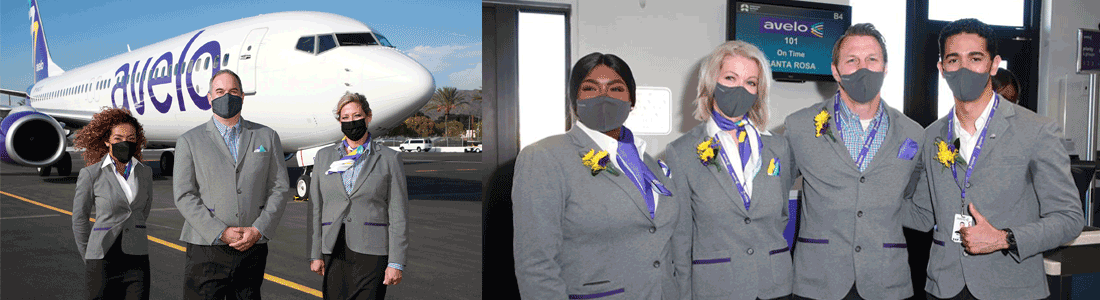
Az Avelo Airlines kabinszemélyzete szürke és fekete színű egyenruhát visel. A férfi légiutas-kísérők kék négyzet motívumú ing és szürke mellény és fekete nadrág ruhadarabot viselnek. A női légiutas-kísérők fehér hosszú ujjú szürke mellény valamint fekete szoknya ruhadarabot viselnek. Maga az dizájn az ő erős szenvedélyüket képviseli, hogy kiváló szolgáltatást az utasai számára biztosítsanak a repülés alatt.
Flotta

Az Avelo Airlines rendelkezik számos légi járművel, amelyek mind megtekinthetők alább:
| Type | Quantity |
|---|---|
| Boeing 737-800 | 14 |
Élő csevegés
Nincs élő csevegési szolgáltatás az Avelo Airlines utasai számára.
Poggyász
Kézipoggyász
Ingyenes utastéri poggyász nem érhető el az Avelo Airlines járatain utazó utasok számára.Kérjük, ne feledje, hogy ennek el kell férnie az Ön előtti ülés alatt.
Feladott poggyász
Ingyenes feladottpoggyász-keret nem biztosított az Avelo Airlines járatain utazó utasok számára.
Túlsúlyos poggyász
Extra feladott poggyász keret nem szerezhető be az Airpaz.com oldalán.
Jogi nyilatkozat: A fent feltüntetett információk kizárólag általános útmutatóként szolgálnak, és a légitársaság előzetes értesítés nélkül módosíthatja őket. További információért lépjen kapcsolatba a légitársasággal.
Ülés
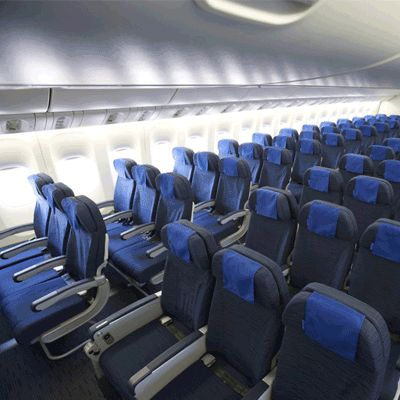
Turistaosztály
Az Avelo Airlines Turista osztályán a standard ülés mérete 30" seat pitch and 17.3" seat width.
Ingyenes fedélzeti snack
Ingyenes snack/ital nem biztosított az Avelo Airlines járatain.
Online check-in
Az utasok az Avelo Airlines hivatalos weboldalán keresztül webes check-int végezhetnek. Ehhez kattintson ide, hogy megnyissa a légitársaság check-in oldalát. Az webes check-in a menetrend szerinti indulási idő előtt 1 nappal végezhető el.
Repülőtéri check-in
A repülőtéri check-in az Avelo Airlines check-in pultjainál 120 perccel a menetrend szerinti járatindulási idő előtt végezhető el. Javasoljuk, hogy legalább másfél órával azelőtt jelentkezzen be, hogy a repülőtéri check-in és poggyászleadó pult bezár.
Kioszkos check-in
Az Avelo Airlines nem nyújt kioszkos check-in szolgáltatásokat az utasok számára.
Alkalmazásos check-in
Az alkalmazásos check-in a légitársaság hivatalos mobil (Android/iOS) appján keresztül lehetséges. Ehhez az utasoknak le kell tölteniük az Avelo Airlines mobilalkalmazást a okostelefonjukra.
Viteldíjszabályok
a. Lemondás és visszatérítés
A légitársaságnál vásárolt jegyek lemondhatók, és visszatérítés igényelhető.b. Átfoglalás
Az olyan módosítások, mint az átfoglalás, végrehajthatók a jegyen, ha közvetlenül kapcsolatba lép a légitársasággal.
Az Avelo Airlines repülőjegyével és a viteldíjszabályokkal kapcsolatos teljesebb információkért kattintson ide.
Jogi nyilatkozat: A légitársaság előzetes értesítés nélkül módosíthatja szabályzatát. Ha ez megtörténik, a friss információkért, valamint a biztosításra, járatkésésre stb. vonatkozó szabályzatért ellenőrizze a légitársaság viteldíjszabályokat tartalmazó oldalát, vagy lépjen közvetlenül kapcsolatba a légitársasággal.
Miért választják az utazók az Airpazt a(z) Avelo Airlines repülőjegyek foglalásához
- Gyors és egyszerű keresés: Szűrje és hasonlítsa össze a járatokat ár, menetrend, időtartam és átszállások alapján – mindezt egyetlen kereséssel.
- Egyszerű kiegészítők: Adjon hozzá feladott poggyászt, válasszon ülőhelyet, rendeljen előre ételt, vagy kössön utasbiztosítást a járatára.
- Osztályválasztási lehetőségek: Egy kis extra luxusra vágyik? A turistaosztálytól az első osztályig számos viteldíj-kategóriát kínálunk a prémium repülési élményért.
- Többféle fizetési mód: Válasszon hitel-/betéti kártyák, banki átutalások, PayPal, e-pénztárcák és számos népszerű helyi fizetési lehetőség közül.
- Zökkenőmentes jegyvisszaigazolás: A fizetés befejezése után a foglalás visszaigazolását és a jegyet közvetlenül az e-mail fiókjába küldjük.
- Globális ügyfélszolgálat: Többnyelvű ügyfélszolgálati csapatunk a nap 24 órájában rendelkezésre áll, hogy segítsen a foglalások módosításában, törlésében vagy bármilyen kérdésben.
- Exkluzív alkalmazás- és tagi promóciók: Élvezze az Airpaz-tagoknak szóló különleges ajánlatokat és a csak az alkalmazásban elérhető kedvezményeket.
- Kivételes érték: Exkluzív ajánlatokat és különleges promóciós árakat biztosítunk, hogy a legtöbbet hozhassa ki utazási költségvetéséből.
Tippek olcsó Avelo Airlines járatok kereséséhez az Airpazon
- Foglaljon előre: A viteldíjak általában emelkednek az indulás napjának közeledtével. Törekedjen arra, hogy 4–8 héttel előre foglaljon a legjobb ajánlatok és árak elérése érdekében.
- Legyen rugalmas a dátumokkal: Használja az Airpaz naptárnézetét a viteldíjak összehasonlításához több dátum esetén.
- Utazzon hétközben: A keddi és szerdai járatok általában olcsóbbak, mint a hétvégi járatok.
- Vadásszon a promóciókra: Rendszeresen ellenőrizze az Airpaz és oldalát promóciós kódokért és a(z) Avelo Airlines korlátozott ideig érvényes ajánlataiért.
- Kerülje a csúcsszezonokat: Az iskolai szünetek, munkaszüneti napok és ünnepi időszakok felhajtják az árakat — utazzon főszezonon kívül, hogy többet spóroljon.
- Csomagok és megtakarítások: Foglalja le repülőjegyét és szállását egyetlen foglalásban, hogy további kedvezményeket élvezhessen.
- Fizessen az Airpaz alkalmazással: Az exkluzív alkalmazás-promóciós kódok és a csak tagoknak szóló kedvezmények gyakran a legjobb módjai az alacsonyabb repülőjegy-árak elérésének.
Hogyan foglaljon repülőjegyet az Airpazon
- Látogasson el az Airpaz.com oldalra, vagy nyissa meg az Airpaz alkalmazást, majd válassza a Repülés menüpontot.
- Adja meg az indulási várost (pl. Kuala Lumpur) és a célállomást (pl. Bali, Szingapúr vagy Bangkok).
- Válassza ki az utazás dátumát és az utasok számát.
- Koppintson a Keresés gombra az elérhető járatok megtekintéséhez.
- Használja a szűrőket, mint például ár, indulási idő vagy időtartam, a legjobb lehetőség megtalálásához, majd válassza ki a kívánt járatot.
- Töltse ki az utasok adatait pontosan úgy, ahogy az az útlevelében vagy személyi igazolványában szerepel (teljes név, születési idő, állampolgárság és elérhetőségek).
- Szükség esetén adjon hozzá extrákat, például poggyászt, ülőhely-választást, étkezést vagy utasbiztosítást.
- Ellenőrizze a foglalás részleteit.
- Válasszon fizetési módot (hitel-/betéti kártya, banki átutalás, PayPal vagy részletfizetés).
- Fejezze be a fizetést — e-jegyét elküldjük e-mail címére, és elérhető lesz az alkalmazásban is.
Gyakran ismételt kérdések a(z) Avelo Airlines-ról


Miért kell az Airpazzal utazni

Egyszerűsítse a foglalási élményt
Érezze a rugalmasságot és az egyszerűséget a foglalási folyamat során

Utazási termék széles választéka
Élvezze emlékezetes pillanatait több millió kedvező járattal és szállással

Exkluzív ajánlat mindennap
Különböző napi promóció versenyképes áron minden utazó számára

Online foglalási szakértő
Hiteles partnereinkkel együtt 2011 óta számtalan utazó igényeit elégítjük ki

Szeretetteljes ügyfélszolgálat
A legjobb segítséget nyújtva, ügyfélszolgálatunk 24/7 elérhető az Ön helyi nyelvén

A világ helyi foglalási izgalma
Stresszmentes foglalási élmény helyi fizetéssel, pénznemmel és nyelvvel