
Χειραποσκευή
Δωρεάν όριο χειραποσκευής 7 kg
Check-in πριν την αναχώρηση
Ξεκινά 150 λεπτά πριν την αναχώρηση
Τελευταία ενημέρωση στις
Κάντε κράτηση και κερδίστε τις καλύτερες προσφορές πτήσεων Airblue
 Airblue
Από
US$ 78.56
Τιμή/ Pax
AirblueΑπό
US$ 86.71
Τιμή/ Pax
AirblueΑπό
US$ 87.14
Τιμή/ Pax
AirblueΑπό
US$ 93.61
Τιμή/ Pax
AirblueΑπό
US$ 93.61
Τιμή/ Pax
AirblueΑπό
US$ 93.63
Τιμή/ Pax
AirblueΑπό
US$ 96.58
Τιμή/ Pax
AirblueΑπό
US$ 97.75
Τιμή/ Pax
AirblueΑπό
US$ 98.1
Τιμή/ Pax
AirblueΑπό
US$ 103.98
Τιμή/ Pax
 Λάβετε υπόψη ότι οι τιμές που αναφέρονται σε αυτήν τη σελίδα ενδέχεται να μην είναι ενημερωμένες και υπόκεινται σε αλλαγές χωρίς προηγούμενη ειδοποίηση. Προσπαθούμε να παρέχουμε τις πιο ακριβείς και ενημερωμένες πληροφορίες.
Airblue Πληροφορίες πτήσης
Μήνας χαμηλότερου ναύλου
Σεπτ
Σύνολο προορισμών
12


Πληροφορίες για την Airblue
Το να γνωρίσετε την αεροπορική σας εταιρεία πριν από την πτήση είναι πάντα μια συνετή επιλογή. Σας βοηθά να ταξιδεύετε με σιγουριά και να γνωρίζετε ακριβώς τι να περιμένετε. Η Airblue είναι αεροπορική εταιρεία χαμηλού κόστους που εκτελεί πτήσεις εσωτερικού και εξωτερικού από το 2003, με έδρα στο Πακιστάν. Στον κλάδο των αερομεταφορών, η Airblue αναγνωρίζεται επίσημα από τον κωδικό IATA (PA) και τον κωδικό ICAO (ABQ), τα τυποποιημένα αναγνωριστικά που χρησιμοποιούνται παγκοσμίως για κρατήσεις, check-in και παρακολούθηση πτήσεων. Παρακάτω θα βρείτε όλες τις βασικές πληροφορίες, από κωδικούς και δρομολόγια έως σημαντικά στοιχεία, ώστε να προγραμματίσετε και να κλείσετε το επόμενο ταξίδι σας με απόλυτη σιγουριά.
Κόμβος και δραστηριότητες
Η Airblue εκτελεί πτήσεις εσωτερικού και εξωτερικού από τον κύριο κόμβο της στο King Abdulaziz International Airport (JED), Διεθνής Αερολιμένας Ζαγιέντ (AUH), Διεθνές Αεροδρόμιο Ντουμπάι (DXB), Jinnah International Airport (KHI), Allama Iqbal International Airport (LHE), Διεθνής Αερολιμένας Ισλαμαμπάντ (ISB), με έδρα στο Πακιστάν. Ο πλήρης κατάλογος προορισμών και τα τρέχοντα δρομολόγια είναι διαθέσιμα όταν αναζητάτε πτήση στην Airpaz.
Αποσκευές
Χειραποσκευές
Οι επιβάτες της Airblue μπορούν να μεταφέρουν χειραποσκευές στην καμπίνα με δωρεάν επιτρεπόμενο βάρος έως 7 kg. Οι χειραποσκευές πρέπει να έχουν διαστάσεις έως 22 x 15 x 8 inches (56 x 38 x 20 cm). Μπορείτε επίσης να πάρετε μαζί σας ένα μικρότερο προσωπικό αντικείμενο, όπως τσάντα φορητού υπολογιστή, τσάντα χειρός ή μικρό σακίδιο, εφόσον χωρά κάτω από το μπροστινό κάθισμα.
Θέσεις
Η Airblue προσφέρει θέσεις σε διάφορες κατηγορίες καμπίνας, με την άνεση και τη διαμόρφωση να διαφέρουν ανάλογα με τον τύπο αεροσκάφους και το δρομολόγιο. Επιλέξτε την πτήση σας για να δείτε τις διαθέσιμες θέσεις για την κράτησή σας.
Θέσεις οικονομικής θέσης
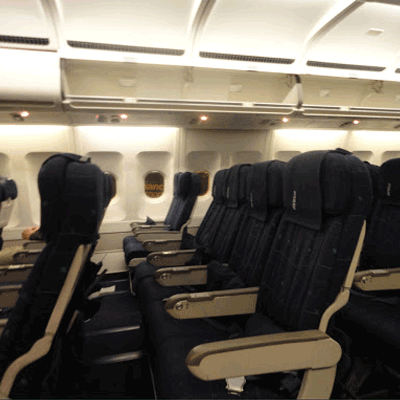
Οι θέσεις οικονομικής θέσης προσφέρουν 28"-32" pitch and 18" width. Τα χαρακτηριστικά και η διαμόρφωση των θέσεων ενδέχεται να διαφέρουν ανάλογα με τον τύπο αεροσκάφους και το δρομολόγιο.Οι επιλογές του μενού ενδέχεται να διαφέρουν ανάλογα με το δρομολόγιο, τον τύπο ναύλου ή τη διάρκεια της πτήσης.
Check-in
Παρακάτω παρατίθενται οι διαθέσιμες μέθοδοι check-in για τις πτήσεις της Airblue. Η διαθεσιμότητα ενδέχεται να διαφέρει ανάλογα με το αεροδρόμιο, το δρομολόγιο ή τον τύπο ναύλου.
Check-in στο γκισέ του αεροδρομίου
Επισκεφθείτε το γκισέ check-in της Airblue στο αεροδρόμιο αναχώρησής σας έως και 150 λεπτά πριν από την αναχώρηση. Αυτή η επιλογή συνιστάται για επιβάτες που χρειάζονται ειδική βοήθεια, έχουν ομαδικές κρατήσεις ή ταξιδεύουν με υπερμεγέθεις αποσκευές. Ενδέχεται να ισχύουν πρόσθετες χρεώσεις ανάλογα με την πολιτική της Airblue.
Σημαντικές ταξιδιωτικές πληροφορίες
- Φτάστε στο αεροδρόμιο αρκετά νωρίς, ώστε να ολοκληρώσετε το check-in, τον έλεγχο ασφαλείας και τυχόν απαιτούμενες διαδικασίες μετανάστευσης.
- Ελέγξτε τις προθεσμίες προσέλευσης στο γκισέ check-in και στην πύλη επιβίβασης για το δρομολόγιό σας προτού μεταβείτε στο αεροδρόμιο.
- Έχετε μαζί σας όλα τα έγκυρα ταξιδιωτικά έγγραφα — το αεροπορικό σας εισιτήριο, έγγραφο ταυτοποίησης εκδοθέν από κρατική αρχή και το διαβατήριό σας (μαζί με τυχόν απαιτούμενες θεωρήσεις) για διεθνή ταξίδια.
- Οι προϋποθέσεις εισόδου ενδέχεται να αλλάξουν χωρίς προειδοποίηση. Ελέγξτε τις απαιτήσεις του προορισμού σας σχετικά με τις θεωρήσεις, την υγεία και την είσοδο αρκετά πριν από την ημερομηνία αναχώρησής σας.
- Τηρείτε τους κανόνες της Airblue σχετικά με το επιτρεπόμενο όριο αποσκευών. Ανατρέξτε στην ενότητα Παροχές και υπηρεσίες για λεπτομέρειες σχετικά με τις αποσκευές καμπίνας.
- Οι τύποι ναύλων συνοδεύονται από διαφορετικούς κανόνες για τις αποσκευές, την επιλογή θέσης, τα γεύματα και την ευελιξία. Ελέγξτε τους όρους του ναύλου που εμφανίζονται κατά την ολοκλήρωση της αγοράς προτού ολοκληρώσετε την κράτησή σας.
- Σε περίπτωση αλλαγής προγράμματος, καθυστέρησης ή ακύρωσης με πρωτοβουλία της Airblue, ισχύουν οι επιχειρησιακές πολιτικές της ίδιας της αεροπορικής εταιρείας. Η Airpaz θα παρέχει, όπου είναι δυνατόν, βοήθεια με τις ειδοποιήσεις και τον συντονισμό, αλλά οι τελικές αποφάσεις σχετικά με την εκ νέου κράτηση, τις επιστροφές χρημάτων ή την αποζημίωση ανήκουν στην αεροπορική εταιρεία.
Κανόνες εντός του αεροσκάφους
- Κάθε επιβάτης πρέπει να κάθεται στη θέση που του ανατέθηκε κατά το check-in.
- Οι χειραποσκευές πρέπει να τοποθετούνται στον χώρο αποσκευών πάνω από τα καθίσματα ή κάτω από το μπροστινό σας κάθισμα.
- Τα κινητά τηλέφωνα και οι ηλεκτρονικές συσκευές πρέπει να απενεργοποιούνται ή να τίθενται σε λειτουργία πτήσης, ιδιαίτερα κατά την απογείωση και την προσγείωση.
- Δέστε τη ζώνη ασφαλείας σας, κλείστε το τραπεζάκι, επαναφέρετε το κάθισμά σας σε όρθια θέση και ανοίξτε το σκίαστρο του παραθύρου κατά την απογείωση και την προσγείωση.
- Το κάπνισμα, συμπεριλαμβανομένης της χρήσης ηλεκτρονικών τσιγάρων και συσκευών ατμίσματος, απαγορεύεται αυστηρά σε όλους τους χώρους του αεροσκάφους καθ’ όλη τη διάρκεια της πτήσης.
- Ακολουθείτε πάντοτε όλες τις οδηγίες του πληρώματος της Airblue και τις ανακοινώσεις ασφαλείας εντός του αεροσκάφους.
Πώς να διαχειριστείτε την κράτησή σας στην Airpaz
- Συνδεθείτε στον λογαριασμό σας στην Airpaz.
- Μεταβείτε στην ενότητα Παραγγελία για να βρείτε την πτήση σας.
- Επιλέξτε την κράτησή σας για να δείτε το ηλεκτρονικό εισιτήριο, το δρομολόγιο και τα στοιχεία πληρωμής σας.
- Για να ζητήσετε επιστροφή χρημάτων ή αλλαγή προγράμματος, επιλέξτε τη σχετική επιλογή που εμφανίζεται και ακολουθήστε τα βήματα.
- Καταχωρίστε τις ζητούμενες πληροφορίες και επιβεβαιώστε την υποβολή του αιτήματός σας.
- Παρακολουθήστε την κατάσταση του αιτήματός σας από την ίδια σελίδα.
Ελέγξτε το πρόγραμμα πτήσεων της Airblue
flightstaticpage.airlineinfoheadingpricechart


Γιατί οι ταξιδιώτες επιλέγουν την Airpaz για κρατήσεις πτήσεων της Airblue
- Γρήγορη & Εύκολη Αναζήτηση: Φιλτράρετε και συγκρίνετε πτήσεις βάσει τιμής, προγράμματος, διάρκειας και στάσεων — όλα σε μία μόνο αναζήτηση.
- Εύκολες Πρόσθετες Υπηρεσίες: Προσθέστε παραδιδόμενες αποσκευές, επιλέξτε τη θέση σας, προπαραγγείλετε γεύματα ή αποκτήστε ταξιδιωτική ασφάλιση για την πτήση σας.
- Επιλογές Κατηγορίας Ναύλου: Ψάχνετε για λίγη επιπλέον πολυτέλεια; Προσφέρουμε επιλογές κατηγορίας ναύλου από οικονομική έως πρώτη θέση για μια πιο premium πτητική εμπειρία.
- Πολλαπλές Μέθοδοι Πληρωμής: Επιλέξτε από πιστωτικές/χρεωστικές κάρτες, τραπεζικές μεταφορές, PayPal, ηλεκτρονικά πορτοφόλια (e-wallets) και πολλές δημοφιλείς τοπικές επιλογές πληρωμής.
- Απρόσκοπτη Επιβεβαίωση Εισιτηρίου: Λάβετε την επιβεβαίωση της κράτησής σας & το ηλεκτρονικό εισιτήριο απευθείας στα εισερχόμενα του email σας μετά την ολοκλήρωση της πληρωμής.
- Παγκόσμια Υποστήριξη Πελατών: Η πολύγλωσση ομάδα υποστήριξης πελατών μας είναι έτοιμη 24/7 να σας βοηθήσει με τροποποιήσεις κρατήσεων, ακυρώσεις ή οποιεσδήποτε ερωτήσεις.
- Αποκλειστικές προσφορές εφαρμογής & μελών: Απολαύστε ειδικές προσφορές σχεδιασμένες για τα μέλη της Airpaz και προσφορές μόνο για την εφαρμογή.
- Εξαιρετική Αξία: Εξασφαλίζουμε αποκλειστικές προσφορές και ειδικές προωθητικές τιμές για να σας επιτρέψουμε να αξιοποιήσετε στο έπακρο τον ταξιδιωτικό σας προϋπολογισμό.
Συμβουλές για να βρείτε φθηνές πτήσεις της Airblue στην Airpaz
- Κάντε Κράτηση Νωρίς: Οι ναύλοι τείνουν να ανεβαίνουν όσο πλησιάζει η ημέρα αναχώρησης. Στοχεύστε να κάνετε κράτηση 4–8 εβδομάδες νωρίτερα για να λάβετε τις καλύτερες προσφορές και ναύλους.
- Μείνετε Ευέλικτοι στις Ημερομηνίες: Χρησιμοποιήστε την προβολή ημερολογίου της Airpaz για να συγκρίνετε τους ναύλους σε πολλές ημερομηνίες.
- Πετάξτε Μεσοβδόμαδα: Οι πτήσεις την Τρίτη και την Τετάρτη συνήθως προσφέρουν φθηνότερους ναύλους από τις πτήσεις του Σαββατοκύριακου.
- Αναζητήστε Προσφορές: Ελέγχετε τακτικά για εκπτωτικούς κωδικούς και προσφορές της Airblue περιορισμένου χρόνου στη σελίδα και στη σελίδα της Airpaz.
- Αποφύγετε τις Περιόδους Αιχμής: Οι σχολικές διακοπές, οι επίσημες αργίες και οι εορταστικές περίοδοι ανεβάζουν τους ναύλους — ταξιδέψτε εκτός περιόδου αιχμής για να εξοικονομήσετε περισσότερα.
- Συνδυάστε και Εξοικονομήστε: Κάντε κράτηση για την πτήση και τη διαμονή σας σε μία μόνο κράτηση για να απολαύσετε μεγαλύτερη εξοικονόμηση.
- Πληρώστε με την εφαρμογή Airpaz: Οι αποκλειστικοί εκπτωτικοί κωδικοί της εφαρμογής και οι εκπτώσεις μόνο για μέλη είναι συχνά ο καλύτερος τρόπος για να έχετε τους χαμηλότερους ναύλους πτήσεων.
Πώς να Κάνετε Κράτηση Πτήσης στην Airpaz
- Επισκεφθείτε το Airpaz.com ή ανοίξτε την εφαρμογή Airpaz, στη συνέχεια επιλέξτε Πτήση
- Εισαγάγετε την πόλη αναχώρησης (π.χ. Κουάλα Λουμπούρ) και τον προορισμό (π.χ. Μπαλί, Σιγκαπούρη ή Μπανγκόκ)
- Επιλέξτε την ημερομηνία ταξιδιού σας και τον αριθμό των επιβατών
- Πατήστε Αναζήτηση για να δείτε τις διαθέσιμες πτήσεις
- Χρησιμοποιήστε φίλτρα όπως η τιμή, η ώρα αναχώρησης ή η διάρκεια για να βρείτε την καλύτερη επιλογή, και στη συνέχεια επιλέξτε την προτιμώμενη πτήση σας
- Συμπληρώστε τα στοιχεία των επιβατών ακριβώς όπως αναγράφονται στο διαβατήριο ή την ταυτότητά σας (πλήρες όνομα, ημερομηνία γέννησης, εθνικότητα και στοιχεία επικοινωνίας)
- Προσθέστε επιπλέον παροχές εάν χρειάζεται, όπως αποσκευές, επιλογή θέσης, γεύματα ή ταξιδιωτική ασφάλιση
- Ελέγξτε τις λεπτομέρειες της κράτησής σας
- Επιλέξτε μια μέθοδο πληρωμής (πιστωτική/χρεωστική κάρτα, τραπεζική μεταφορά, PayPal ή δόσεις)
- Ολοκλη��ώστε την πληρωμή σας — το e-ticket (ηλεκτρονικό εισιτήριο) θα σταλεί στο email σας και θα είναι διαθέσιμο στην εφαρμογή
Συχνές ερωτήσεις για την Airblue
Περισσότερες προτεινόμενες πτήσεις με Airblue
Δημοφιλές δρομολόγιο της Airblue
Δημοφιλής προορισμός ανά Αεροδρόμιο
Δημοφιλής προορισμός ανά Πόλη
Δημοφιλής προορισμός ανά Ήπειρος
Δημοφιλής προορισμός ανά Χώρα


Γιατί πρέπει να ταξιδέψετε με την Airpaz?

Απλοποιήστε την εμπειρία κράτησής σας
Νιώστε την ευελιξία και την απλότητα σε όλη τη διαδικασία κράτησης

Ευρείες επιλογές ταξιδιωτικών προϊόντων
Απολαύστε τις αξέχαστες στιγμές σας με εκατομμύρια ευνοϊκές πτήσεις και καταλύματα

Αποκλειστική προσφορά καθημερινά
Διάφορες καθημερινές προσφορές με ανταγωνιστικές τιμές για όλους τους ταξιδιώτες

Ειδικός σε online κρατήσεις
Μαζί με τους αξιόπιστους συνεργάτες μας, ικανοποιώντας τις ανάγκες αμέτρητων ταξιδιωτών από το 2011

Στοργική υποστήριξη πελατών
Παρέχοντας την καλύτερη δυνατή βοήθεια, η υποστήριξη πελατών μας είναι διαθέσιμη 24 ώρες το 24ωρο, 7 ημέρες την εβδομάδα με την τοπική σας γλώσσα

Ο ενθουσιασμός των τοπικών κρατήσεων στον κόσμο
Εμπειρία κράτησης χωρίς άγχος με τοπική πληρωμή, νόμισμα και γλώσσα