
Kabinové zavazadlo
Bezplatný limit kabinového zavazadla: 8 kg
Online odbavení
K dispozici pro online odbavení
Odbavení před odletem
Začíná 180 minut před odletem
Naposledy aktualizováno dne
Rezervujte a získejte ty nejlepší nabídky letů Air Baltic
 Air Baltic
Začít od
US$ 45.3
Cena za osobu
Air BalticZačít od
US$ 64.35
Cena za osobu
Air BalticZačít od
US$ 64.37
Cena za osobu
Air BalticZačít od
US$ 71.79
Cena za osobu
Air BalticZačít od
US$ 96.52
Cena za osobu
Air BalticZačít od
US$ 141.78
Cena za osobu
Air BalticZačít od
US$ 150.37
Cena za osobu
Air BalticZačít od
US$ 170.85
Cena za osobu
Air BalticZačít od
US$ 175.63
Cena za osobu
Air BalticZačít od
US$ 206.31
Cena za osobu
 Upozorňujeme, že ceny uvedené na této stránce nemusí být aktuální a mohou se změnit bez předchozího upozornění. Snažíme se poskytovat co nejpřesnější a aktuální informace.
Informace o letu Air Baltic
Měsíc nejnižšího jízdného
zář
Celkový počet destinací
77


Informace o Air Baltic
Seznámit se s leteckou společností před letem je vždy rozumný krok. Pomůže vám cestovat s jistotou a přesně vědět, co očekávat. Air Baltic je letecká společnost s plnými službami, která provozuje mezinárodní trasy od roku 1995 a má své sídlo v Lotyšsko. V celém leteckém odvětví je Air Baltic oficiálně rozpoznávána podle svého kódu IATA (BT) a kódu ICAO (BTI), což jsou standardní identifikátory používané po celém světě pro rezervace, odbavení a sledování letů. Níže najdete všechny podstatné informace, od kódů a tras až po klíčová fakta, které vám pomohou naplánovat a rezervovat další cestu s naprostou jistotou.
Hub a provoz
Air Baltic provozuje mezinárodní lety ze svého hlavního hubu na letišti Letiště Vilnius (VNO), Letiště Riga (RIX), Letiště Tallinn (TLL), Tampere Pirkkala Airport (TMP) a má své sídlo v Lotyšsko. Úplný seznam destinací a aktuální letové řády jsou k dispozici při vyhledávání letu na Airpaz.
Ocenění a uznání
Air Baltic získala v celém odvětví uznání za svůj závazek k vynikající kvalitě. Následující ocenění tuto pověst odrážejí:
- 2025 Skytrax Best Low-Cost Airline in Eastern Europe
- 2026 APEX Five Star Major Airlines
Milníky
Historie Air Baltic je poznamenána řadou významných milníků. Níže uvedené okamžiky ukazují, jak se letecká společnost v průběhu let měnila a rostla:
- in 2019
- Air Baltic becomes the first airline to obtain full-scope maintenance capability for Airbus A220-300 aircraft
- Air Baltic carries more than five million passengers in 2019
- or 22% more than the year before
- in 2020
- Air Baltic becomes the first European airline to hand every customer on every flight an envelope containing a face mask and two disinfectant wipes
Zavazadla
Příruční zavazadlo
Cestující Air Baltic si mohou vzít na palubu příruční zavazadlo v rámci bezplatného limitu pro kabinové zavazadlo až 8 kg. Kabinová zavazadla musí odpovídat rozměrům 55 x 40 x 23 cm, zatímco menší osobní věc, například taška na notebook, kabelka nebo malý batoh, nesmí být větší než 40 x 30 x 10 cm a musí se vejít pod sedadlo před vámi.
Sedadla
Air Baltic nabízí sedadla v několika cestovních třídách, přičemž pohodlí a uspořádání se liší podle typu letadla a trasy. Vyberte svůj let a zobrazte sedadla dostupná pro vaši rezervaci.
Sedadla v ekonomické třídě

Sedadla v ekonomické třídě nabízejí 32" pitch and 18.5" width. Vlastnosti a uspořádání sedadel se mohou lišit podle typu letadla a trasy.
Sedadla v business třídě
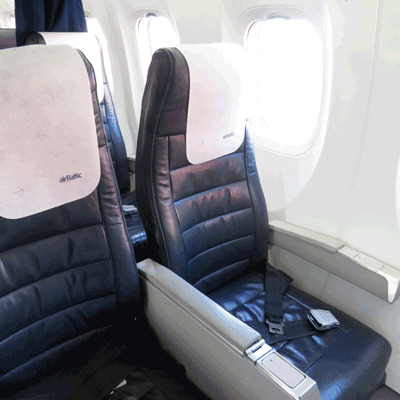
Pro cestující, kteří hledají více prostoru a prémiové služby, nabízejí sedadla v business třídě 38" pitch and 18.5" width spolu s vyšší úrovní služeb a vybavení.
Jídla během letu

Air Baltic nabízí jídla během letu na palubě. Možnosti menu se mohou lišit podle trasy, typu tarifu nebo délky letu.
Palubní zábava

Palubní zábava u Air Baltic je k dispozici. Pokud je dostupná, možnosti zábavy zahrnují magazine.
Odbavení
Níže jsou uvedeny způsoby odbavení dostupné pro lety Air Baltic. Dostupnost se může lišit podle letiště, trasy nebo typu tarifu.
Webové odbavení
Odbavte se online prostřednictvím webových stránek Air Baltic pomocí údajů o své rezervaci. Po odbavení si můžete stáhnout nebo vytisknout palubní vstupenku. Webové odbavení je dostupné až 5 dní před odletem.
Odbavení v kiosku
Samoobslužné kiosky jsou dostupné na vybraných letištích. Použijte kiosek k odbavení, výběru sedadla a vytištění palubní vstupenky. Dostupnost se liší podle letiště. Odbavení v kiosku je otevřeno od 2 hodin před odletem letu.
Odbavení u letištní přepážky
Navštivte odbavovací přepážku Air Baltic na letišti odletu nejpozději 180 minut před odletem. Tato možnost se doporučuje cestujícím, kteří potřebují zvláštní asistenci, mají skupinovou rezervaci nebo cestují s nadrozměrným zavazadlem. V závislosti na zásadách Air Baltic mohou být účtovány další poplatky.
Důležité cestovní informace
- Dostavte se na letiště dostatečně včas, abyste dokončili odbavení, bezpečnostní kontrolu a veškeré požadované imigrační postupy.
- Před cestou na letiště si ověřte nejzazší časy odbavení u přepážky a nástupu do letadla pro vaši trasu.
- Vezměte si všechny platné cestovní doklady — letenku, průkaz totožnosti vydaný státním orgánem a pro mezinárodní cesty také cestovní pas (včetně případných požadovaných víz).
- Vstupní požadavky se mohou změnit bez předchozího upozornění. S dostatečným předstihem před datem odletu si ověřte vízové, zdravotní a vstupní požadavky vaší destinace.
- Dodržujte pravidla pro povolená zavazadla Air Baltic. Podrobnosti o kabinových zavazadlech najdete v části Vybavení a služby.
- Různé typy tarifů mají odlišná pravidla pro zavazadla, výběr sedadla, stravování a flexibilitu. Před dokončením rezervace si zkontrolujte tarifní podmínky zobrazené při platbě.
- V případě změny letového řádu, zpoždění nebo zrušení letu ze strany Air Baltic se použijí vlastní provozní zásady letecké společnosti. Airpaz pomůže s oznámeními a koordinací, kdykoli to bude možné, ale konečná rozhodnutí o změně rezervace, vrácení peněz nebo kompenzaci jsou na letecké společnosti.
Pravidla na palubě
- Každý cestující musí obsadit sedadlo přidělené během odbavení.
- Příruční zavazadlo musí být uloženo v horní přihrádce nebo pod sedadlem před vámi.
- Mobilní telefony a elektronická zařízení musí být vypnuta nebo nastavena do letového režimu, zejména během vzletu a přistání.
- Během vzletu a přistání si zapněte bezpečnostní pás, sklopte stolek, vraťte sedadlo do vzpřímené polohy a otevřete okenní clonu.
- Kouření, včetně elektronických cigaret a vapování, je po celou dobu letu přísně zakázáno kdekoli v letadle.
- Vždy dodržujte všechny pokyny posádky Air Baltic a bezpečnostní oznámení na palubě.
Jak spravovat svou rezervaci na Airpaz
- Přihlaste se ke svému účtu Airpaz.
- Přejděte do části Objednávka, kde najdete svůj let.
- Vyberte svou rezervaci a zobrazte si elektronickou letenku, itinerář a platební údaje.
- Chcete-li požádat o vrácení peněz nebo změnu termínu, vyberte zobrazenou možnost a postupujte podle kroků.
- Uveďte požadované informace a potvrďte odeslání žádosti.
- Stav své žádosti sledujte na stejné stránce.
Zkontrolujte letový řád společnosti Air Baltic
Najděte nejnižší cenu letu Air Baltic


Proč si cestovatelé vybírají Airpaz pro rezervace letenek se společností Air Baltic
- Rychlé a snadné vyhledávání: Filtrujte a porovnávejte lety podle ceny, času, délky trvání a počtu přestupů – vše v jednom vyhledávání.
- Snadné doplňkové služby: Přidejte si odbavené zavazadlo, vyberte si sedadlo, předobjednejte si jídlo nebo si k letu sjednejte cestovní pojištění.
- Možnosti letových tříd: Hledáte trochu více luxusu? Nabízíme výběr letových tříd od ekonomické až po první třídu pro prémiovější zážitek z letu.
- Více způsobů platby: Vyberte si z kreditních/debetních karet, bankovních převodů, služby PayPal, elektronických peněženek a mnoha oblíbených lokálních platebních metod.
- Bezproblémové potvrzení letenky: Získejte potvrzení rezervace a letenku přímo do vaší e-mailové schránky ihned po dokončení platby.
- Globální zákaznická podpora: Náš vícejazyčný tým zákaznické podpory je připraven vám 24/7 pomoci se změnami rezervace, zrušením letu nebo s jakýmikoliv dotazy.
- Exkluzivní akce pro aplikaci a členy: Užijte si speciální nabídky vytvořené přímo pro členy Airpaz a exkluzivní slevy dostupné pouze v aplikaci.
- Výjimečná hodnota: Zajišťujeme pro vás exkluzivní nabídky a speciální akční ceny, abyste mohli ze svého cestovního rozpočtu vytěžit maximum.
Tipy, jak najít levné letenky společnosti Air Baltic na Airpaz
- Rezervujte s předstihem: Ceny letenek mají tendenci růst s blížícím se dnem odletu. Pro získání nejlepších nabídek a cen se snažte rezervovat 4–8 týdnů předem.
- Zůstaňte flexibilní ohledně termínů: Použijte zobrazení kalendáře Airpaz k porovnání cen napříč různými daty.
- Létejte uprostřed týdne: Úterý a středa obvykle nabízejí levnější letenky než víkendové lety.
- Lovte akční nabídky: Pravidelně kontrolujte promo kódy a časově omezené nabídky společnosti Air Baltic na stránce a stránce Airpaz.
- Vyhněte se hlavní sezóně: Školní prázdniny, státní svátky a sváteční období zvyšují ceny letenek — cestujte mimo sezónu a ušetřete více.
- Kombinujte a ušetřete: Rezervujte si let i ubytování v jedné rezervaci a užijte si další úspory.
- Plaťte pomocí aplikace Airpaz: Exkluzivní promo kódy v aplikaci a slevy pouze pro členy jsou často tím nejlepším způsobem, jak získat nižší ceny letenek.
Jak si rezervovat letenku na Airpaz
- Navštivte Airpaz.com nebo otevřete aplikaci Airpaz a vyberte možnost Lety.
- Zadejte město odletu (např. Kuala Lumpur) a destinaci (např. Bali, Singapur nebo Bangkok).
- Vyberte datum vaší cesty a počet cestujících.
- Kliknutím na Hledat zobrazíte dostupné lety.
- Použijte filtry, jako je cena, čas odletu nebo délka letu, abyste našli tu nejlepší možnost, a poté vyberte preferovaný let.
- Vyplňte údaje o cestujících přesně tak, jak jsou uvedeny ve vašem pasu nebo občanském průkazu (celé jméno, datum narození, státní příslušnost a kontaktní údaje).
- V případě potřeby přidejte doplňkové služby, jako je zavazadlo, výběr sedadla, jídlo nebo cestovní pojištění.
- Zkontrolujte podrobnosti vaší rezervace.
- Vyberte způsob platby (kreditní/debetní karta, bankovní převod, PayPal nebo platba na splátky).
- Dokončete platbu – vaše elektronická letenka vám bude zaslána na e-mail a bude k dispozici v aplikaci.
Často kladené dotazy o Air Baltic
Další doporučené lety s Air Baltic
Oblíbená trasa Air Baltic
Populární destinace podle Letiště
Populární destinace podle Město
Populární destinace podle Kontinent
Proč musíte cestovat s Airpaz

Zjednodušte své rezervace
Pociťte flexibilitu a jednoduchost během celého procesu rezervace

Široký výběr cestovních produktů
Užijte si své nezapomenutelné chvíle s miliony výhodných letů a ubytování

Exkluzivní nabídka každý den
Různé denní promo akce s konkurenceschopnou cenou pro všechny cestovatele

Odborník na online rezervace
Společně s našimi důvěryhodnými partnery naplňujeme od roku 2011 nespočet cestovatelských potřeb

Láskyplná zákaznická podpora
Naše zákaznická podpora je k dispozici 24 hodin denně, 7 dní v týdnu ve vašem místním jazyce

Vzrušení z místních rezervací po celém světě
Rezervace bez stresu s místní platbou, měnou a jazykem