

Online check-in
Online check-in için uygun
Kalkıştan önce check-in
Kalkıştan 120 dakika önce başlar
Son Güncelleme Tarihi
Avelo Airlines Uçuş Bilgileri


Genel Bakış
Avelo Airlines (XP), iç hat rotalarında faaliyet gösteren bir düşük maliyetli hava yolu şirketidir. Avelo Airlines yolcularına kabin bagajı hakkı verilmez. Bilet ücretine kayıtlı bagaj hakkı dahil değildir. Yolcular, planlanan kalkış saatinden 120 dakika evvel havalimanında check-in işlemine başlayabilir. İnternet üzerinden check-in, Avelo Airlines uçuşu için şirketin resmî internet sitesinde mevcuttur. İşlem, kalkış saatinden 24 saat evvel tamamlanabilir.
Rezervasyon Nasıl Yapılır?
Ödeme Nasıl Yapılır?
Avelo Airlines için bilet rezervasyonunuzun ödemesi, Airpaz üzerinden banka PayPal, kredi kartı, banka havalesi, ve gişede ödeme yöntemleriyle yapılabilir. Daha fazla bilgi için Airpaz.com Ödeme Rehberi sayfasını ziyaret edin.
Avelo Airlines Hakkında Bilgiler
Uçuşunuzdan önce hava yolu şirketinizi tanımak her zaman akıllıca bir adımdır. Bu, güvenle seyahat etmenize ve sizi nelerin beklediğini tam olarak bilmenize yardımcı olur. Avelo Airlines, düşük maliyetli hava yolu şirketi olarak 1987 yılından bu yana yurt içi rotalarda faaliyet göstermektedir ve genel merkezi Amerika Birleşik Devletleri konumundadır. Havacılık sektöründe Avelo Airlines, dünya genelinde rezervasyon, check-in ve uçuş takibi için kullanılan standart tanımlayıcılar olan IATA kodu (XP) ve ICAO kodu (VXP) ile resmî olarak tanınır. Aşağıda, bir sonraki seyahatinizi tam bir güvenle planlamanıza ve rezerve etmenize yardımcı olacak kodlardan rotalara ve önemli bilgilere kadar tüm temel ayrıntıları bulabilirsiniz.
Merkez ve Operasyonlar
Avelo Airlines, ana merkezi Wilmington Airport (ILG), Tweed New Haven Airport (HVN) üzerinden yurt içi uçuşlar gerçekleştirir ve genel merkezi Amerika Birleşik Devletleri konumundadır. Uçuş noktalarının tam listesine ve güncel tarifelere Airpaz'da uçuş aradığınızda ulaşabilirsiniz.
Bagaj
Koltuklar
Avelo Airlines, konfor ve düzenin uçak türüne ve rotaya göre değiştiği birden fazla kabin sınıfında koltuk seçenekleri sunar. Rezervasyonunuzda mevcut koltukları görüntülemek için uçuşunuzu seçin.
Ekonomi Sınıfı Koltukları
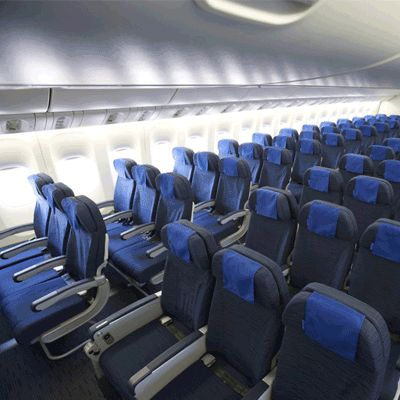
Ekonomi sınıfı koltukları 30" seat pitch and 17.3" seat width sunar. Koltuk özellikleri ve düzeni uçak türüne ve rotaya göre değişebilir.
Check-in
Avelo Airlines uçuşları için kullanılabilen check-in yöntemleri aşağıda belirtilmiştir. Kullanılabilirlik; havalimanına, rotaya veya ücret türüne göre değişebilir.
İnternet Üzerinden Check-in
Rezervasyon bilgilerinizi kullanarak Avelo Airlines internet sitesi üzerinden check-in yapın. Check-in işleminin ardından biniş kartınızı indirebilir veya yazdırabilirsiniz. İnternet üzerinden check-in, kalkıştan en geç 24 saat öncesine kadar yapılabilir.
Uygulama Üzerinden Check-in
Avelo Airlines mobil uygulaması üzerinden iOS veya Android cihazınızla check-in yapın. Biniş kartınız uygulamada kullanıma sunulur ve genellikle dijital cüzdanınıza eklenebilir. Uygulama üzerinden check-in hizmeti, kalkıştan en geç 0 saat öncesine kadar kullanılabilir.
Havalimanı Kontuarında Check-in
Kalkıştan en geç 120 dakika öncesine kadar kalkış havalimanınızdaki Avelo Airlines check-in kontuarına başvurun. Bu seçenek; özel yardıma ihtiyaç duyan, grup rezervasyonu bulunan veya büyük boy bagajla seyahat eden yolcular için önerilir. Avelo Airlines politikasına bağlı olarak ek ücretler uygulanabilir.
Önemli Seyahat Bilgileri
- Check-in, güvenlik kontrolü ve gerekli göçmenlik işlemlerini tamamlamak için havalimanına yeterince erken gelin.
- Havalimanına gitmeden önce güzergahınız için check-in kontuarının ve biniş kapısının kapanış saatlerini kontrol edin.
- Uluslararası seyahatler için uçak biletiniz, resmi makamlarca düzenlenmiş kimliğiniz ve pasaportunuz (gerekli vizelerle birlikte) dahil olmak üzere tüm geçerli seyahat belgelerinizi yanınızda bulundurun.
- Giriş koşulları önceden bildirilmeksizin değişebilir. Kalkış tarihinizden yeterince önce varış noktanızın vize, sağlık ve giriş koşullarını kontrol edin.
- Avelo Airlines tarafından uygulanan bagaj hakkı kurallarına uyun. Kabin bagajı ayrıntıları için Olanaklar ve Hizmetler bölümüne bakın.
- Ücret türleri; bagaj, koltuk seçimi, yemekler ve esneklik konusunda farklı kurallara tabidir. Rezervasyonunuzu tamamlamadan önce ödeme sayfasında gösterilen ücret koşullarını inceleyin.
- Avelo Airlines tarafından başlatılan bir tarife değişikliği, gecikme veya iptal durumunda hava yolunun kendi operasyonel politikaları geçerlidir. Airpaz, mümkün olan durumlarda bildirim ve koordinasyon konusunda yardımcı olacaktır; ancak yeniden rezervasyon, para iadesi veya tazminata ilişkin nihai kararlar hava yoluna aittir.
Uçak İçi Kurallar
- Her yolcu, check-in sırasında kendisine atanan koltukta oturmalıdır.
- El bagajı, baş üstü dolabına veya önünüzdeki koltuğun altına yerleştirilmelidir.
- Cep telefonları ve elektronik cihazlar, özellikle kalkış ve iniş sırasında kapatılmalı veya uçuş moduna alınmalıdır.
- Kalkış ve iniş sırasında emniyet kemerinizi bağlayın, tepsi masanızı kapatın, koltuğunuzu dik konuma getirin ve pencere perdesini açın.
- Elektronik sigara ve buhar cihazlarının kullanımı dahil olmak üzere, uçuş boyunca uçağın hiçbir yerinde sigara içilmesine kesinlikle izin verilmez.
- Avelo Airlines mürettebatının tüm talimatlarına ve uçak içi güvenlik anonslarına her zaman uyun.
Airpaz'da Rezervasyonunuzu Yönetme
- Airpaz hesabınızda oturum açın.
- Uçuşunuzu bulmak için Sipariş bölümüne gidin.
- E-biletinizi, seyahat planınızı ve ödeme bilgilerinizi görüntülemek için rezervasyonunuzu seçin.
- Para iadesi veya yeniden planlama talebinde bulunmak için gösterilen seçeneği belirleyin ve adımları izleyin.
- İstenen bilgileri girin ve talebinizi onaylayın.
- Talebinizin durumunu aynı sayfadan takip edin.
Gezginler Avelo Airlines Uçak Bileti Rezervasyonları İçin Neden Airpaz'ı Seçiyor
- Hızlı ve Kolay Arama: Uçuşları fiyat, program, süre ve aktarmalara göre filtreleyin ve karşılaştırın; hepsi tek bir aramada.
- Kolay Ek Hizmetler: Kayıtlı bagaj ekleyin, koltuğunuzu seçin, yemekleriniz için ön sipariş verin veya uçuşunuz için seyahat sigortası alın.
- Bilet Sınıfı Seçenekleri: Biraz daha lüks mü arıyorsunuz? Daha premium bir uçuş deneyimi için ekonomiden first class'a kadar bilet sınıfı seçenekleri sunuyoruz.
- Çoklu Ödeme Yöntemleri: Kredi/banka kartları, banka transferleri, PayPal, e-cüzdan ve birçok popüler yerel ödeme seçeneği arasından seçiminizi yapın.
- Sorunsuz Bilet Onayı: Ödeme tamamlandıktan sonra rezervasyon onayınızı ve biletinizi doğrudan e-posta kutunuza alın.
- Küresel Müşteri Desteği: Çok dilli müşteri destek ekibimiz rezervasyon değişiklikleri, iptaller veya her türlü sorunuzda size yardımcı olmak için 7/24 hazırdır.
- Özel uygulama ve üye promosyonları: Airpaz üyeleri için tasarlanmış özel fırsatların ve yalnızca uygulamaya özel indirimlerin tadını çıkarın.
- Olağanüstü Değer: Seyahat bütçenizden en iyi şekilde yararlanmanızı sağlamak için özel fırsatlar ve promosyonlu fiyatlar sunuyoruz.
Airpaz'da Ucuz Avelo Airlines Uçak Bileti Bulma İpuçları
- Önceden Rezervasyon Yapın: Bilet fiyatları kalkış günü yaklaştıkça artma eğilimindedir. En iyi fırsatları ve fiyatları almak için 4–8 hafta önceden rezervasyon yapmayı hedefleyin.
- Tarihlerde Esnek Olun: Fiyatları birden fazla tarih arasında karşılaştırmak için Airpaz'ın takvim görünümünü kullanın.
- Hafta İçi Uçun: Salı ve Çarşamba günleri uçuşlar genellikle hafta sonu uçuşlarından daha ucuz bilet fiyatları sunar.
- Promosyon Avı: Airpaz'ın sayfası ve sayfasında promosyon kodları ve sınırlı süreli Avelo Airlines fırsatları olup olmadığını düzenli olarak kontrol edin.
- Yoğun Sezonlardan Kaçının: Okul tatilleri, resmi tatiller ve bayram dönemleri bilet fiyatlarını yükseltir — daha fazla tasarruf etmek için sezon dışında seyahat edin.
- Birlikte Ayırtın ve Tasarruf Edin: Daha fazla indirimin tadını çıkarmak için uçuşunuzu ve konaklamanızı tek bir rezervasyonda yapın.
- Airpaz uygulamasıyla ödeyin: Uygulamaya özel promosyon kodları ve yalnızca üyelere özel indirimler genellikle daha düşük uçak bileti fiyatları elde etmenin en iyi yoludur.
Airpaz'da Uçak Bileti Nasıl Rezerve Edilir
- Airpaz.com'u ziyaret edin veya Airpaz uygulamasını açın, ardından Uçuş seçin.
- Kalkış şehrinizi (örn. Kuala Lumpur) ve varış noktanızı (örn. Bali, Singapur veya Bangkok) girin.
- Seyahat tarihinizi ve yolcu sayısını seçin.
- Mevcut uçuşları görmek için Ara'ya dokunun.
- En iyi seçeneği bulmak için fiyat, kalkış saati veya süre gibi filtreleri kullanın, ardından tercih ettiğiniz uçuşu seçin.
- Yolcu bilgilerini pasaportunuzda veya kimliğinizde göründüğü gibi (tam ad, doğum tarihi, uyruk ve iletişim bilgileri) eksiksiz bir şekilde doldurun.
- Bagaj, koltuk seçimi, yemek veya seyahat sigortası gibi ek hizmetleri (gerekirse) ekleyin.
- Rezervasyon bilgilerinizi gözden geçirin.
- Bir ödeme yöntemi seçin (kredi/banka kartı, banka havalesi, PayPal veya taksit).
- Ödemenizi tamamlayın; e-biletiniz e-postanıza gönderilecek ve uygulamada kullanıma sunulacaktır.
Avelo Airlines Hakkında SSS
Daha fazla önerilen Avelo Airlines uçuşu
Avelo Airlines popüler rotası
Popüler destinasyon Kıta bazında
Popüler destinasyon Ülke bazında
Neden Airpaz ile seyahat etmelisiniz

Rezervasyon Deneyiminizi Basitleştirin
Rezervasyon süreciniz boyunca esnekliği ve sadeliği hissedin

Geniş Seyahat Ürünü Seçenekleri
Milyonlarca uygun uçuş ve konaklama ile unutulmaz anlarınızın tadını çıkarın

Her Güne Özel Teklif
Tüm gezginler için rekabetçi fiyatlarla çeşitli günlük promosyonlar

Online Rezervasyon Uzmanı
Güvenilir ortaklarımızla birlikte 2011'den bu yana sayısız seyahatçinin ihtiyaçlarını karşılıyoruz

Sevecen Müşteri Desteği
En iyi yardımı veren müşteri desteğimiz, yerel dilinizde 7/24 hizmetinizdedir

Dünyanın Yerel Rezervasyon Heyecanı
Yerel ödeme, para birimi ve dil ile stressiz rezervasyon deneyimi