
អីវ៉ាន់ក្នុងកាប៊ីន
កម្រិតអនុញ្ញាតអីវ៉ាន់ក្នុងកាប៊ីនឥតគិតថ្លៃ 7 គីឡូក្រាម
ពិនិត្យចូលមុនពេលចេញដំណើរ
ចាប់ពី 150 នាទីមុនពេលចេញដំណើរ
បច្ចុប្បន្នភាពចុងក្រោយនៅ
កក់ និងទទួលបានកិច្ចព្រមព្រៀងជើងហោះហើរ Airblue ល្អបំផុត
 Airblue
ចាប់ផ្ដើមពី
US$ 86.71
តម្លៃ/ អ្នកដំណើរ
Airblueចាប់ផ្ដើមពី
US$ 87.14
តម្លៃ/ អ្នកដំណើរ
Airblueចាប់ផ្ដើមពី
US$ 93.61
តម្លៃ/ អ្នកដំណើរ
Airblueចាប់ផ្ដើមពី
US$ 105.36
តម្លៃ/ អ្នកដំណើរ
Airblueចាប់ផ្ដើមពី
US$ 168.88
តម្លៃ/ អ្នកដំណើរ
Airblueចាប់ផ្ដើមពី
US$ 168.88
តម្លៃ/ អ្នកដំណើរ
Airblueចាប់ផ្ដើមពី
US$ 170.85
តម្លៃ/ អ្នកដំណើរ
Airblueចាប់ផ្ដើមពី
US$ 172.12
តម្លៃ/ អ្នកដំណើរ
Airblueចាប់ផ្ដើមពី
US$ 172.45
តម្លៃ/ អ្នកដំណើរ
Airblueចាប់ផ្ដើមពី
US$ 172.46
តម្លៃ/ អ្នកដំណើរ
 សូមចំណាំថាតម្លៃដែលបានរាយនៅលើទំព័រនេះប្រហែលជាមិនទាន់សម័យ និងអាចផ្លាស់ប្តូរដោយគ្មានការជូនដំណឹងជាមុន។ យើងខិតខំផ្តល់ព័ត៌មានត្រឹមត្រូវ និងបច្ចុប្បន្នបំផុត។
Airblue ព័ត៌មានជើងហោះហើរ
ខែថ្លៃសំបុត្រទាបបំផុត
sep
ទិសដៅសរុប
14


ព័ត៌មានអំពី Airblue
ការស្គាល់ក្រុមហ៊ុនអាកាសចរណ៍របស់អ្នកមុនពេលហោះហើរ គឺជាជំហានដ៏ឆ្លាតវៃជានិច្ច។ វាជួយឱ្យអ្នកធ្វើដំណើរដោយមានទំនុកចិត្ត និងដឹងយ៉ាងច្បាស់ថាត្រូវរំពឹងអ្វីខ្លះ។ Airblue គឺជាក្រុមហ៊ុនអាកាសចរណ៍តម្លៃទាបដែលបានប្រតិបត្តិការផ្លូវហោះហើរក្នុងស្រុក និងអន្តរជាតិតាំងពី 2003 ដោយមានការិយាល័យកណ្ដាលស្ថិតនៅ ប៉ាគីស្ថាន។ នៅទូទាំងឧស្សាហកម្មអាកាសចរណ៍ Airblue ត្រូវបានទទួលស្គាល់ជាផ្លូវការដោយលេខកូដ IATA (PA) និងលេខកូដ ICAO (ABQ) ដែលជាអត្តសញ្ញាណស្តង់ដារប្រើសម្រាប់ការកក់ ការឆែកអ៊ីន និងការតាមដានជើងហោះហើរទូទាំងពិភពលោក។ ខាងក្រោមនេះ អ្នកនឹងឃើញព័ត៌មានលម្អិតសំខាន់ៗទាំងអស់ ចាប់ពីលេខកូដ និងផ្លូវហោះហើរ រហូតដល់ការពិតសំខាន់ៗ ដើម្បីជួយអ្នករៀបចំផែនការ និងកក់ដំណើរបន្ទាប់របស់អ្នកដោយមានទំនុកចិត្តពេញលេញ។
មជ្ឈមណ្ឌល និងប្រតិបត្តិការ
Airblue ប្រតិបត្តិការជើងហោះហើរក្នុងស្រុក និងអន្តរជាតិពីមជ្ឈមណ្ឌលសំខាន់របស់ខ្លួននៅ King Abdulaziz International Airport (JED), Abu Dhabi International Airport (AUH), អាកាសយ៉ូន ឌុប៉ី (DXB), Jinnah International Airport (KHI), Allama Iqbal International Airport (LHE), Islamabad International Airport (ISB) ដោយមានការិយាល័យកណ្ដាលស្ថិតនៅ ប៉ាគីស្ថាន។ បញ្ជីគោលដៅពេញលេញ និងកាលវិភាគបច្ចុប្បន្នមាននៅពេលអ្នកស្វែងរកជើងហោះហើរនៅលើ Airpaz។
ឥវ៉ាន់
ឥវ៉ាន់យកចូលកាប៊ីន
អ្នកដំណើរ Airblue អាចយកឥវ៉ាន់កាន់ឡើងយន្តហោះចូលក្នុងយន្តហោះបាន ជាមួយនឹងកំណត់ឥវ៉ាន់ក្នុងកាប៊ីនឥតគិតថ្លៃរហូតដល់ 7 គីឡូក្រាម។ កាបូបកាប៊ីនត្រូវតែសមនឹង 22 x 15 x 8 inches (56 x 38 x 20 cm)។ អ្នកក៏អាចយករបស់ប្រើប្រាស់ផ្ទាល់ខ្លួនតូចជាង ដូចជា កាបូបកុំព្យូទ័រយួរដៃ កាបូបដៃ ឬកាបូបស្ពាយតូច បានផងដែរ ដរាបណាវាដាក់ចូលក្រោមកៅអីខាងមុខអ្នកបាន។
កៅអី
Airblue ផ្តល់ជូនកៅអីនៅក្នុងថ្នាក់កាប៊ីនជាច្រើន ដោយភាពងាយស្រួល និងការរៀបចំអាចខុសគ្នាតាមប្រភេទយន្តហោះ និងផ្លូវហោះហើរ។ ជ្រើសរើសជើងហោះហើររបស់អ្នក ដើម្បីមើលកៅអីដែលមានសម្រាប់ការកក់របស់អ្នក។
កៅអីថ្នាក់សេដ្ឋកិច្ច
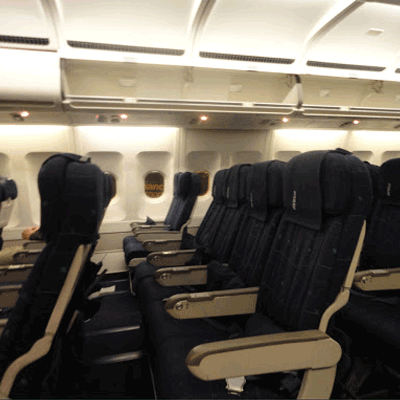
កៅអីថ្នាក់សេដ្ឋកិច្ចផ្តល់ជូន 28"-32" pitch and 18" width។ លក្ខណៈពិសេស និងការរៀបចំកៅអីអាចខុសគ្នាតាមប្រភេទយន្តហោះ និងផ្លូវហោះហើរ។
អាហារលើជើងហោះហើរ

Airblue ផ្តល់ជូនអាហារនៅលើយន្តហោះ។ ជម្រើសម៉ឺនុយអាចខុសគ្នាតាមផ្លូវហោះហើរ ប្រភេទថ្លៃសំបុត្រ ឬរយៈពេលជើងហោះហើរ។
ឆែកអ៊ីន
ខាងក្រោមនេះគឺជាវិធីឆែកអ៊ីនដែលមានសម្រាប់ជើងហោះហើរ Airblue។ ភាពអាចប្រើបានអាចខុសគ្នាតាមអាកាសយានដ្ឋាន ផ្លូវហោះហើរ ឬប្រភេទថ្លៃសំបុត្រ។
ឆែកអ៊ីននៅបញ្ជរអាកាសយានដ្ឋាន
សូមទៅកាន់បញ្ជរឆែកអ៊ីនរបស់ Airblue នៅអាកាសយានដ្ឋានចេញដំណើររបស់លោកអ្នករហូតដល់ 150 នាទីមុនពេលចេញដំណើរ។ ជម្រើសនេះត្រូវបានណែនាំសម្រាប់អ្នកដំណើរដែលត្រូវការជំនួយពិសេស មានការកក់ជាក្រុម ឬធ្វើដំណើរជាមួយឥវ៉ាន់មានទំហំធំលើសកំណត់។ អាចមានការគិតថ្លៃបន្ថែម អាស្រ័យលើគោលការណ៍របស់ Airblue។
ព័ត៌មានធ្វើដំណើរសំខាន់ៗ
- សូមមកដល់អាកាសយានដ្ឋានឱ្យបានមុនពេលគ្រប់គ្រាន់ ដើម្បីបំពេញការឆែកអ៊ីន ការត្រួតពិនិត្យសន្តិសុខ និងនីតិវិធីអន្តោប្រវេសន៍ណាមួយដែលត្រូវការ។
- ពិនិត្យពេលវេលាបិទបញ្ជរឆែកអ៊ីន និងច្រកឡើងយន្តហោះសម្រាប់ផ្លូវហោះហើររបស់អ្នក មុនពេលធ្វើដំណើរទៅអាកាសយានដ្ឋាន។
- យកឯកសារធ្វើដំណើរដែលមានសុពលភាពទាំងអស់មកជាមួយ — សំបុត្រយន្តហោះរបស់អ្នក អត្តសញ្ញាណប័ណ្ណដែលចេញដោយរដ្ឋាភិបាល និងលិខិតឆ្លងដែនរបស់អ្នក (រួមជាមួយទិដ្ឋាការណាមួយដែលត្រូវការ) សម្រាប់ការធ្វើដំណើរអន្តរជាតិ។
- លក្ខខណ្ឌចូលប្រទេសអាចផ្លាស់ប្តូរដោយគ្មានការជូនដំណឹងជាមុន។ សូមពិនិត្យលក្ខខណ្ឌទិដ្ឋាការ សុខភាព និងការចូលប្រទេសរបស់គោលដៅអ្នកឱ្យបានមុនថ្ងៃចេញដំណើរយ៉ាងគ្រប់គ្រាន់។
- អនុវត្តតាមច្បាប់អនុញ្ញាតសំភារៈរបស់ Airblue។ សូមមើលផ្នែកបរិក្ខារ និងសេវាកម្មសម្រាប់ព័ត៌មានលម្អិតអំពីសំភារៈក្នុងកាប៊ីន។
- ប្រភេទតម្លៃសំបុត្រមានច្បាប់ខុសៗគ្នាសម្រាប់សំភារៈ ការជ្រើសរើសកៅអី អាហារ និងភាពបត់បែន។ សូមពិនិត្យលក្ខខណ្ឌតម្លៃសំបុត្រដែលបង្ហាញនៅពេលបង់ប្រាក់ មុនបញ្ចប់ការកក់របស់អ្នក។
- ក្នុងករណីមានការផ្លាស់ប្តូរកាលវិភាគ ការពន្យារពេល ឬការលុបចោលដែលផ្តួចផ្តើមដោយ Airblue គោលនយោបាយប្រតិបត្តិការផ្ទាល់របស់ក្រុមហ៊ុនអាកាសចរណ៍នឹងត្រូវបានអនុវត្ត។ Airpaz នឹងជួយផ្នែកការជូនដំណឹង និងការសម្របសម្រួលតាមដែលអាចធ្វើបាន ប៉ុន្តែការសម្រេចចិត្តចុងក្រោយអំពីការកក់ឡើងវិញ ការសងប្រាក់វិញ ឬសំណង គឺស្ថិតនៅលើក្រុមហ៊ុនអាកាសចរណ៍។
ច្បាប់នៅលើយន្តហោះ
- អ្នកដំណើរគ្រប់រូបត្រូវអង្គុយលើកៅអីដែលបានកំណត់នៅពេលឆែកអ៊ីន។
- សំភារៈយកតាមខ្លួនត្រូវរក្សាទុកក្នុងប្រអប់ដាក់សំភារៈខាងលើ ឬក្រោមកៅអីខាងមុខអ្នក។
- ទូរសព្ទចល័ត និងឧបករណ៍អេឡិចត្រូនិកត្រូវបិទ ឬកំណត់ទៅជារបៀបហោះហើរ ជាពិសេសនៅពេលយន្តហោះឡើង និងចុះចត។
- សូមពាក់ខ្សែក្រវាត់សុវត្ថិភាព បត់តុថាស បញ្ជូនកៅអីរបស់អ្នកទៅទីតាំងត្រង់ និងបើកវាំងននបង្អួចនៅពេលយន្តហោះឡើង និងចុះចត។
- ការជក់បារី រួមទាំងបារីអេឡិចត្រូនិក និងការជក់វេប ត្រូវបានហាមឃាត់យ៉ាងតឹងរ៉ឹងគ្រប់កន្លែងនៅលើយន្តហោះពេញមួយជើងហោះហើរ។
- អនុវត្តតាមសេចក្តីណែនាំទាំងអស់ពីក្រុមបុគ្គលិក Airblue និងសេចក្តីប្រកាសសុវត្ថិភាពនៅលើយន្តហោះគ្រប់ពេលវេលា។
របៀបគ្រប់គ្រងការកក់របស់អ្នកនៅលើ Airpaz
- ចូលទៅក្នុងគណនី Airpaz របស់អ្នក។
- ទៅកាន់ផ្នែក ការបញ្ជាទិញ ដើម្បីស្វែងរកជើងហោះហើររបស់អ្នក។
- ជ្រើសរើសការកក់របស់អ្នក ដើម្បីមើលសំបុត្រអេឡិចត្រូនិក កាលវិភាគធ្វើដំណើរ និងព័ត៌មានលម្អិតអំពីការទូទាត់របស់អ្នក។
- ដើម្បីស្នើសុំការសងប្រាក់វិញ ឬការកំណត់កាលវិភាគឡើងវិញ សូមជ្រើសរើសជម្រើសដែលបានបង្ហាញ ហើយអនុវត្តតាមជំហាន។
- ផ្តល់ព័ត៌មានដែលបានស្នើសុំ ហើយបញ្ជាក់ការដាក់ស្នើរបស់អ្នក។
- តាមដានស្ថានភាពសំណើរបស់អ្នកពីទំព័រដដែល។
ពិនិត្យមើលកាលវិភាគហោះហើររបស់ Airblue
Find cheapest price of Airblue flight


ហេតុអ្វីបានជាអ្នកដំណើរជ្រើសរើស Airpaz សម្រាប់ការកក់ជើងហោះហើរ Airblue
- ស្វែងរករហ័ស និងងាយស្រួល៖ ត្រង និងប្រៀបធៀបជើងហោះហើរតាមតម្លៃ កាលវិភាគ រយៈពេល និងចំណត — ទាំងអស់នេះក្នុងការស្វែងរកតែមួយ។
- ការបន្ថែមងាយស្រួល៖ បន្ថែមវ៉ាលីផ្ទុក ជ្រើសរើសកៅអីរបស់អ្នក កុម្ម៉ង់អាហារទុកជាមុន ឬទទួលបានធានារ៉ាប់រងការធ្វើដំណើរសម្រាប់ជើងហោះហើររបស់អ្នក។
- ជម្រើសប្រភេទសំបុត្រ៖ កំពុងស្វែងរកភាពប្រណីតបន្ថែមមែនទេ? យើងផ្តល់ជូននូវជម្រើសប្រភេទសំបុត្រពីថ្នាក់សន្សំសំចៃ (Economy) ដល់ថ្នាក់លំដាប់កំពូល (First Class) សម្រាប់បទពិសោធន៍ហោះហើរដ៏អស្ចារ្យ។
- វិធីសាស្រ្តទូទាត់ច្រើនយ៉ាង៖ ជ្រើសរើសពីកាតឥណទាន/ឥណពន្ធ ការផ្ទេរប្រាក់តាមធនាគារ PayPal កាបូបអេឡិចត្រូនិក និងជម្រើសការទូទាត់ក្នុងស្រុកពេញនិយមជាច្រើនទៀត។
- ការបញ្ជាក់សំបុត្រដោយរលូន៖ ទទួលបានការបញ្ជាក់ការកក់ និងសំបុត្ររបស់អ្នកដែលផ្ញើទៅកាន់ប្រអប់សំបុត្រអ៊ីមែលរបស់អ្នកបន្ទាប់ពីការទូទាត់បានបញ្ចប់។
- ជំនួយអតិថិជនសកល៖ ក្រុមជំនួយអតិថិជនពហុភាសារបស់យើងត្រៀមខ្លួនជាស្រេច 24/7 ដើម្បីជួយអ្នកក្នុងការកែប្រែការកក់ ការលុបចោល ឬសំណួរនានា។
- កម្មវិធីផ្តាច់មុខ និងប្រូម៉ូសិនសមាជិក៖ រីករាយជាមួយកិច្ចព្រមព្រៀងពិសេសដែលបានរចនាឡើងសម្រាប់សមាជិក Airpaz និងការផ្តល់ជូនសម្រាប់តែកម្មវិធីប៉ុណ្ណោះ។
- តម្លៃដ៏អស្ចារ្យ៖ យើងធានានូវកិច្ចព្រមព្រៀងផ្តាច់មុខ និងអត្រាប្រូម៉ូសិនពិសេស ដើម្បីឱ្យអ្នកទទួលបានអត្ថប្រយោជន៍ច្រើនបំផុតពីថវិកាធ្វើដំណើររបស់អ្នក។
គន្លឹះដើម្បីស្វែងរកជើងហោះហើរ Airblue តម្លៃថោកនៅលើ Airpaz
- កក់ទុកជាមុន៖ តម្លៃសំបុត្រតែងតែកើនឡើងនៅពេលថ្ងៃចេញដំណើរជិតមកដល់។ ព្យាយាមកក់ទុកមុន 4–8 សប្តាហ៍ដើម្បីទទួលបានកិច្ចព្រមព្រៀង និងតម្លៃល្អបំផុត។
- បត់បែនលើកាលបរិច្ឆេទ៖ ប្រើទិដ្ឋភាពប្រតិទិនរបស�� Airpaz ដើម្បីប្រៀបធៀបតម្លៃសំបុត្រឆ្លងកាត់កាលបរិច្ឆេទជាច្រើន។
- ហោះហើរពាក់កណ្តាលសប្តាហ៍៖ ថ្ងៃអង្គារ និងថ្ងៃពុធជាធម្មតាផ្តល់នូវតម្លៃសំបុត្រថោកជាងជើងហោះហើរចុងសប្តាហ៍។
- ស្វែងរកប្រូម៉ូសិន៖ ពិនិត្យមើលជាប្រចាំសម្រាប់លេខកូដប្រូម៉ូសិន និងការផ្តល់ជូន Airblue ក្នុងរយៈពេលកំណត់នៅលើទំព័រ និងទំព័រ របស់ Airpaz។
- ចៀសវាងរដូវកាលមានមនុស្សច្រើន៖ វិស្សមកាលសាលារៀន ថ្ងៃឈប់សម្រាកសាធារណៈ និងរដូវកាលបុណ្យទានធ្វើឱ្យតម្លៃសំបុត្រកើនឡើង — ធ្វើដំណើរនៅក្រៅរដូវកាលដើម្បីសន្សំប្រាក់បន្ថែម។
- កក់បញ្ចូលគ្នា និងសន្សំប្រាក់៖ កក់ជើងហោះហើរ និងការស្នាក់នៅរបស់អ្នកក្នុងការកក់តែមួយដើម្បីទទួលបានការសន្សំបន្ថែម។
- ទូទាត់ជាមួយកម្មវិធី Airpaz៖ លេខកូដប្រូម៉ូសិនកម្មវិធីផ្តាច់មុខ និងការបញ្ចុះតម្លៃសម្រាប់តែសមាជិកជារឿយៗគឺជាវិធីដ៏ល្អបំផុតក្នុងការទទួលបានតម្លៃសំបុត្រយន្តហោះទាបជាង។
របៀបកក់ជើងហោះហើរនៅលើ Airpaz
- ចូលទៅកាន់ Airpaz.com ឬបើកកម្មវិធី Airpaz បន្ទាប់មកជ្រើសរើស ជើងហោះហើរ
- បញ្ចូលទីក្រុងចេញដំណើររបស់អ្នក (ឧទាហរណ៍ គូឡាឡាំពួ) និងគោលដៅ (ឧទាហរណ៍ បាលី សិង្ហបុរី ឬបាងកក)
- ជ្រើសរើសកាលបរិច្ឆេទធ្វើដំណើរ និងចំនួនអ្នកដំណើររបស់អ្នក
- ចុច ស្វែងរក ដើម្បីមើលជើងហោះហើរដែលមាន
- ប្រើតម្រងដូចជាតម្លៃ ម៉ោងចេញដំណើរ ឬរយៈពេល ដើម្បីស្វែងរកជម្រើសល្អបំផុត បន្ទាប់មកជ្រើសរើសជើងហោះហើរដែលអ្នកពេញចិត្ត
- បំពេញព័ត៌មានលម្អិតអ្នកដំណើរឱ្យបានត្រឹមត្រូវដូចដែលបានបង្ហាញនៅលើលិខិតឆ្លងដែន ឬអត្តសញ្ញាណប័ណ្ណរបស់អ្នក (ឈ្មោះពេញ ថ្ងៃខែឆ្នាំកំណើត សញ្ជាតិ និងព័ត៌មានទំនាក់ទំនង)
- បន្ថែមជម្រើសផ្សេងៗប្រសិនបើចាំបាច់ ដូចជាវ៉ាលី ការជ្រើសរើសកៅអី អាហារ ឬធានារ៉ាប់រងការធ្វើដំណើរ
- ពិនិត្យមើលព័ត៌មានលម្អិតនៃការកក់របស់អ្នកឡើងវិញ
- ជ្រើសរើសវិធីសាស្រ្តទូទាត់ (កាតឥណទាន/ឥណពន្ធ ការផ្ទេរប្រាក់តាមធនាគារ PayPal ឬបង់រំលស់)
- បញ្ចប់ការទូទាត់របស់អ្នក — សំបុត្រអេឡិចត្រូនិករបស់អ្នកនឹងត្រូវបានផ្ញើទៅកាន់អ៊ីមែលរបស់អ្នក ហើយមាននៅក្នុងកម្មវិធី
សំណួរញឹកញាប់អំពី Airblue
ជើងហោះហើរ Airblue ដែលបានណែនាំបន្ថែម
ផ្លូវហោះហើរពេញនិយមរបស់ Airblue
គោលដៅពេញនិយមតាម អាកាសយានដ្ឋាន
គោលដៅពេញនិយមតាម ទីក្រុង
គោលដៅពេញនិយមតាម ទ្វីប


តើហេតុអ្វីត្រូវធ្វើដំណើរជាមួយ Airpaz?

សាមញ្ញកម្មវិធីកក់របស់អ្នក
មើលឃើញភាពបត់បែន និងភាពសាមញ្ញនៅពេលដំណើរការកក់

ជម្រើសផលិតផលដំណើរកំសាន្តធំៗ
រីករាយជាមួយពេលវេលាដ៏កម្រមានមួយជាមួយហោះហើរ និងកន្លែងស្នាក់នៅដ៏ល្អឥតខ្ចោះ

ការផ្តល់ជូនផ្តាច់មុខរាល់ថ្ងៃ
កម្មវិធីផ្សព្វផ្សាយប្រចាំថ្ងៃជាច្រើនជាមួយតម្លៃប្រកួតប្រជែងសម្រាប់អ្នកធ្វើដំណើរទាំងអស់

អ្នកជំនាញការកក់អនឡាញ
ជាមួយដៃគូដែលមានភាពជឿនលឿនរបស់យើង បំពេញតម្រូវការរបស់អ្នកធ្វើដំណើរដ៏ច្រើនតាំងពីឆ្នាំ 2011

ការគាំទ្រអតិថិជនដោយអារម្មណ៍
ផ្តល់ជំនួយល្អបំផុត ក្រុមការគាំទ្រអតិថិជនរបស់យើងមានសម្រាប់អ្នក ២៤/៧ ជាមួយភាសាក្នុងស្រុករបស់អ្នក

ភាពរំភើបនៃការកក់ក្នុងស្រុកពិភពលោក
បទពិសោធន៍ការកក់ដោយឥតបារម្ភជាមួយការទូទាត់ក្នុងស្រុក រូបិយប័ណ្ណ និងភាសា